CCNA Fundamentals Explained
Network Fundamentals
The Building Blocks of a Network
A network is more than just a bunch of connected computers. It’s a carefully designed system where each component has a specific job. Think of it like a city's road system. You have highways, local streets, traffic lights, and destinations. Each part works together to get traffic where it needs to go efficiently and safely.
In a computer network, different devices play these roles. Some direct traffic between cities (routers), while others manage traffic on local streets (switches). Firewalls act as security checkpoints, and servers are the destinations—the buildings and businesses people are trying to reach.
| Component | Primary Function |
|---|---|
| Router | Forwards data packets between different computer networks. It acts as a traffic director. |
| Switch | Connects devices within the same local network (LAN) and forwards data to the correct device. |
| Firewall | A security device that monitors and filters incoming and outgoing network traffic. |
| Access Point (AP) | Allows wireless devices to connect to a wired network using Wi-Fi. |
| Controller | Manages, configures, and monitors network devices like access points from a central point. |
| Endpoint | Any device that connects to the network, like a laptop, smartphone, or printer. |
| Server | A powerful computer that provides data or services to other computers (clients). |
These components don't work in isolation. An endpoint, like your laptop, connects to an access point to get on the Wi-Fi. That AP is connected to a switch, which manages local traffic. When you want to visit a website, the switch sends your request to a router. The router finds the best path across the internet, likely passing through several firewalls, to reach the server hosting the website.
Network Blueprints
Just as a building needs a blueprint, a network needs a clear structure, or topology. The topology dictates how devices are connected and how data flows. A good design ensures the network is reliable, scalable, and easy to manage.
For traditional campus networks, a hierarchical model is common. This separates the network into layers, each with a specific purpose.
The Three-Tier Architecture includes:
- Core Layer: The network's backbone. It's responsible for high-speed, reliable data transport and shouldn't be bogged down with any complex packet filtering.
- Distribution Layer: The middle ground. It connects the access layer to the core and is where policies, like routing rules and access control lists, are applied.
- Access Layer: Where endpoints connect to the network. This layer provides port-level security and ensures data gets to the right local devices.
For smaller networks, a Two-Tier Architecture is often used. It combines the core and distribution layers into one, simplifying the design and reducing costs.
Modern data centers often use a Spine-Leaf Architecture. In this model, every leaf switch (where servers connect) is connected to every spine switch. This creates a highly efficient, predictable path for traffic with low latency, which is critical for data center performance.
Other common network types include:
- WAN (Wide Area Network): Connects networks over large geographical areas, like linking office branches in different cities.
- SOHO (Small Office/Home Office): A small, simple network for a home or small business, usually consisting of a single router/modem combo from an internet service provider.
- On-Premises vs. Cloud: An on-premises network is physically located in your building. A cloud network relies on infrastructure hosted by a third party like Amazon Web Services or Microsoft Azure. Many organizations use a hybrid of both.
The Physical Connections
Data travels through physical cables and interfaces. The type of cable used depends on the distance, speed, and cost requirements. Ethernet is the most common technology for wired local networks.
| Cable Type | Description | Use Case |
|---|---|---|
| Copper | Uses electrical signals to transmit data. Common types are twisted-pair cables like Cat5e, Cat6, and Cat6a. | LANs, connecting workstations, printers, and servers. Limited by distance (typically 100 meters). |
| Multimode Fiber | Uses light to transmit data over glass or plastic strands. Has a larger core, allowing multiple modes of light. | Shorter-distance, high-bandwidth links, such as within a data center or between buildings on a campus. |
| Single-mode Fiber | Has a very narrow core that allows only one mode of light to travel. | Long-distance, high-bandwidth links, such as carrier networks and connections between cities. |
Even with the right cables, problems can occur at the physical layer. A collision happens on older hub-based networks when two devices try to send data at the same time. While modern switches prevent most collisions, you might still see errors.
Another common issue is a duplex mismatch. Full-duplex means devices can send and receive data simultaneously. Half-duplex means they can only do one at a time. If one side of a link is configured for full-duplex and the other for half-duplex, it will lead to significant performance issues and interface errors.
Delivering the Data
Once data is on the wire, it needs rules for how it's sent and received. Two of the most important protocols for this are TCP and UDP. They both work at the Transport Layer, but they handle data delivery in very different ways.
TCP (Transmission Control Protocol) is reliable and connection-oriented. It establishes a connection before sending data, checks for errors, and guarantees that packets arrive in the correct order. It's like sending a certified letter: you get confirmation it was delivered.
UDP (User Datagram Protocol) is fast, simple, and connectionless. It sends data without establishing a connection or checking for delivery. It's like sending a postcard: it's quick and efficient, but there's no guarantee it will arrive.
| Feature | TCP | UDP |
|---|---|---|
| Reliability | High (guaranteed delivery) | Low (best-effort delivery) |
| Connection | Connection-oriented | Connectionless |
| Speed | Slower | Faster |
| Overhead | Higher | Lower |
| Use Cases | Web browsing (HTTP), email (SMTP), file transfer (FTP) | Video streaming, online gaming, DNS |
| Ordering | Segments are ordered | Segments are not ordered |
Addressing the Network
Every device on a network needs a unique address, just like every house on a street. In networking, this is the IP (Internet Protocol) address. For decades, IPv4 has been the standard.
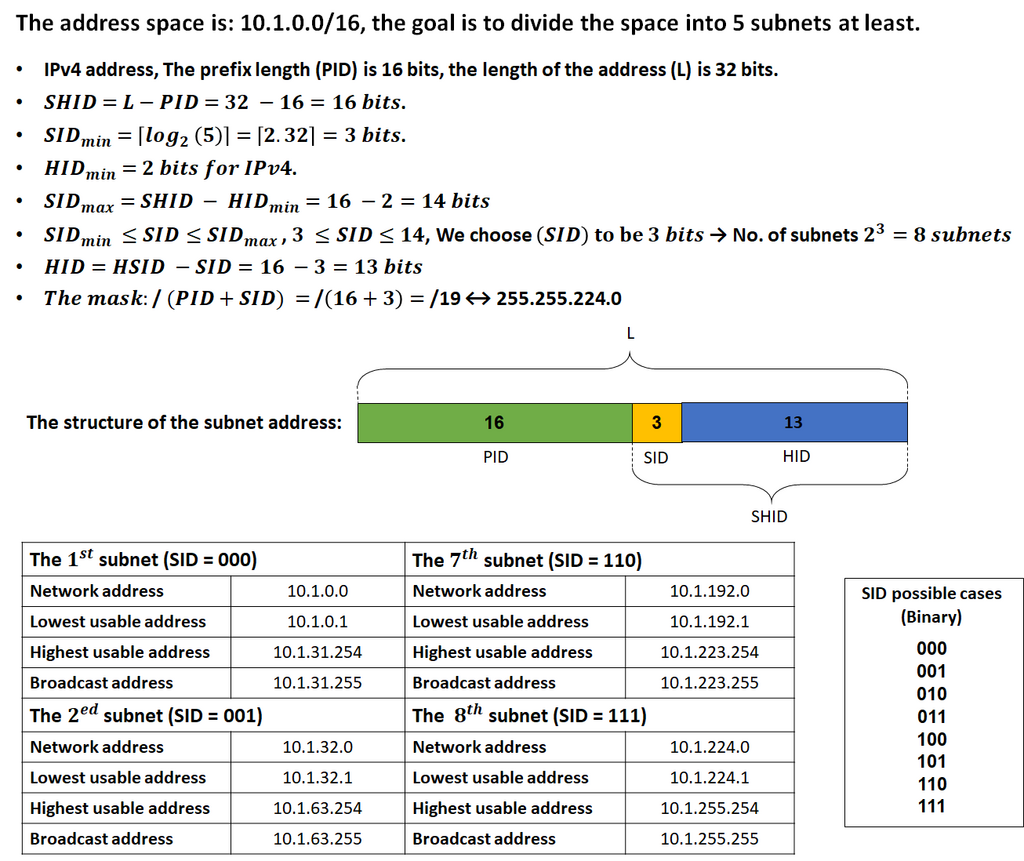
An IPv4 address is a 32-bit number, usually written as four decimal numbers separated by periods (e.g., 192.168.1.1). Along with the address, a device needs a subnet mask (e.g., 255.255.255.0). The subnet mask separates the address into two parts: the network portion and the host portion.
Subnetting is the process of taking a large network and dividing it into smaller, more efficient networks, or subnets. This reduces traffic congestion and improves security by isolating networks from each other.
Because the world ran out of unique IPv4 addresses, a system of private IPv4 addressing was created. Address ranges like
10.0.0.0to10.255.255.255and192.168.0.0to192.168.255.255can be used by anyone inside their private network. These addresses are not routable on the public internet. A router uses a technology called Network Address Translation (NAT) to translate these private addresses into a single public address when data needs to leave the local network.
The long-term solution to IPv4 address exhaustion is IPv6. An IPv6 address is 128 bits long and is written as eight groups of four hexadecimal digits, separated by colons.
2001:0db8:85a3:0000:0000:8a2e:0370:7334
IPv6 addresses can be abbreviated. For instance, leading zeros in any group can be omitted, and one sequence of all-zero groups can be replaced with a double colon (::). The address above could be shortened to 2001:db8:85a3::8a2e:370:7334.
Like IPv4, IPv6 uses a prefix to define the network portion of the address. The prefix length is written in CIDR notation, like /64. A /64 prefix is standard for most LANs, leaving 64 bits for host addresses—an enormous number.
IPv6 has several address types:
- Global Unicast: A unique, publicly routable address, similar to a public IPv4 address.
- Unique Local: Similar to a private IPv4 address, used for internal communication and not routable on the internet.
- Link-Local: Automatically configured on every interface and used for communication only on the local network link. They always start with
FE80::. - Multicast: An address used to send a single packet to multiple destinations simultaneously.