CCNA Certification Essentials
Introduction to Networking
The Rules of the Road
Think of a computer network as a global postal service for digital information. Instead of letters and packages, it moves data—emails, websites, videos, and more. And just like the postal service, it needs a system of rules and addresses to make sure everything gets where it's supposed to go.
This system is built on two key ideas: a common language that all devices can understand (protocols) and a clear structure for communication (a model). Without these, the internet would be chaos. Every device would be speaking its own language with no way to translate.
Two Models for Communication
To manage the complexity of sending data across the globe, engineers use layered models. Imagine building a house. You don't do everything at once. You have separate stages, or layers: the foundation, the framing, the plumbing, and so on. Each layer handles a specific job, and they all work together.
Networking models work the same way. The two most important are the OSI model and the TCP/IP model.
The OSI (Open Systems Interconnection) model is a 7-layer conceptual framework. It's a detailed blueprint that's great for learning and understanding how all the pieces fit together.
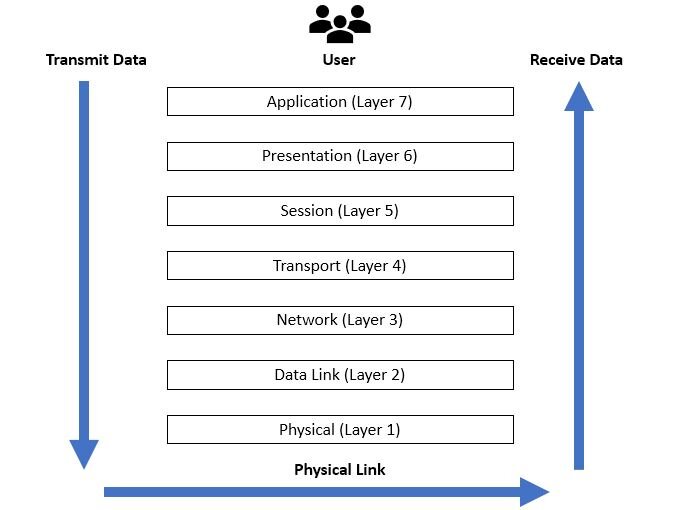
Here’s a quick look at what each layer does:
| Layer | Name | Function |
|---|---|---|
| 7 | Application | Provides network services directly to user applications like web browsers and email. |
| 6 | Presentation | Translates, encrypts, and compresses data so the application layer can understand it. |
| 5 | Session | Manages the conversation between two computers, establishing, maintaining, and ending the connection. |
| 4 | Transport | Manages the end-to-end transfer of data. This is where TCP and UDP work. |
| 3 | Network | Handles routing and addressing, figuring out the best path for data to travel across the network. |
| 2 | Data Link | Manages communication between devices on the same local network, using MAC addresses. |
| 1 | Physical | The hardware layer: cables, connectors, and radio signals that transmit raw bits of data. |
While the OSI model is the textbook standard, the TCP/IP model is what the modern internet actually runs on. It’s a more practical, streamlined version with just four layers.
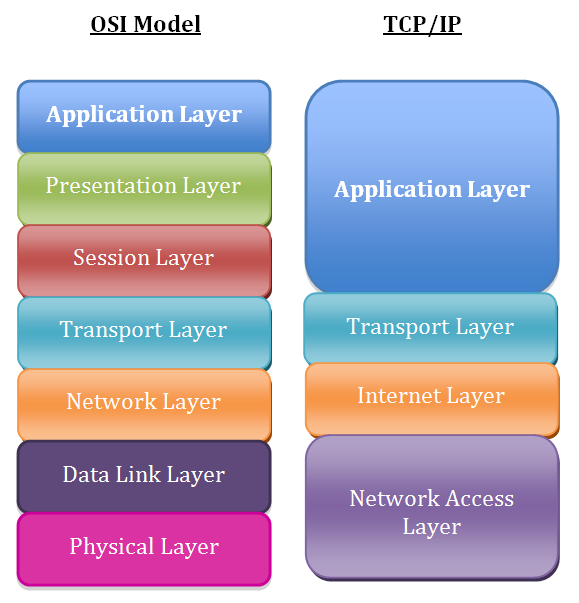
The TCP/IP model combines some of the OSI layers. For example, its Application layer handles the jobs of the OSI's Application, Presentation, and Session layers. This makes it simpler and more efficient for real-world use.
Network Devices and Layouts
Data travels through a physical infrastructure made up of specialized devices. Each one plays a specific role in getting information from point A to point B.
Switch
noun
A device that connects multiple devices on a single local area network (LAN). It uses MAC addresses to forward data packets only to the specific device they're intended for.
Router
noun
A device that connects different networks together. It uses IP addresses to direct traffic between networks, like from your home network to the internet.
The way these devices are arranged is called the network topology. It’s the map of the network. The two most common topologies you'll encounter are the star and bus topologies.
In a star topology, all devices connect to a central hub, like a switch. This is common in homes and offices. If one cable fails, only that one device loses connection.
In a bus topology, all devices share a single main cable. This is an older design. If the main cable breaks, the entire network can go down.
Addresses and Protocols
For data to find its way, it needs an address, just like a letter. In networking, we use IP addresses.
IP Address
noun
A unique numerical label assigned to each device connected to a computer network that uses the Internet Protocol for communication. It serves as a location identifier.
An IP address, like 192.168.1.101, tells routers where to send data packets. But sometimes we want to create smaller, more manageable networks within a larger one. This is done through subnetting.
Subnetting involves borrowing some bits from the Host ID part of an IP address to create a Subnet ID. This divides one large network into multiple smaller ones. Think of it like dividing a large office building into different departments. Everyone still has the same main street address (the network), but each department has its own room number (the subnet).
Subnetting improves organization, security, and performance by keeping traffic contained within the relevant subnet.
Finally, we need rules for how the conversation happens. At the Transport layer, two protocols handle this: TCP and UDP.
| Protocol | Full Name | How it Works | Use Case |
|---|---|---|---|
| TCP | Transmission Control Protocol | Establishes a connection before sending data, checks for errors, and guarantees delivery. It's reliable but slower. | Web browsing, email, file transfers. |
| UDP | User Datagram Protocol | Sends data without establishing a connection or checking for errors. It's fast but unreliable. | Video streaming, online gaming, DNS. |
Choosing between TCP and UDP is a trade-off between reliability and speed. For watching a movie, a few lost pixels (dropped UDP packets) don't matter as much as keeping the stream flowing smoothly. But for downloading a file, you need every single bit to be perfect (guaranteed by TCP).
What is the primary reason for using layered models, such as the OSI and TCP/IP models, in networking?
In a star network topology, what happens if a single cable connecting a computer to the central hub fails?
These are the core building blocks of any computer network. Understanding them is the first step toward mastering how our digital world is connected.