CCNA Certification Essentials
Networking Basics
What Is a Network?
At its simplest, a computer network is a group of two or more connected devices that can share resources and communicate with each other. The purpose is straightforward: to share things. This could be an internet connection, a printer, files on a server, or just sending a message to a colleague.
Think about your home. Your laptop, phone, and smart TV might all be connected to your Wi-Fi. That's a network. It allows your phone to print a photo on your wireless printer and your laptop to stream a movie from the internet. In an office, this scales up, connecting dozens or hundreds of computers to shared servers and the outside world.
Networks Big and Small
Networks aren't one-size-fits-all. They are categorized based on the geographical area they cover.
Local Area Network (LAN): This is a network confined to a small area, like a single building, office, or home. They are typically managed privately. The network in your house or at your school's computer lab is a LAN. Data speeds are usually high because the devices are close to each other. Most LANs use Ethernet cables or Wi-Fi.

Wide Area Network (WAN): A WAN spans a large geographical area, such as a state, country, or even the entire globe. WANs connect multiple LANs together. The most famous example of a WAN is the Internet itself, which is a global network of networks.
Metropolitan Area Network (MAN): A MAN is larger than a LAN but smaller than a WAN. It typically covers a city or a large campus. A university with multiple buildings spread across a city might use a MAN to connect them all into one cohesive network.
How Networks Are Laid Out
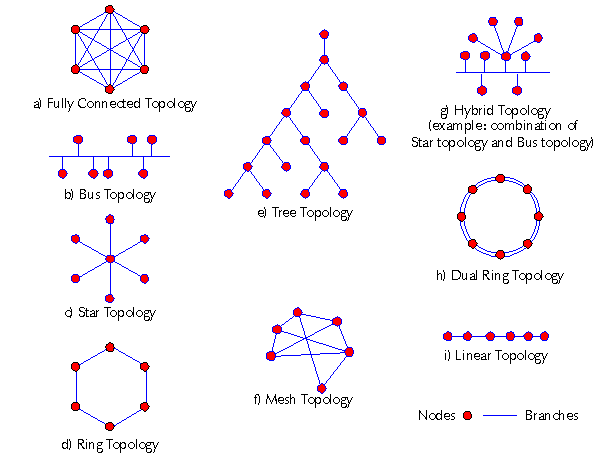
The physical or logical arrangement of a network is called its topology. It's the blueprint for how all the devices are connected. While there are many complex designs, a few basic topologies form the foundation.
topology
noun
The arrangement of the elements (links, nodes, etc.) of a communication network.
Bus Topology: In this setup, all devices share a single communication line, or bus. It's simple and cheap to set up, but it has a major weakness. If the main cable fails, the entire network goes down.
Ring Topology: Here, devices are connected in a circle. Data travels from one device to the next in the ring until it reaches its destination. Like the bus topology, it has a single point of failure; a break in the ring can bring down the whole network.
Star Topology: This is the most common topology used in modern LANs. All devices are connected to a central hub or switch. This design is more robust. If one computer's cable breaks, only that computer loses connectivity; the rest of the network continues to function normally.
The Rules of the Road
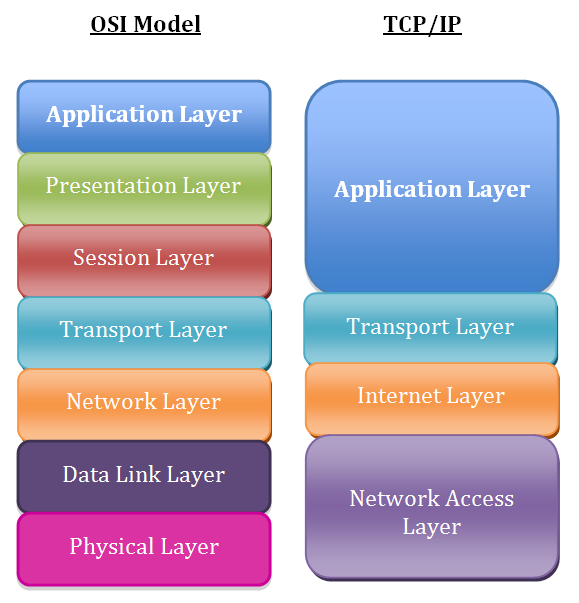
For devices to communicate, they need a common set of rules, or protocols. To standardize these rules, computer scientists developed conceptual frameworks called networking models. These models break down the complex process of network communication into smaller, manageable parts called layers.
Think of it like shipping a package. You have layers of process: writing the address (Application), putting the item in a box (Presentation), sealing it (Session), choosing a shipping service (Transport), the mail truck route (Network), the specific truck and driver (Data Link), and the actual roads (Physical).
The two most important models to know are the OSI model and the TCP/IP model.
OSI (Open Systems Interconnection) Model: This is a 7-layer model that serves as a theoretical guide. It's excellent for understanding how different network functions relate to one another, from the physical hardware (Layer 1) to the software applications you use (Layer 7).
TCP/IP (Transmission Control Protocol/Internet Protocol) Model: This is a 4-layer model that is more practical and is the foundation of the modern internet. It's a more condensed version of the OSI model and describes the specific protocols used in real-world networking.
The Hardware That Connects Us
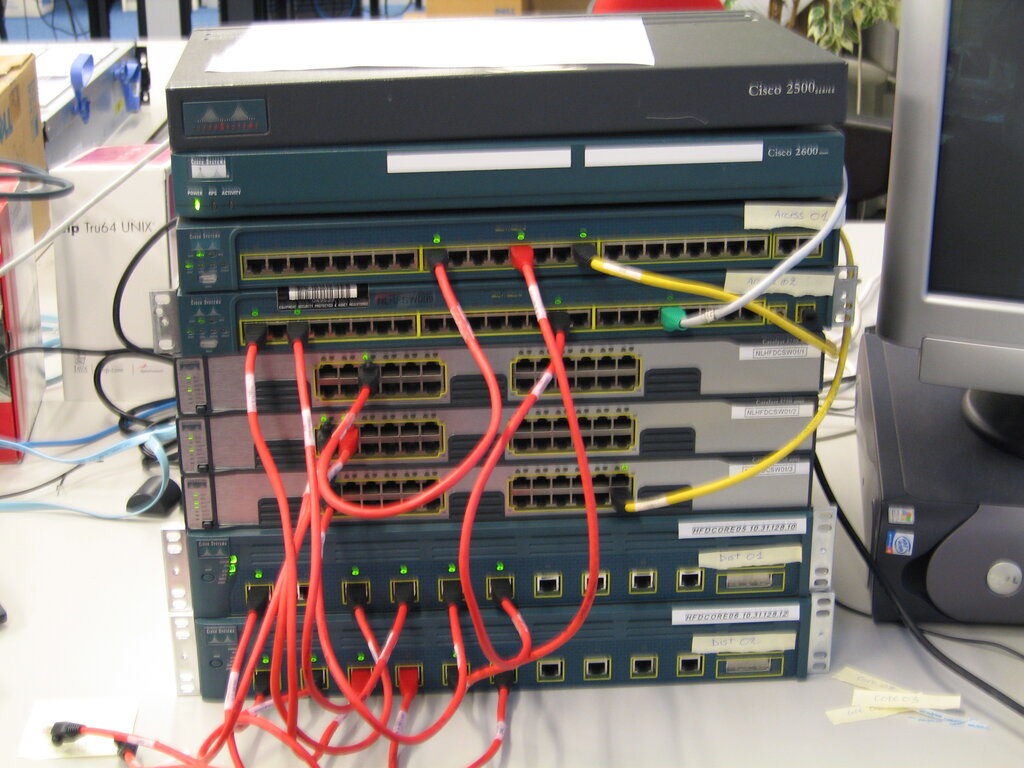
Several key pieces of hardware make networking possible. While you might see them as simple boxes with blinking lights, each has a distinct and crucial job.
| Device | Primary Function | Operates on a... |
|---|---|---|
| Switch | Connects devices on the same LAN | LAN |
| Router | Connects different networks together | WAN |
| Access Point (AP) | Allows wireless devices to join a wired network | LAN |
Switches are the traffic cops of a local network. When a device sends data, the switch receives it and intelligently forwards it only to the intended recipient on the same network. This creates direct lines of communication and prevents unnecessary traffic from bogging down the network.
Routers are the gateways between networks. Your home router, for example, connects your entire LAN to the internet (a massive WAN). Routers inspect the destination IP address of data packets and decide the best path to send them on their journey across different networks.
Wireless Access Points (APs) are what create a Wi-Fi network, technically called a Wireless Local Area Network (WLAN). An AP connects to a wired network (via a switch or router) and broadcasts a wireless signal, allowing devices like laptops and smartphones to connect without cables.
Understanding these core components—the types of networks, their layouts, the models that govern them, and the devices that build them—is the first step toward mastering computer networking.