C Programming Language
Compilation Workflow
From Source Code to Executable
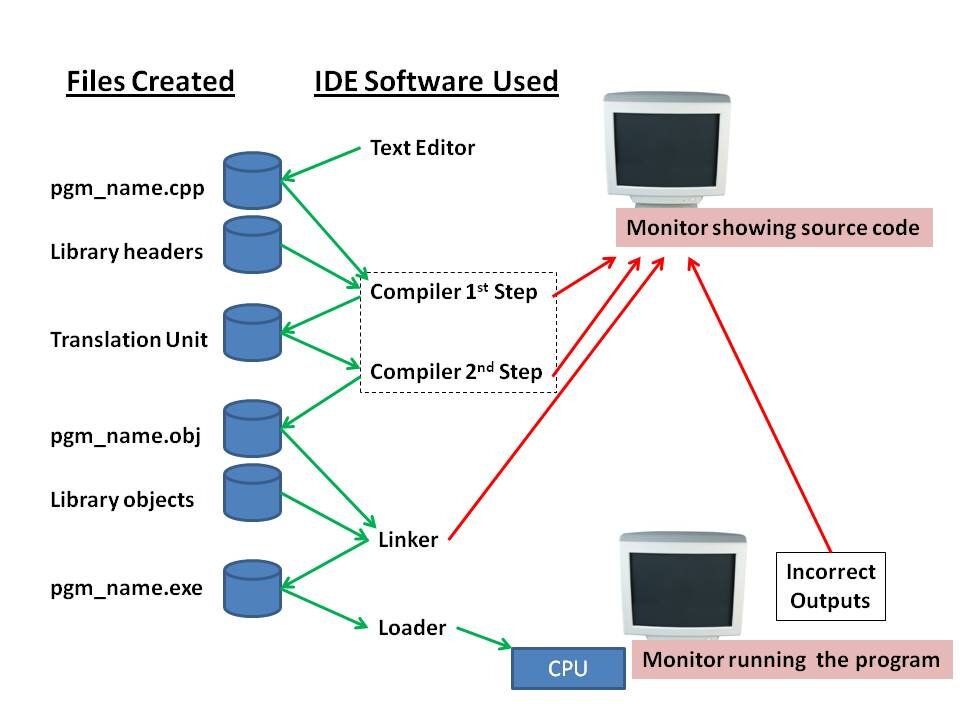
When you write a C program, you're writing instructions in a language humans can understand. But a computer's processor only understands machine code—a stream of binary ones and zeroes. The journey from your C source file to an executable program your computer can run is a multi-stage process managed by a toolchain, most commonly the GNU Compiler Collection, or GCC for short. Unlike interpreted languages that run line-by-line, C code must be fully translated, or compiled, before it can be executed. This process has four main steps: preprocessing, compilation, assembly, and linking.
Let's break down each stage.
Preprocessing: Getting the Code Ready
The first step is handled by the preprocessor. It doesn't know any C; it's a simple text-processing tool. It scans your source code for lines beginning with a hash symbol (#). These are called preprocessor directives.
The most common directives are #include and #define. When the preprocessor sees #include <stdio.h>, it finds the stdio.h and literally pastes its entire contents into your source file. A #define directive sets up a macro, which is a rule for find-and-replace. For example, #define PI 3.14159 tells the preprocessor to replace every instance of the word PI with 3.14159.
/* Original source file: main.c */
#include <stdio.h>

#define GREETING "Hello, world!"

int main(void) {
    printf(GREETING);
    return 0;
}

/* After preprocessing (conceptually): main.i */
// ... a huge block of text from stdio.h ...

int main(void) {
    printf("Hello, world!");
    return 0;
}
The output is a single, expanded source file that's ready for the next stage. You can tell GCC to stop after this step with the -E flag, which is useful for debugging tricky macros.
Compilation and Assembly
Now the actual compiler takes over. It parses the preprocessed C code, checks it for syntax errors, and translates it into a lower-level language called assembly. Assembly code is a human-readable representation of the processor's machine code instructions. Each line of assembly corresponds to a single, basic operation for the CPU, like 'move this value into that register' or 'add these two numbers'.
Next, the assembler converts the assembly code into pure machine code—the binary ones and zeros. The result of this stage is an (usually with a .o or .obj extension). This file contains the translated code for your source file, but it's not a complete program yet. If your code calls a function like printf, the object file contains a reference to it but not its actual code. It's like having a phone number but not the person on the other end.
Linking: Assembling the Final Program
The final stage is linking. The linker's job is to take all the necessary pieces and bind them together into a single executable file. This includes your own object files (if your project is split into multiple .c files) and object code from libraries. A library is a pre-compiled collection of useful functions. The printf function, for example, lives in the C standard library.
There are two main types of linking: static and dynamic.
Static Linking: The linker copies the library code directly into your final executable. The result is a larger, self-contained file that has no external dependencies. It's like baking the recipe for a cake right into the cake itself.
Dynamic Linking: The linker doesn't add the library code. Instead, it leaves a note in the executable that says, "When you run, you'll need this shared library (e.g., a
.sofile on Linux or a.dllon Windows)." This results in smaller executables, and multiple programs can share a single copy of a library in memory. However, it means the program won't run if the required library is missing or the wrong version.
Once the linker resolves all the references and connects all the pieces, it outputs a final, executable program.
Automating the Build with Makefiles
Manually running these steps for every file in a large project would be tedious. This is where the make utility comes in. A Makefile is a simple script that defines the rules for building your project.
It specifies dependencies: for instance, it tells make that main.o depends on main.c, and the final executable depends on main.o and other object files. When you run make, it checks which files have changed since the last build and only re-compiles what's necessary, saving a lot of time.
# A very simple Makefile

# CC is a variable for the compiler
CC=gcc
# CFLAGS are flags passed to the compiler
CFLAGS=-Wall -g

# The default rule: build 'my_program'
all: my_program

# Rule to build 'my_program'
# It depends on main.o and utils.o
my_program: main.o utils.o
	$(CC) $(CFLAGS) -o my_program main.o utils.o

# Rule to build main.o
# It depends on main.c
main.o: main.c
	$(CC) $(CFLAGS) -c main.c

# Rule to build utils.o
# It depends on utils.c
utils.o: utils.c
	$(CC) $(CFLAGS) -c utils.c

# Rule to clean up build files
clean:
	rm -f my_program *.o
This Makefile defines how to compile main.c and utils.c into object files and then link them to create my_program. Understanding this workflow is crucial for debugging complex projects, especially when you encounter infamous "linker errors," which signal that the linker couldn't find the code for a function you tried to use.
What is the primary role of the preprocessor in the C compilation process?
What is the direct output of the assembler stage?
This build process, from text file to executable binary, gives C much of its power and performance. It allows for fine-grained control and optimization at every step of the way.