C++ Programming Fundamentals
Introduction to C++
What is C++?
C++ is a powerful, general-purpose programming language. It was created in the 1980s by Bjarne Stroustrup as an extension of the C language. Think of C as a solid, reliable manual car. C++ is that same car, but with a bunch of modern upgrades like a GPS and power steering. It adds powerful features to C without sacrificing the speed and low-level control that C is famous for.
This combination of power and control makes C++ a go-to choice for performance-critical applications. It's the language behind many operating systems, web browsers, and blockbuster video games. It gives the programmer a high degree of control over system resources and memory, making it efficient and fast.
Setting Up Your Workspace
To start writing C++ programs, you need two main tools: a text editor to write your code and a compiler to translate that code into a language the computer can understand. While you can use them separately, it's much easier to use an Integrated Development Environment, or IDE.
An IDE bundles an editor, a compiler, and other helpful tools (like a debugger) into a single application, making the whole process smoother.
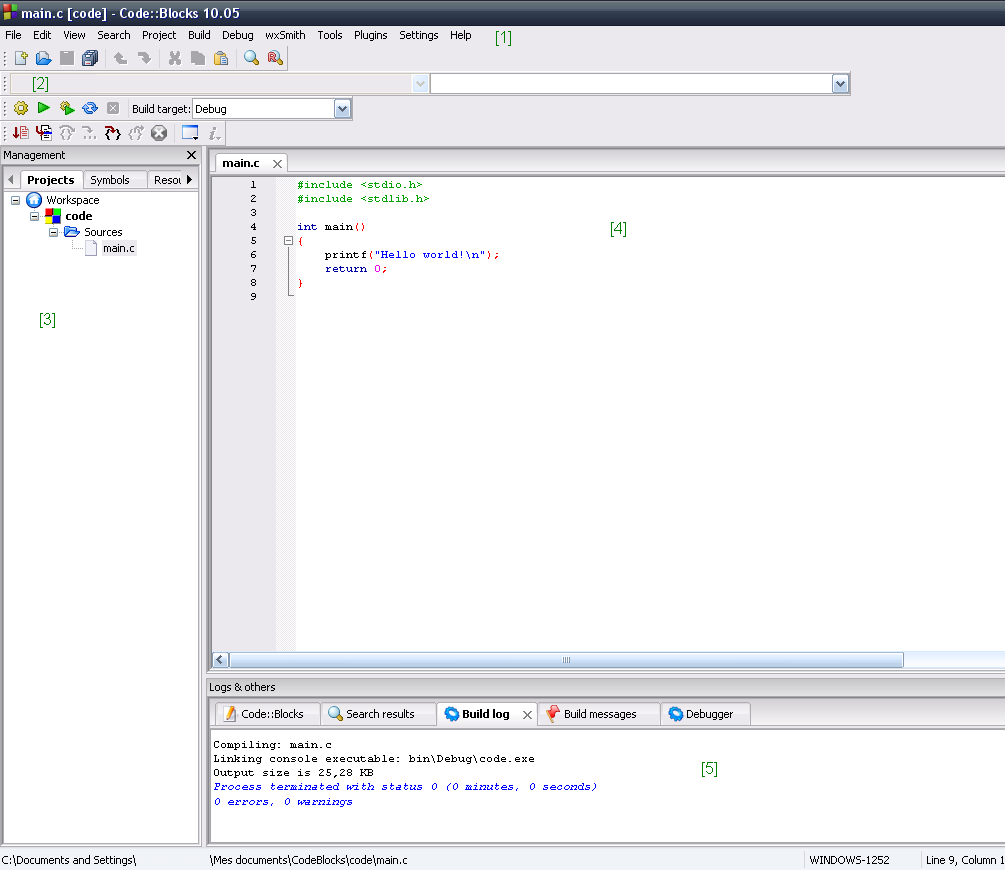
There are many free IDEs available. Some popular choices for beginners are Code::Blocks, Dev-C++, and Visual Studio Code (with the C/C++ extension). Any of these will work just fine for learning. The important thing is to get one installed so you can start writing and running code.
Your First C++ Program
It's a tradition in programming to start with a program that simply displays "Hello, World!" on the screen. It's a small victory that proves your setup is working correctly. Let's look at the code to do this in C++.
#include <iostream>

int main() {
    // This line prints "Hello, World!" to the console
    std::cout << "Hello, World!" << std::endl;
    return 0;
}
This might look a little cryptic, but each part has a specific job:
#include <iostream>: This is a preprocessor directive. It tells the compiler to include theiostreamfile, which is a standard library that lets us work with input and output, like printing text to the screen.int main(): This is the main function. Every C++ program must have amainfunction. It's the starting point of your program—execution always begins here.std::cout << "Hello, World!" << std::endl;: This is the statement that does the work.std::coutis the standard output stream (usually your screen or console). The<<operator sends the text "Hello, World!" to it.std::endladds a new line at the end.return 0;: This line tells the operating system that the program finished without any errors. A return value of 0 conventionally means success.
From Code to Program
After you write your code, you can't just run it directly. First, it needs to be turned into an executable file that your computer can understand. This process involves two main steps: compiling and linking.
Compiling is the process of taking your source code (the human-readable C++ file) and translating it into object code (a machine-readable file). The compiler checks your code for syntax errors. If you forgot a semicolon or misspelled a keyword, the compiler will let you know.
Linking takes the generated object code and combines it with any necessary code from libraries (like iostream) to create the final, runnable program, often called an executable.
Luckily, your IDE handles all of this for you. There's usually a single button labeled "Build and Run" or something similar that performs both steps and then executes your program.
Now it's time to check your understanding of these foundational concepts.
What is the primary relationship between the C and C++ programming languages?
In a basic C++ program, what is the purpose of the line int main()?
Getting your first program to run is a big step. You now understand the basic structure of a C++ program and the process required to bring it to life.