C# Programming Essentials
Introduction to C#
Welcome to C#
C# (pronounced “C sharp”) is a popular programming language developed by Microsoft. It first appeared in 2000 as part of Microsoft's .NET initiative. Think of it as a modern evolution of older languages like C and C++, designed to be easier to use while still being powerful enough for large-scale applications.
Today, C# is incredibly versatile. You can use it to build web applications, desktop software, mobile apps, and even video games with the Unity game engine. Its clean syntax and strong features make it a great choice for beginners and experienced developers alike.
Learn the fundamental concepts of C# programming, including syntax, data types, control flow, and basic object-oriented principles, to begin writing simple applications.
The .NET Framework
You can't talk about C# without mentioning the .NET framework. C# was designed to run on .NET. But what exactly is that?
Think of the .NET framework as a large, supportive ecosystem for your code. It's not a programming language itself, but a platform that provides a huge library of pre-written code and a runtime environment where your programs live and execute. The runtime environment is called the Common Language Runtime (CLR).
The CLR handles essential tasks like managing memory and ensuring your application runs securely. This lets you focus on writing your program's logic instead of worrying about low-level details.
Because C# compiles to an intermediate language (IL) first, any language that also compiles to IL can work seamlessly with C#. This makes the .NET ecosystem very powerful and flexible.
Setting Up Your Environment
To start writing C#, you need a tool called an Integrated Development Environment, or IDE. The most common IDE for C# is Visual Studio, also made by Microsoft. It includes a code editor, a compiler to turn your code into a runnable program, and a debugger to help you find and fix errors.
You can download the free Community edition of Visual Studio from Microsoft's website. During installation, make sure to select the .NET desktop development workload. This will install all the necessary tools for building C# applications.
Your First C# Program
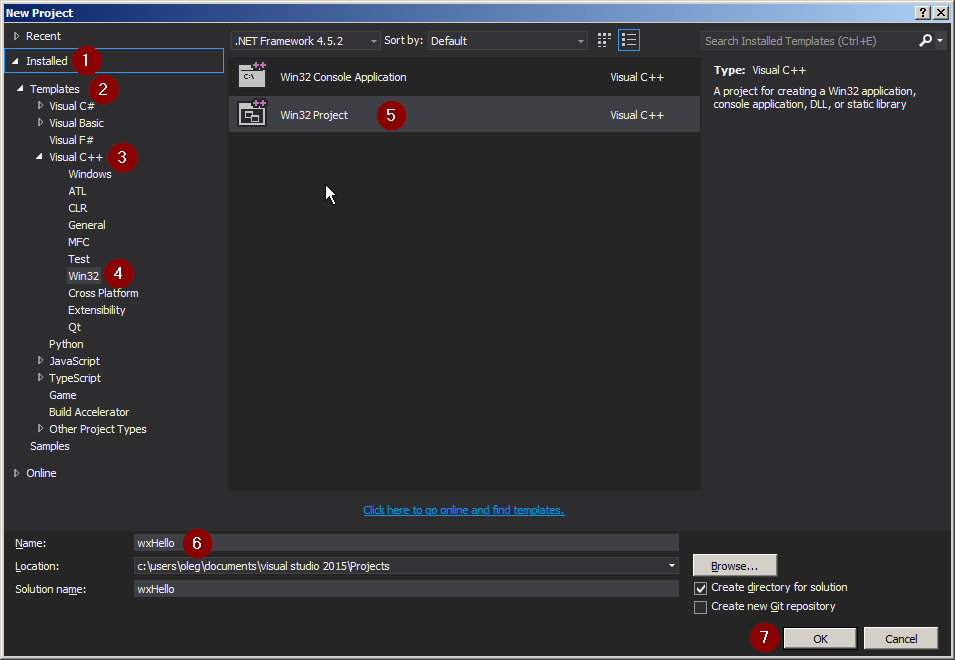
Let's create the classic "Hello, World!" program. It's a simple tradition when learning a new language. Open Visual Studio and create a new project. Choose the "Console App" template, give your project a name like "HelloWorld", and click Create.
Visual Studio will generate some starting code for you. It should look something like this. Don't worry about what every line means just yet. Find the line that says Console.WriteLine("Hello, World!"); and make sure it's there. If not, type it in exactly as shown.
using System;

namespace HelloWorld
{
    class Program
    {
        static void Main(string[] args)
        {
            Console.WriteLine("Hello, World!");
        }
    }
}
Now, run your program. You can do this by pressing the green play button at the top of Visual Studio or by pressing F5 on your keyboard. A console window will pop up briefly, display the text "Hello, World!", and then close. Congratulations, you've just run your first C# program!
Anatomy of the Program
Let's quickly break down the basic structure of that program.
using System;
This line tells the compiler that our program is using things from the System namespace. A namespace is just a way to organize code. The System namespace contains fundamental tools, including the Console we used.
namespace HelloWorld
This declares our own namespace for this project. As your projects get bigger, namespaces help you keep your code from getting tangled.
class Program
A class is a container for your code. For now, just know that all C# code needs to live inside a class.
static void Main(string[] args)
This is the entry point of your application. When you run your program, the Main method is the very first thing that gets called. All of your program's execution starts here.
Console.WriteLine("Hello, World!");
This is the line that does the work. It calls the WriteLine method from the Console class, which prints the text inside the parentheses to the console. Notice that the line ends with a semicolon ;. In C#, most statements must end with a semicolon.
Ready to check your understanding?
Which company developed the C# programming language as part of its .NET initiative?
What is the role of the .NET framework in relation to C#?
That's a quick look at the fundamentals of C#. You've learned what C# is, how it works with the .NET framework, and how to write and run a basic program. From here, you can start exploring more features of the language.