C++ Fundamentals
Introduction to C++
From C to C++
In the late 1970s, a computer scientist named Bjarne Stroustrup was working on his PhD thesis. He needed a programming language that was both efficient like C and organized like Simula. Since no such language existed, he decided to create one.
He started with the C language, which was already popular for its speed and flexibility. He then added features inspired by Simula, most notably the concept of "classes," a way to bundle data and functions together. He initially called his new language "C with Classes."
By 1983, the name was changed to C++. The "++" is a clever nod to the C language itself. In C, ++ is an operator that increments a variable by one. The name C++ suggests it's the next step up from C.
What Makes C++ Special
C++ is often described as a multi-paradigm language. This just means you can write code in different styles. It supports procedural programming, like C, but also object-oriented programming, which is its main claim to fame.
Here are some of its key features:
- Performance: C++ is fast. It allows for low-level memory management, giving programmers fine-tuned control over how their programs use resources. This makes it ideal for software that needs to run quickly, like video games, financial trading systems, and embedded systems in cars or medical devices.
- Portability: You can write C++ code on one operating system (like Windows) and compile it to run on another (like macOS or Linux) with minimal changes.
- Scalability: C++ can be used to build small, simple applications or massive, complex systems that serve millions of users, such as search engines and operating systems.
Because C++ is an extension of C, nearly all valid C code is also valid C++ code. This made it easier for existing C programmers to adopt the new language.
Your First Program
Let's get our hands dirty and write a program. The traditional first program for any language is one that simply prints "Hello, World!" to the screen. To do this, you'll need a text editor to write the code and a compiler to translate it into a language the computer can understand.
compiler
noun
A special program that translates source code written in a high-level programming language (like C++) into a low-level language (like machine code) to create an executable program.
Many programmers use an Integrated Development Environment (IDE), which bundles a text editor, compiler, and other helpful tools together. For beginners, a web-based compiler is often the easiest way to start. There are many free options online where you can write and run C++ code directly in your browser, no installation required.
Here is the code for our "Hello, World!" program. Type it into your editor or online compiler:
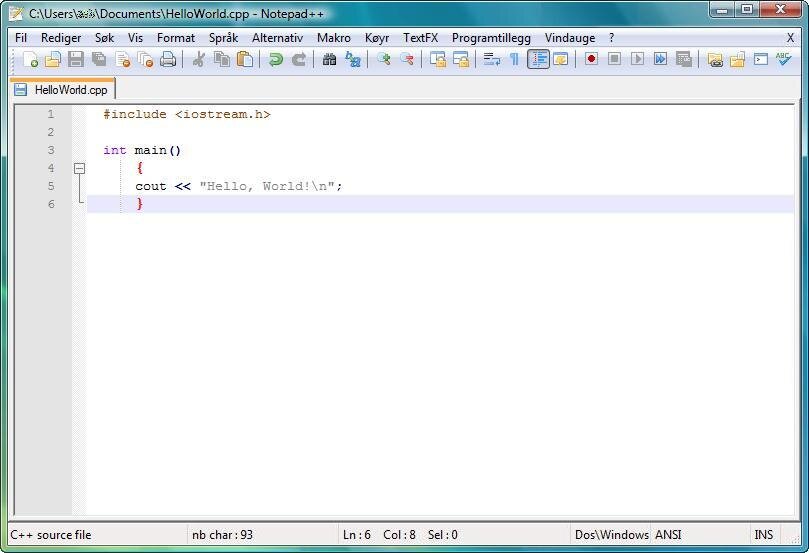
// This is a comment. The compiler ignores it.

// Include the iostream library, which lets us work with input and output.
#include <iostream>

// This is the main function, where program execution begins.
int main() {
    // std::cout sends output to the console.
    // << is the insertion operator.
    std::cout << "Hello, World!\n";

    // Return 0 to indicate the program finished successfully.
    return 0;
}
Let's break that down:
#include <iostream>: This line tells the compiler to include theiostreamfile. This file contains the code that allows us to get input from the user and print output to the screen.int main(): This is the main function. Every C++ program must have amain()function. It's the starting point of the program.- `std::cout <<
Don't worry about understanding every single piece of syntax right now. The goal is to see the basic structure and successfully run your first program.
After you've written the code, you need to compile and run it. In an online IDE, this is usually a single "Run" button. If you're using a compiler on your computer, you'll typically run a command in your terminal. Once you run it, you should see this output:
Hello, World!
Congratulations! You've just written and executed your first C++ program.
Ready to check your understanding?
Who is credited with creating the C++ programming language?
What is the significance of the "++" in the name C++?
This is just the first step. You've learned about the origins of C++, its core features, and how to write, compile, and run a simple program. From here, you can start exploring the building blocks of the language, like variables, data types, and control structures.