C# and .NET Programming Mastery
Introduction to C# Programming
What is C#
C# (pronounced C-sharp) is a modern programming language created by Microsoft. Think of it as a versatile tool that can build almost anything, from desktop applications for Windows to web services and even video games. It's known for being powerful yet relatively straightforward to learn, striking a good balance between the low-level control of languages like C++ and the simplicity of languages like Python.
C# doesn't work in isolation. It's part of the .NET Framework, which is a platform developed by Microsoft that provides a huge library of pre-written code and a runtime environment for executing programs. This means you don't have to build everything from scratch. The .NET library gives you ready-to-use tools for tasks like reading files, handling web requests, and working with databases.
In short: C# is the language you write, and .NET is the platform that runs it and provides helpful tools.
Setting Up Your Workspace
To start writing C# code, you need an Integrated Development Environment, or IDE. An IDE is a software application that bundles all the tools a programmer needs into one place, including a text editor, a debugger for finding errors, and a way to run your code.
For C#, the most popular IDE is Visual Studio. Microsoft offers a free version called Visual Studio Community, which is incredibly powerful and perfect for learning. When you install it, you'll be asked to choose which 'workloads' to include. A workload is just a bundle of tools for a specific type of development.
Make sure to select the '.NET desktop development' workload during installation. This will give you everything you need to build console applications, which is where we'll start.
Your First C# Program
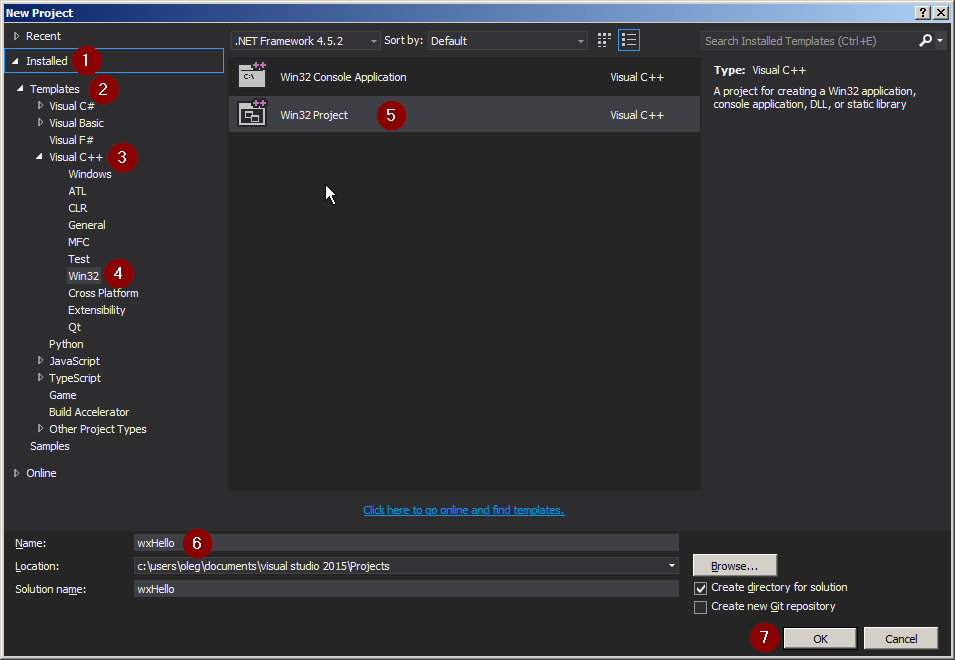
Once Visual Studio is installed, let's create our first program. Open Visual Studio and select 'Create a new project'. In the project templates, find and select 'Console App', then give your project a name.
A console application is a simple program that runs in a text-based window, without any graphical buttons or menus. It's the perfect place to learn the fundamentals.
Visual Studio will generate some starting code for you. It will look something like this:
// This is the main entry point of our application.
Console.WriteLine("Hello, World!");
This might look simple, but it's a complete C# program. To run it, you can press the green play button at the top of Visual Studio or simply press the F5 key. A console window will pop up briefly, display the text "Hello, World!", and then close. You've just run your first C# application!
Understanding the Structure
Let's break down the code we just ran. Don't worry about understanding every single detail right now; we're just getting a feel for the basic building blocks.
Depending on the version of .NET you're using, your initial file (often called Program.cs) might look slightly different. A more traditional version looks like this:
using System;

namespace HelloWorld
{
    class Program
    {
        static void Main(string[] args)
        {
            Console.WriteLine("Hello, World!");
        }
    }
}
Here's what each part does:
using System;: This line tells our program that we want to use code from theSystem'namespace'. A namespace is just a way to organize code. TheSystemnamespace contains fundamental tools, including theConsolewe used.namespace HelloWorld: We wrap our own code in a namespace to keep it organized and avoid conflicts with other code.class Program: In C#, all code lives inside a 'class'. A class is a container for methods and data. For now, just think of it as a required organizational block.static void Main(string[] args): This is theMainmethod. It's the special starting point for every C# console application. When you run your program, the code inside the curly braces{}of theMainmethod is the first thing that gets executed.Console.WriteLine("Hello, World!");: This is the instruction that does the work.Consoleis an object that represents the console window.WriteLineis a method that writes a line of text to that console. The text we want to write goes inside the parentheses and quotes. Finally, the semicolon;at the end marks the end of the statement, like a period at the end of a sentence.
Newer versions of C# have simplified this with a feature called 'top-level statements', which is why you might just see Console.WriteLine("Hello, World!"); by itself. The compiler automatically generates the namespace, class, and Main method behind the scenes for you.
C# is a modern programming language primarily developed by which company?
What is the primary role of the .NET Framework when working with C#?
That's your first step into the world of C#. You've set up your tools, written a program, and taken a peek at its structure. From here, you can start exploring variables, logic, and all the other concepts that bring software to life.