C# and Angular Development Fundamentals
Introduction to C#
Meet C#
C# (pronounced “C sharp”) is a popular programming language developed by Microsoft. It first appeared in 2000 as a modern, versatile language for building a wide range of applications. Think of it as an evolution of C and C++, but with a simpler, more streamlined approach inspired by Java.
The language is object-oriented, which means it organizes code in a way that mimics real-world objects and their interactions. This makes it easier to manage complex software. One of its standout features is type safety. C# checks your code for type-related errors before it runs, which helps catch bugs early. It also handles memory management automatically, freeing you from many of the manual, error-prone tasks found in older languages.
Because of its power and flexibility, C# is used everywhere—from building dynamic websites and powerful desktop applications to creating video games with the Unity engine.
The .NET Ecosystem
C# doesn't work in isolation. It’s the primary language for the .NET framework, a platform created by Microsoft for building, deploying, and running applications. If C# is the language you write in, .NET is the environment where your code comes to life.
Think of .NET as a massive toolbox and a support system combined. It consists of two core components you'll hear about often:
CLR
noun
The Common Language Runtime. This is the engine that executes your C# code. It manages memory, handles security, and ensures your program runs smoothly on different types of hardware.
The other key part is the Framework Class Library (FCL). This is a huge collection of pre-written, reusable code. Need to work with files, connect to a database, or build a user interface? The FCL has tools and code ready for you, so you don't have to build everything from scratch.
Setting Up Your Workspace
To write and run C# code, you need an Integrated Development Environment (IDE). An IDE is a software application that combines a code editor, a compiler (to translate your code into machine language), and a debugger (to help find and fix errors) into one convenient package.
The standard and most recommended IDE for C# development is Visual Studio. It’s also made by Microsoft and integrates perfectly with the .NET ecosystem. There's a free version called Visual Studio Community, which is incredibly powerful and perfect for learning.
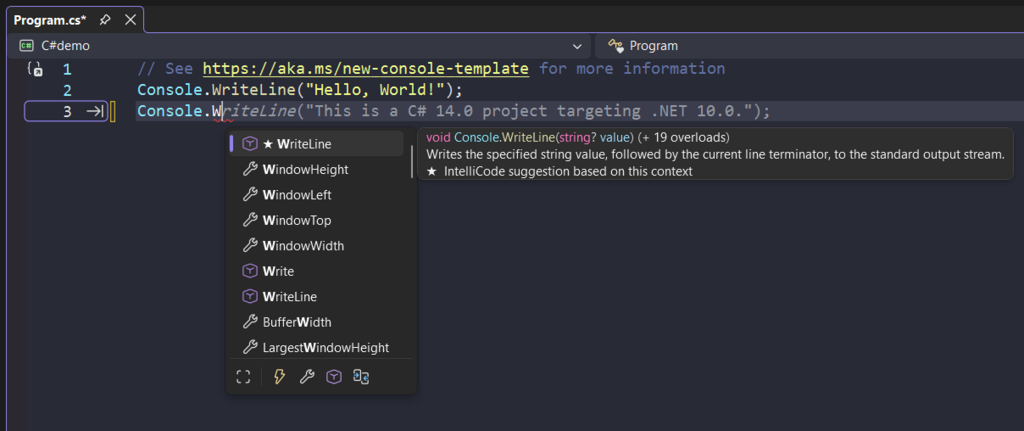
To get started, simply download Visual Studio Community from the official Microsoft website. During installation, make sure to select the workload for ".NET desktop development" or "ASP.NET and web development," depending on what you plan to build. This ensures all the necessary tools for C# are installed.
Your First C# Program
Once Visual Studio is set up, you can create your first program. The traditional first step in learning any new language is to write a "Hello, World!" program, which simply prints that phrase to the screen. In Visual Studio, you’ll create a new "Console App" project.
Here’s what the code looks like:
using System;

namespace HelloWorld
{
    class Program
    {
        static void Main(string[] args)
        {
            // This line prints the text to the console.
            Console.WriteLine("Hello, World!");
        }
    }
}
Let's break that down quickly:
using System;imports the coreSystemlibrary, which contains fundamental tools like theConsoleclass.namespace HelloWorldcreates a container for our code to keep it organized.class Programdefines the main container for our program's logic.static void Main(string[] args)is the entry point. When you run your application, theMainmethod is the very first thing that gets executed.Console.WriteLine("Hello, World!");is the action. It calls theWriteLinemethod to display the text "Hello, World!" in the console window.
To run this in Visual Studio, you simply press the green play button at the top of the window (or press F5). A console window will pop up, display your message, and then close. You've just written and executed your first C# program.
Now, let's test what you've learned about C# and .NET.
What is the primary platform or framework that C# was designed to work with?
In a C# program, what is the specific role of the static void Main(string[] args) method?
You've taken the first step into a powerful and widely-used programming language. With this foundation, you're ready to explore more complex ideas and start building your own applications.