Building Language Learning Platforms with Java
System Architecture Design
Blueprint for a Modern App
Before writing a single line of application code, we need a plan. A blueprint. In software, this is called architecture. A good architecture ensures our language learning app can grow without becoming a tangled mess. It allows different developers to work on different parts simultaneously and makes the system easier to test and maintain.
We're going to build our app on a few proven software design patterns. Think of these as standard, battle-tested solutions to common problems. The primary pattern we'll use is , or MVC. It's a way of thinking that splits a program into three distinct, interconnected parts.
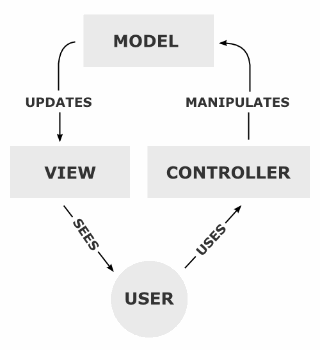
Here’s how it works:
- Model: This is the brain of the operation. It manages the application's data and business logic. In our app, the Model would handle things like fetching lesson data, tracking user progress, and defining what a 'Quiz' or a 'User' is.
- View: This is what the user sees and interacts with. It’s the user interface (UI). The View's job is to display the data from the Model. It could be a web page showing a vocabulary list or an app screen with a multiple-choice question.
- Controller: This acts as the middleman. When a user clicks a button in the View, the Controller receives that input. It then tells the Model what to do (e.g., "Mark this word as learned"). Finally, it updates the View to reflect any changes.
By keeping these three roles separate, we avoid [{
}], where changes in one part of the system unexpectedly break another. If we want to redesign our UI, we can swap out the View without having to rewrite the core logic in the Model.
Adding a Service Layer
While MVC is a great start, modern applications often add another layer for clarity: the Service Layer. This layer sits between the Controller and the Model. Its job is to handle the core business logic.
Think about what happens when a user completes a lesson. The Controller gets the request, but it doesn't figure out all the details itself. Instead, it calls a LessonCompletionService. This service might be responsible for several steps:
- Updating the user's progress in the database.
- Calculating points or experience earned.
- Checking if the user unlocked an achievement.
- Queuing up a congratulatory email.
Bundling this logic into a service makes the Controller cleaner and the logic itself reusable. Another part of the application, like an automated weekly progress report, could use the same service.
Structuring the Project
To keep our code organized, we'll create a modular project. Instead of one giant codebase, we'll have several smaller, focused projects, or modules. For our app, we can imagine at least three core modules:
core-learning: Handles lessons, vocabulary, and learning mechanics.user-management: Manages user accounts, profiles, and authentication.assessment-logic: Contains the logic for quizzes, tests, and progress tracking.
This structure makes the codebase easier to navigate. A developer fixing a bug in the quiz system knows to look in the assessment-logic module and can work without worrying about breaking user login. To manage these modules and their external dependencies (like libraries for database access or video streaming), we'll use a build automation tool. is a popular choice in the Java world.
Maven uses a file named pom.xml (Project Object Model) to define the project structure and its dependencies. Here’s a simplified snippet of what it looks like:
<project>
  <modelVersion>4.0.0</modelVersion>
  <groupId>com.langlearn</groupId>
  <artifactId>language-app</artifactId>
  <version>1.0.0</version>
  <packaging>pom</packaging> <!-- This defines a parent project -->

  <modules>
    <module>core-learning</module>
    <module>user-management</module>
    <module>assessment-logic</module>
  </modules>

  <dependencies>
    <!-- Shared dependencies go here -->
    <dependency>
      <groupId>org.springframework.boot</groupId>
      <artifactId>spring-boot-starter-web</artifactId>
      <version>3.2.0</version>
    </dependency>
  </dependencies>
</project>
This file tells Maven that our project has three sub-modules and that they all might use an external library called Spring Boot for building web components.
Modeling the Domain
Finally, we need to model our application's domain. This just means creating Java classes that represent the real-world concepts in our app. These classes are the core of our Model component in MVC. They hold the data and are often simple Plain Old Java Objects (POJOs).
For our language app, we might start with classes like User, LanguageCourse, Lesson, and VocabularyItem.
public class User {
    private Long id;
    private String username;
    private String email;
    // ...getters and setters
}

public class Lesson {
    private Long id;
    private String title;
    private String content;
    private List<VocabularyItem> vocabulary;
    // ...getters and setters
}
These simple classes form the backbone of our application. The Service Layer will use them to perform operations, and the Controller will pass them to the View to display to the user. With this structure in place, we have a solid, scalable foundation to start building our app's features.
Now, let's test your understanding of these architectural concepts.
In the Model-View-Controller (MVC) pattern, which component is primarily responsible for managing the application's data and business logic?
What is the main benefit of introducing a Service Layer between the Controller and the Model?