Build Your Travel Budget App
Introduction to App Development
The Lifecycle of an App
Every app, from a simple game to a complex banking platform, goes through a similar journey from idea to reality. This journey is called the Software Development Lifecycle, or SDLC for short. Think of it like building a house. You don't just start hammering nails; you need a plan, blueprints, a construction phase, and inspections.
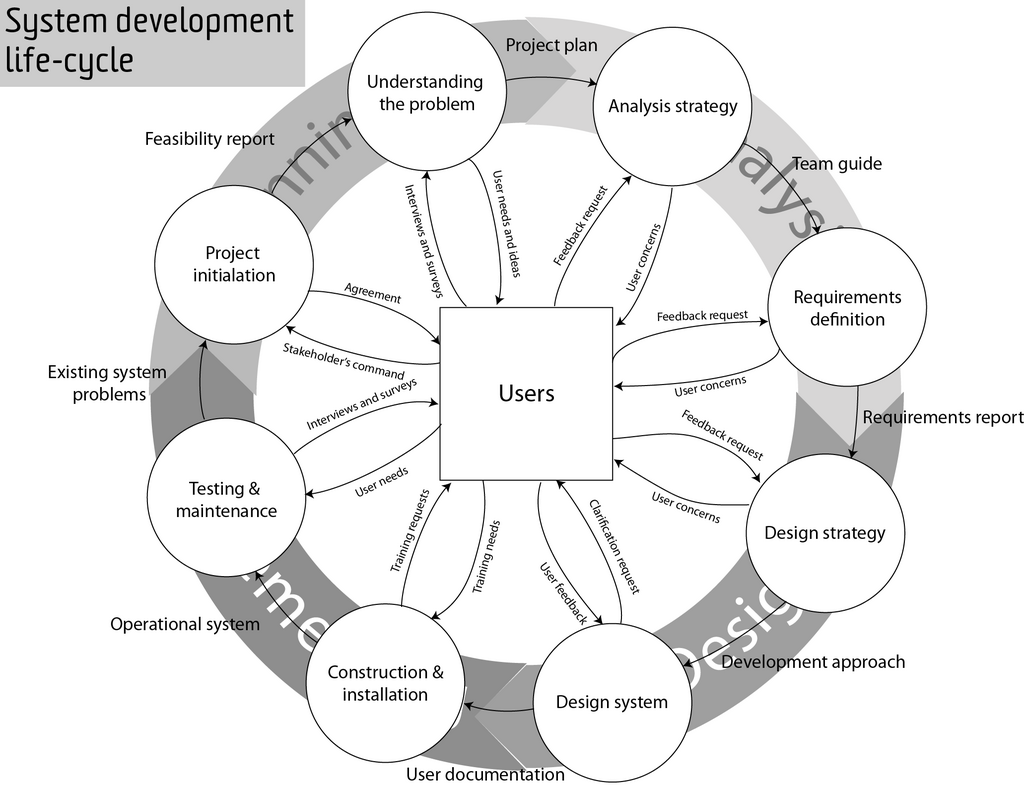
The SDLC breaks the process into manageable stages:
- Planning: This is the idea phase. What problem will the app solve? Who is it for? This is where you define the app's core purpose.
- Design: Here, developers and designers create the blueprint. They map out how the app will look (the user interface, or UI) and how users will interact with it (the user experience, or UX).
- Development: This is the coding phase where programmers write the actual code that brings the design to life.
- Testing: Before the app is released, it's rigorously tested to find and fix bugs. Testers try to break the app in every way imaginable to ensure it's stable and reliable.
- Deployment: The app is released to the public. For mobile apps, this means submitting it to app stores. For web apps, it means putting it live on the internet.
- Maintenance: The work isn't over after launch. Developers continuously update the app to fix new bugs, add features, and keep it running smoothly.
The Two Sides of an App
Applications are typically split into two main parts: the front-end and the back-end. Imagine a restaurant. The front-end is the dining area: the tables, menus, and waiters. It's everything you, the customer, see and interact with.
The back-end is the kitchen. It's where the orders are processed, the food is cooked, and all the behind-the-scenes work happens. You don't see the kitchen, but it's essential for the restaurant to function.
| Front-End (The Client) | Back-End (The Server) | |
|---|---|---|
| What it is | What the user sees and interacts with. | The engine that powers the app. |
| Analogy | The storefront, menus, and decor. | The kitchen, storage, and office. |
| Concerns | Layout, design, buttons, navigation. | Databases, security, application logic. |
| Example | The login form you type into. | The code that checks if your password is correct. |
For our travel budget app, the front-end will be the screens where you input your expenses and view your budget. The back-end will be what stores that data, calculates your spending, and keeps your information safe.
The Building Blocks of Code
At its heart, programming is about giving a computer a set of instructions. While programming languages have different rules and syntax, they all share a few fundamental concepts.
Variables: Think of these as labeled boxes where you can store information, like a name, a number, or a date.
Functions: A set of instructions that performs a specific task, like a recipe. You can use it over and over again without rewriting the steps each time.
Conditionals: These allow your app to make decisions. They follow a simple logic: if this is true, then do that, else do something different.
Loops: These are used to repeat an action multiple times, like checking every item in a list.
Algorithm
noun
A step-by-step procedure or set of rules for solving a problem or accomplishing a task. In programming, an algorithm is the specific logic written to get a desired output.
A Developer's Toolkit
To build an app, developers use a set of specialized tools to write, manage, and run their code. You don't need to be an expert in them yet, but it's good to know what they are.
Code Editor or IDE: An Integrated Development Environment (IDE) is a software application that provides comprehensive facilities to computer programmers for software development. Think of it as a word processor specifically for writing code, with features like syntax highlighting and debugging.
Version Control System: This is like a time machine for your code. A tool like Git allows developers to track changes, collaborate with others, and revert to previous versions if something goes wrong.
Terminal / Command Line: A text-based interface for interacting with your computer. While it might look intimidating, it's a powerful tool for running commands, managing files, and executing programs.
Ready to check your understanding? Let's see what you've learned about the basics of app development.
Which of the following represents the first three stages of the Software Development Lifecycle (SDLC) in the correct order?
A version control system like Git is primarily used for which purpose?
With these foundational concepts in place, you're ready to start thinking about the specifics of building our travel budget app.