Build Your Own App From Scratch
Introduction to Programming
The Building Blocks of Code
At its core, programming is about telling a computer what to do. To give these instructions, we need a way to store and manage information. This is where variables come in. Think of a variable as a labeled box where you can keep a piece of information. You give the box a name, and you can put something inside it. Later, you can look inside, take the item out, or replace it with something new.
Variable
noun
A storage location in a computer's memory, paired with an associated symbolic name, which contains some known or unknown quantity of information referred to as a value.
The type of information you store matters. You wouldn't store a sentence in a box labeled "My Age." Computers are similar; they need to know what kind of data a variable holds. These categories are called data types.
Here are a few of the most common data types:
- Integer: A whole number, like 10, -5, or 0.
- Float: A number with a decimal point, like 3.14 or -0.5.
- String: Text, enclosed in quotes, like "Hello, world!".
- Boolean: Represents one of two values:
trueorfalse.
Let's see how this looks in practice. Here we are creating four variables, each with a different data type.
# Python is a popular language for beginners.

# An integer variable
player_score = 100

# A float variable
average_rating = 4.7

# A string variable
user_name = "Alex"

# A boolean variable
is_game_over = False
Making Decisions and Repeating Actions
A program that just stores data isn't very useful. We need it to make decisions and perform actions based on that data. This is handled by control structures. The most basic decision-making tool is the if statement. It checks if a certain condition is true and runs a block of code only if it is.
For example, a game might check if a player's health has reached zero.
player_health = 0

if player_health <= 0:
    print("Game Over")
else:
    print("Keep playing!")

# This code will print "Game Over"
What if you need to repeat an action? You could copy and paste code, but that's inefficient and messy. Instead, programmers use loops. Loops let you run the same block of code multiple times.
A for loop is great when you know exactly how many times you want to repeat something. For example, if you wanted to print the numbers 1 through 5.
# This loop will run 5 times
for number in range(1, 6):
    print(number)

# Output:
# 1
# 2
# 3
# 4
# 5
A while loop is used when you want to keep repeating an action as long as a condition is true. Imagine a game character attacking an enemy until the enemy's health is gone.
enemy_health = 100

while enemy_health > 0:
    print("Attacking! Enemy health is now:", enemy_health)
    enemy_health = enemy_health - 20 # Decrease health by 20

print("Enemy defeated!")
Packaging Code with Functions
As programs grow, you'll find yourself writing the same logic in multiple places. Functions help solve this problem by letting you package a block of code and give it a name. You can then "call" that function whenever you need to run that code.
Think of it like a recipe. A function can take inputs (called parameters or arguments), just like a recipe takes ingredients. It then performs a series of steps and can produce an output (a return value).
Using functions makes your code more organized, reusable, and easier to understand.
Here’s a simple function that takes two numbers as input, adds them together, and returns the result.
# Define the function
def add_numbers(num1, num2):
    sum_result = num1 + num2
    return sum_result

# Call the function and store the result
total = add_numbers(5, 3)

print(total) # This will print 8
A World of Objects
Most modern programming is built around a concept called Object-Oriented Programming, or OOP. The main idea is to bundle data and the functions that work on that data together into things called "objects."
Imagine you're building a program about a pet dog. Instead of having separate variables for dog_name, dog_age, and dog_breed, and separate functions like bark() and fetch(), you can create a single Dog object.
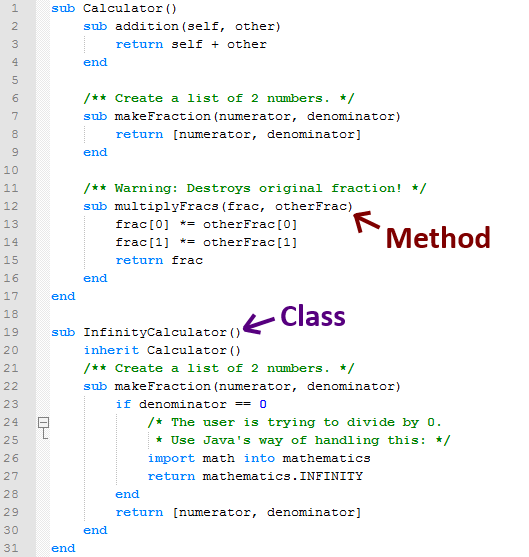
An object has two key parts:
- Properties (or Attributes): The data that describes the object. For our
Dogobject, this would be its name, age, and breed. - Methods: The actions the object can perform. These are functions that belong to the object, like
bark()orwag_tail().
To create objects, we first define a template or blueprint, called a class. The class defines what properties and methods all objects of that type will have.
# This is the blueprint for all Dog objects
class Dog:
    # This method runs when a new Dog object is created
    def __init__(self, name, age):
        self.name = name # A property
        self.age = age   # Another property

    # This is a method
    def bark(self):
        return f"{self.name} says Woof!"

# Create two different Dog objects (instances) from the class
my_dog = Dog("Fido", 3)
another_dog = Dog("Lucy", 5)

# Call the bark method on the my_dog object
print(my_dog.bark()) # Output: Fido says Woof!
This approach helps model the real world in your code, making complex systems much easier to design and manage. By understanding variables, control structures, functions, and objects, you have the foundational tools needed to start building any kind of software, including mobile apps.
What is the primary purpose of a variable in programming?
You need to write code that repeatedly asks a user for a password until they enter the correct one. Which control structure is best suited for this situation?