Build Your First Website with AI Assistants
Web Basics with AI
How the Web Works
Before we build anything, let's figure out how websites get to your screen. The whole system works a lot like ordering food at a restaurant. This is the client-server model, and it's the foundation of the internet.
Think of it this way: You (the client) are sitting at a table with a menu. You decide you want a burger. You tell your waiter what you want, and the waiter takes your order to the kitchen (the server). The kitchen prepares your burger and gives it back to the waiter, who then brings it to your table.
On the web, your browser (like Chrome or Safari) is the client. When you type in a web address, you're placing an order. That order travels across the internet to a powerful computer called a server, which is like the restaurant's kitchen. The server finds the files for the website you requested, packages them up, and sends them back to your browser. Your browser then assembles those files into the webpage you see.
The Building Blocks
Every website you visit is built with three core technologies. They each have a very specific job.

Let's break them down using the analogy of a person:
- HTML (HyperText Markup Language): This is the skeleton. It gives the page structure and defines the content—the headings, the paragraphs, the images. It’s the 'what'.
- CSS (Cascading Style Sheets): This is the skin, hair, and clothes. It controls how the HTML elements look: the colours, fonts, and layout. It’s the 'how it looks'.
- JavaScript: This is the brain and nervous system. It makes the website interactive. When you click a button, watch a video, or see a pop-up, that's at work. It’s the 'what it does'.
Together, these three languages create everything you see and do on the web. You don't need to memorise them. Your AI partner will handle that.
Your AI Coding Partner
The traditional way to learn web development involves memorising hundreds of HTML tags and CSS rules. We're going to skip that. Instead, we'll use an approach called 'Vibe Coding'.
Vibe Coding is about focusing on your goal—the 'vibe' you want to create—and letting an AI assistant like ChatGPT or Claude handle the tedious details of writing the code. You're the director; the AI is your technical crew.
Let's try this now. Go to any website you like. Right-click anywhere on the page and select "Inspect". This will open up a panel filled with code. This is your browser's Developer Tools (or DevTools). It might look intimidating, but it's just the HTML, CSS, and JavaScript for that page.
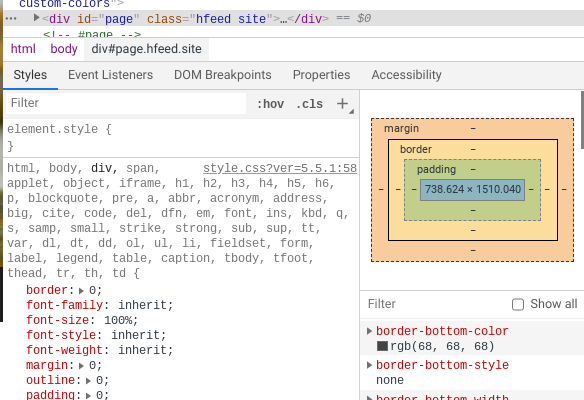
Now, here's the magic. Highlight a chunk of that code, copy it, and paste it into ChatGPT with this prompt:
"Explain this code to me like I'm a complete beginner. What does it do?"
The AI will act as your personal translator, turning complex syntax into plain English. This is the core of Vibe Coding: using AI to understand the 'how' so you can focus on the 'what'.
Setting Up Your Workshop
To start building, you need a place to keep your files and a tool to edit them. First, create a new folder on your computer. Call it something simple, like My-First-Website.
Next, you need a good text editor. We recommend Visual Studio Code (VS Code), a free and powerful editor from Microsoft. It's the industry standard.
Don't search for installation guides. Instead, practice using your AI partner. Open ChatGPT and ask it a specific question based on your computer.
If you're on a Mac, ask: "Give me step-by-step instructions for installing Visual Studio Code on my macOS computer."
If you're using Windows, ask: "Give me step-by-step instructions for installing Visual Studio Code on Windows 11."
The AI will give you a perfect, personalised guide. Follow its steps. Once VS Code is installed, you're ready to start building.
In the client-server model analogy of ordering food at a restaurant, what does the server represent?
Which technology is responsible for the interactivity of a website, such as what happens when you click a button?