Build Your First Front Door Website
Introduction to HTML
The Blueprint of the Web
Every website you visit, from a simple blog to a complex news site, is built on a foundation of HTML. HTML stands for HyperText Markup Language, and it's the standard language used to create and structure the content of web pages. Think of it as the skeleton that gives a website its shape.
HTML isn't a programming language; it's a markup language. It uses tags to describe the different parts of a page, like headings, paragraphs, and images.
An HTML document is a plain text file made up of elements. Most elements are written with a starting tag and an ending tag, with the content in between. For example, to create a paragraph, you'd wrap your text in <p> and </p> tags. The p tells the browser, "This is a paragraph."
All HTML pages share a basic structure to ensure browsers can read them correctly. This is the bare minimum you need for a webpage:
<!DOCTYPE html>
<html>
  <head>
    <title>Page Title</title>
  </head>
  <body>
    <!-- Your content goes here -->
  </body>
</html>
Let's quickly break that down:
<!DOCTYPE html>: Declares that this is an HTML5 document.<html>: The root element that wraps everything else.<head>: Contains meta-information about the page, like the title, which appears in the browser tab.<body>: Holds all the content that you actually see on the page.
Giving Content Meaning
You could build a whole website using just a few generic tags like <div> for every section. But that would be like writing a book without chapters or page numbers. It would be hard for a person to navigate, and impossible for a machine to understand.
This is where semantic HTML comes in. It means using HTML elements that accurately describe their purpose. Using a <nav> tag for your navigation menu or an <footer> tag for the bottom of your page tells browsers, search engines, and screen readers exactly what that piece of content is for.
Semantic HTML not only improves the readability of your code but also enhances accessibility and SEO.
Using semantic tags helps search engines like Google understand your content better, which can improve your site's ranking. It also makes your site much more accessible to users with disabilities who rely on screen readers to navigate the web. The screen reader can announce "main content" or "navigation," giving the user a clear map of the page.
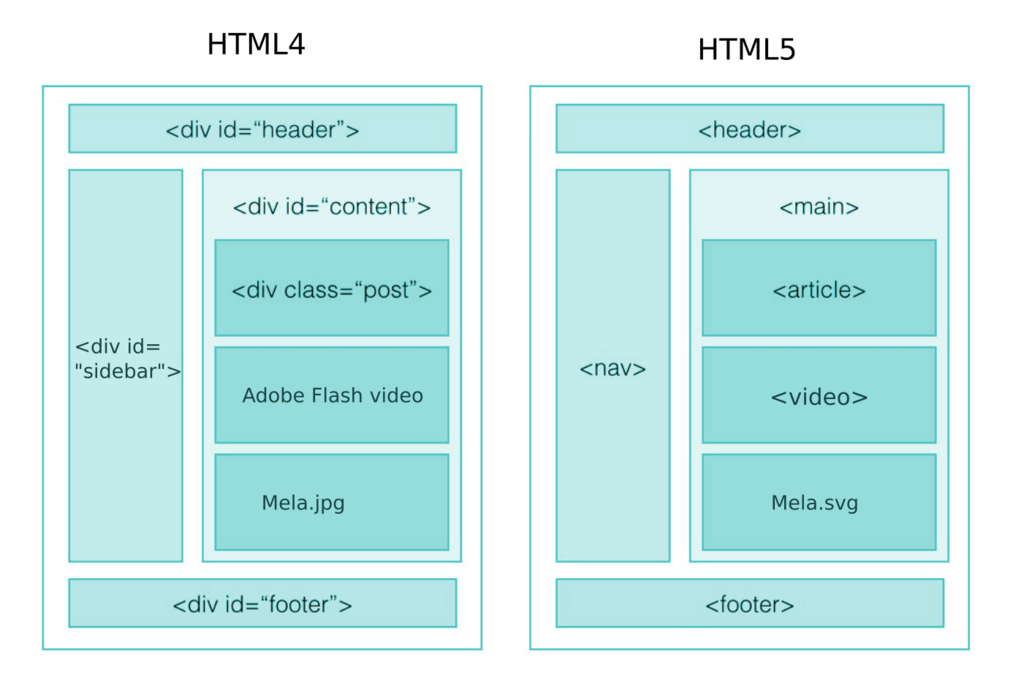
Some key semantic elements include <header>, <nav>, <main>, <article>, <section>, <aside>, and <footer>. Using them creates a clear, logical structure for your document.
Basic Building Blocks
With the overall structure in place, you can start adding content using some of the most common HTML tags. These are the workhorses of any webpage.
heading
noun
A title or subtitle for a section of content.
Headings are used to create an outline for your content. There are six levels, from <h1> (the most important) to <h6> (the least important). Paragraphs, created with the <p> tag, are used for blocks of text.

For organizing items, you have lists. Unordered lists (<ul>) are for bullet points, while ordered lists (<ol>) are for numbered items. Each item within a list is created with a <li> tag.
<!-- An unordered list -->
<ul>
  <li>Apples</li>
  <li>Oranges</li>
</ul>

<!-- An ordered list -->
<ol>
  <li>First step</li>
  <li>Second step</li>
</ol>
Links, Images, and Forms
A webpage wouldn't be very useful without links and images. Links, or anchor tags (<a>), connect your page to other pages on the web. The href attribute specifies the destination URL.
<a href="https://www.example.com">
  Visit Example.com
</a>
Images are added with the <img> tag. This is a self-closing tag, meaning it doesn't need a separate closing tag. It requires a src attribute to point to the image file and an alt attribute to provide a text description. The alt text is crucial for accessibility and is displayed if the image fails to load.
<img src="cute-cat.jpg" alt="A fluffy orange cat sleeping in a sunbeam">
Finally, forms allow users to input data. The <form> element acts as a container for different types of input fields. The most common is the <input> element, whose behavior changes based on its type attribute.
Forms can include text fields, checkboxes, radio buttons, password fields, and submit buttons.
<form>
  <label for="fname">First name:</label><br>
  <input type="text" id="fname" name="fname"><br>

  <label for="lname">Last name:</label><br>
  <input type="text" id="lname" name="lname"><br><br>

  <input type="submit" value="Submit">
</form>
The <label> element improves accessibility by linking a text label to a specific form control. When a user clicks the label, the corresponding input field is focused.
Now, let's test what you've learned.
What does HTML stand for?
Which element is considered the 'root' element that wraps all other content on an HTML page?
These elements are the foundation of every webpage. By combining them, you can structure any type of content you can imagine.