Binary Search Trees Explained
Introduction to Binary Search Trees
Organizing Data with Trees
Imagine you're looking for a word in a dictionary. You don't start at the first page and read every word. Instead, you open to the middle, see if your word comes before or after the words on that page, and then repeat the process on a smaller section. This is the core idea behind a Binary Search Tree (BST).
A BST is a data structure that stores information in a hierarchy, much like a family tree. Each piece of data lives in a node. The very first node is called the root. Every node can have up to two children: a left child and a right child.
The magic of a BST comes from one simple rule: for any given node, everything in its left subtree is smaller, and everything in its right subtree is larger.
This ordering principle applies to the entire tree. Because of this structure, searching for a value is incredibly efficient. You start at the root and ask: is the number I'm looking for smaller or larger? If it's smaller, you go left. If it's larger, you go right. You repeat this at every level, cutting the search area in half each time, just like with the dictionary.
The Best of Both Worlds
Why not just use a sorted list or array? While searching a sorted array is fast (using binary search), adding or removing an item is slow. To insert a new number, you might have to shift every subsequent element over to make room. Deleting an item means shifting everything back.
A BST, on the other hand, excels at all three main operations: searching, inserting, and deleting. On average, these operations are very fast because you only need to traverse a path from the root to the correct spot. You don't have to shuffle the entire dataset around.
| Data Structure | Search (Average) | Insertion (Average) | Deletion (Average) |
|---|---|---|---|
| Unsorted List | Slow () | Fast () | Slow () |
| Sorted Array | Fast () | Slow () | Slow () |
| Binary Search Tree | Fast () | Fast () | Fast () |
It's worth noting that these speeds depend on the tree being reasonably balanced. If you insert numbers in perfect ascending order (1, 2, 3, 4, 5...), the tree will become a long, spindly chain, and its performance will degrade to that of a simple list. Specialized types of BSTs have clever ways to prevent this, ensuring the tree stays bushy and efficient.
Real-World Applications
Binary Search Trees aren't just an academic concept; they are the foundation for many systems you use daily.
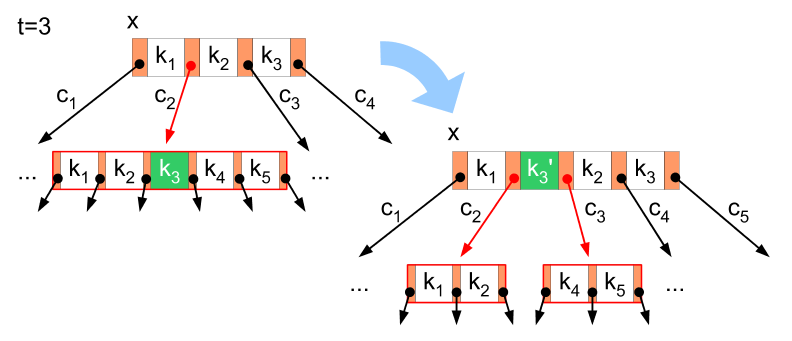
One of the most common uses is in database indexing. When a database needs to find a specific record out of millions, it doesn't scan them one by one. Instead, it often uses a B-Tree (a more complex cousin of the BST) to navigate directly to the data it needs.
They also power autocomplete features. As you type in a search bar, the system can quickly search a tree of possible words or phrases to suggest completions. Compilers use them to manage symbols and variables in your code, and computer file systems can use tree structures to organize directories and files.