Beyond Code App Hosting and Maintenance Hurdles
Introduction to Software Deployment
Getting Software to Users
Writing code is just the beginning. For software to be useful, it needs to move from a developer's computer into the hands of users. This process is called deployment. It involves all the steps required to make a software system available for use.
Think of it like publishing a book. An author writes a manuscript, but that's not the final product. The manuscript must be edited, formatted, printed, and distributed to bookstores. Deployment is the software equivalent of that entire publishing and distribution chain. It's a critical final step that turns code into a working application.
Deployment is the bridge between development and the user.
Without a solid deployment process, even the best software can fail. A buggy or slow release process can frustrate developers and delay new features, while a smooth, reliable one allows teams to deliver value to users quickly and consistently.
The Deployment Pipeline
Modern software teams don't deploy new code by manually copying files. Instead, they use a deployment pipeline, which is an automated series of steps that every code change goes through to get to production.
Each stage acts as a quality gate. If a change fails at any step, the pipeline stops, and the developer is notified. This ensures that only well-tested, high-quality code makes it to users.
Deployment Strategies
The level of automation in a deployment pipeline defines the deployment strategy. The goal is always to make releases faster and more reliable. The main strategies build on each other.
Continuous Integration (CI) is a cornerstone of DevOps, emphasizing the frequent and automatic integration of code changes into a shared repository.
With Continuous Integration (CI), developers merge their code changes into a central repository multiple times a day. Each merge automatically triggers the 'Build' and 'Test' stages of the pipeline. This helps teams catch integration bugs early, before they become bigger problems.
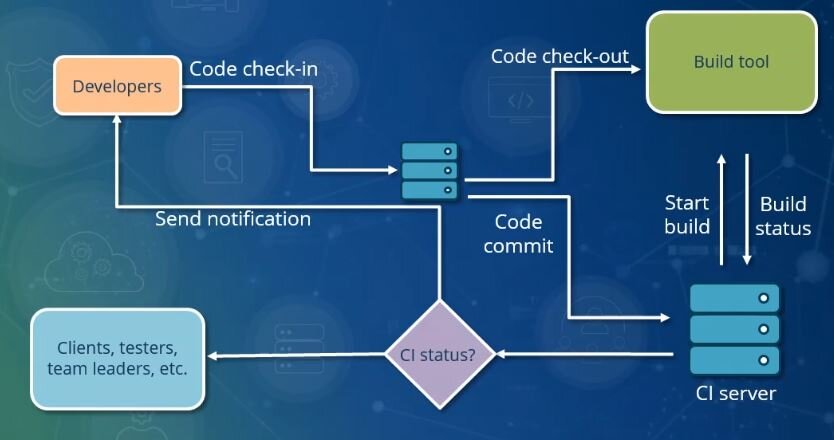
Continuous Delivery (also CD) takes this one step further. It extends CI by automatically running the 'Release' stage after testing. This means you always have a version of your software that is packaged and ready to be deployed to production. The final deployment to users is still a manual step, often just the push of a button.
Continuous Delivery ensures you're always ready to release.
Continuous Deployment (also CD, which can be confusing!) is the ultimate goal for many teams. It automates the entire pipeline. If a code change passes all the automated tests, it is automatically deployed to production without any human intervention. This allows for incredibly rapid release cycles, with some companies deploying new code dozens or even hundreds of times a day.
| Strategy | Build & Test | Release Package | Deploy to Production |
|---|---|---|---|
| Continuous Integration (CI) | Automated | Manual | Manual |
| Continuous Delivery (CD) | Automated | Automated | Manual (One-click) |
| Continuous Deployment (CD) | Automated | Automated | Automated |
Benefits of Automation
Automating the deployment process has huge benefits. Manual deployments are slow, tedious, and prone to human error. A forgotten step or a mistyped command can bring down an entire system.
Use automated deployment tools to standardize installations and reduce errors.
By automating the pipeline, teams gain several advantages:
- Increased Speed: New features and bug fixes reach users faster.
- Improved Reliability: Automated processes are repeatable and consistent, leading to fewer errors and more stable releases.
- Higher Productivity: Developers can spend more time building features and less time worrying about the mechanics of deployment.
Ultimately, a streamlined, automated deployment process is fundamental to modern software development. It allows teams to build, test, and release software with greater speed, efficiency, and confidence.
What is the primary purpose of software deployment?
A team has an automated process where every time a developer merges code, it is automatically built and run through a series of tests. This practice is known as: