Beginners AI Implementation Guide
Data for Intelligence
From Loops to Vectors
In standard Python, if you want to perform an operation on every item in a list, you use a loop. This works perfectly fine for many tasks. But in AI, we often deal with millions or even billions of data points. Looping through them one by one is like trying to move a mountain with a single shovel, it's just too slow.
This is where comes in. Instead of processing elements individually, vectorization allows us to apply an operation to an entire set of data at once. Think of it like a specialized machine in a factory. A single worker might tighten one bolt at a time (a loop), but a machine can tighten all the bolts on a wheel simultaneously (a vectorized operation). This approach is massively more efficient because the underlying calculations are often run in highly optimized, low-level code (like C or Fortran) instead of interpreted Python.
NumPy for Numerical Power
The cornerstone of scientific computing and AI in Python is NumPy, which stands for Numerical Python. Its main feature is the powerful N-dimensional array object, or ndarray. This object is a fast, flexible container for large datasets that allows you to perform mathematical operations on whole blocks of data.
import numpy as np

# A traditional Python list
list_data = [1, 2, 3, 4, 5]

# A NumPy array
array_data = np.array(list_data)

# Vectorized addition: adds 10 to every element at once
result = array_data + 10

print(result)
# Output: [11 12 13 14 15]
Without NumPy, you'd need to write a for loop to iterate through list_data and create a new list. With NumPy, the operation is clean, readable, and dramatically faster.
In AI, data is almost always represented numerically. Images become matrices of pixel values, text becomes vectors of word embeddings, and so on. NumPy is the tool that makes working with this numerical data possible.
When you hear terms like matrices or tensors, just think of them as multi-dimensional NumPy arrays. A matrix is a 2D array (like a spreadsheet), and a tensor is a generalization to any number of dimensions. These are the fundamental data structures used in deep learning.
Structuring Data with Pandas
NumPy is great for raw numbers, but real-world data is rarely just a grid of numbers. It has context. We have rows representing different observations (like different customers) and columns representing different features (like age, location, and purchase history). This is where Pandas comes in.
The core data structure in Pandas is the , a two-dimensional labeled data structure with columns of potentially different types. You can think of it as a spreadsheet, an SQL table, or a dictionary of Series objects. It's built on top of NumPy, so you get all the speed benefits of vectorized operations, but with added labels and a ton of functionality for data cleaning, transformation, and analysis.
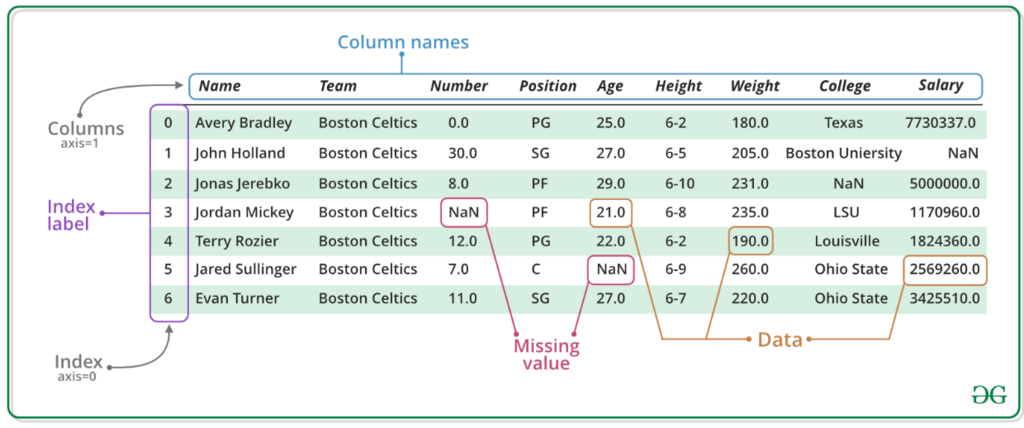
A common task in AI is preparing your dataset. This often involves selecting specific rows or columns to feed into a model. Pandas makes this incredibly easy with slicing and indexing. The two primary methods are .loc for label-based indexing and .iloc for integer-position-based indexing.
import pandas as pd

data = {'user_id': ['A1', 'B2', 'C3', 'D4'],
        'age': [25, 34, 29, 42],
        'is_subscribed': [True, False, True, True]}

df = pd.DataFrame(data)

# Select the 'age' column for all users
ages = df['age']

# Select all data for the user with index label 2 (user 'C3')
user_c3 = df.loc[2]

# Select the subscription status (column 2) for the first user (row 0)
first_user_status = df.iloc[0, 2]

print(user_c3)
AI-Assisted Coding
Writing data manipulation code can be repetitive. AI-powered tools like GitHub Copilot or Cursor can generate boilerplate code for you, saving you time. For example, you could give it a prompt like: "Create a pandas DataFrame named sales_df. It should have columns 'product_id', 'units_sold', and 'sale_price'. Fill it with 5 rows of sample data."
The AI will likely generate perfectly functional code in seconds. However, you must treat this output with healthy skepticism. Always review the code it generates. AI assistants can 'hallucinate' and produce code that looks plausible but is subtly wrong. They might create an index that's off by one, use a deprecated function, or misunderstand the context of your data, leading to incorrect calculations.
Use AI assistants to accelerate your work, not to replace your thinking. Your role is to guide the tool and, most importantly, to verify that its output is correct and logical.
By mastering NumPy for numerical computation and Pandas for data structuring, you're building the foundation needed to handle the vast datasets that power modern AI. These tools allow you to move from thinking about data one piece at a time to manipulating entire datasets with speed and efficiency.
In the context of AI and large datasets, why is vectorization generally preferred over using for loops?
What is the fundamental object in the NumPy library, designed for fast numerical operations?