Backend to AI Engineer Mastery
Data for AI
Beyond CRUD
As a backend engineer, you live and breathe data. You're used to thinking about data in terms of database schemas, API contracts, and CRUD operations. For AI, we need to shift that perspective. Instead of records in a table, think of data as numerical representations: vectors and matrices. AI models don't understand 'users' or 'products'; they understand arrays of numbers.
This is where the traditional backend toolkit meets the data science stack. We move from handling individual transactions to processing massive datasets in bulk. The goal isn't just to store and retrieve data, but to transform it into a format that machine learning models can learn from. This requires a different set of tools and a different mental model, focused on high-performance, numerical computation.
NumPy and Vectorization
The foundation of numerical computing in Python is NumPy. It provides a powerful object for multi-dimensional arrays and a suite of functions to operate on them. Its secret weapon is vectorization.
Instead of iterating through elements one by one with a Python loop, vectorization applies an operation to an entire array at once. Because NumPy's core is written in C, these operations are orders of magnitude faster than their pure Python counterparts. This is not a minor optimization; it's fundamental to handling AI-scale data.
Vectorization
noun
The process of performing operations on entire arrays of data at once, rather than iterating over the elements individually.
Let's see the difference. Imagine adding a constant to a list of a million numbers.
import numpy as np
import time

# The traditional loop approach
my_list = list(range(1_000_000))
start_time = time.time()
result_list = [x + 5 for x in my_list]
end_time = time.time()
print(f"Loop took: {end_time - start_time:.4f} seconds")

# The NumPy vectorized approach
my_array = np.arange(1_000_000)
start_time = time.time()
result_array = my_array + 5
end_time = time.time()
print(f"Vectorization took: {end_time - start_time:.4f} seconds")
The vectorized version is dramatically faster. This principle extends to multi-dimensional arrays (matrices), allowing you to perform complex linear algebra operations, like matrix multiplication, with a single, highly-optimized function call. This is the bedrock of how neural networks are trained.
Structuring Data with Pandas
While NumPy is great for raw numbers, most real-world data is heterogeneous and messy. It has column names, different data types, and missing values. This is where Pandas comes in. Pandas builds on NumPy and provides a data structure called the DataFrame.
The best mental model for a DataFrame is a super-powered, in-memory database table or spreadsheet. It has rows and columns, but you can manipulate it with a rich, expressive API designed for data analysis and cleaning.
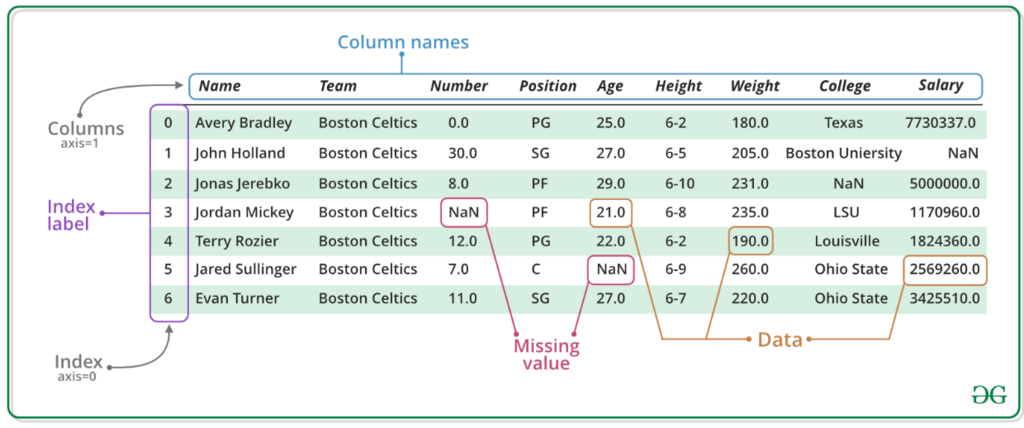
You can pull data from a database, a CSV file, or an API and load it into a DataFrame. From there, you can select columns, filter rows based on conditions, handle missing data, and apply complex transformations—all in a few lines of code.
import pandas as pd

# Create a DataFrame from a dictionary
data = {
    'user_id': [101, 102, 103, 104],
    'comment': [
        'This is great!',
        'I have a question about pricing.',
        ' terrible service :( ',
        'How do I reset my password?'
    ],
    'is_support_request': [False, True, False, True]
}
df = pd.DataFrame(data)

# Filter for support requests (like a WHERE clause)
support_tickets = df[df['is_support_request'] == True]
print(support_tickets)
Preprocessing for LLMs
Preparing data for a Large Language Model (LLM) is a classic use case for Pandas. LLMs require clean, consistent text as input for tasks like creating embeddings or fine-tuning. The raw data, however, is often messy. Let's clean up our comment column.
A typical text cleaning pipeline might involve converting text to lowercase, removing leading/trailing whitespace, and stripping out punctuation or special characters.
With Pandas, you can chain these operations together fluently. The .str accessor lets you apply standard string methods to an entire column at once—another form of vectorization.
# Apply a series of cleaning functions
df['clean_comment'] = df['comment'] \
    .str.lower()                      \
    .str.strip()                     \
    .str.replace(r'[^\w\s]', '', regex=True) # Remove punctuation

print(df[['comment', 'clean_comment']])
This clean, structured data is now ready for the next step, like being passed to an embedding model.
Serialization for AI Pipelines
Once your data is processed, you need to save it. While you might be used to JSON or CSV, the AI world has formats optimized for large-scale data processing.
Parquet is a columnar storage format. Unlike row-based formats like CSV, Parquet stores data by column. This is incredibly efficient for analytics because most queries only need a subset of columns. It also features excellent compression and preserves data types, making it a go-to for storing large, structured datasets.
JSON Lines (JSONL) is another simple but powerful format. Each line in a JSONL file is a complete, self-contained JSON object. This is ideal for streaming data and for many LLM fine-tuning workflows, which often expect one training example per line.
# Saving our DataFrame to Parquet is a one-liner in Pandas
df.to_parquet('comments.parquet')

# Reading it back is just as easy
df_from_parquet = pd.read_parquet('comments.parquet')

# Saving to JSON Lines
df.to_json('comments.jsonl', orient='records', lines=True)
Choosing the right serialization format is a key part of building a robust data pipeline. It impacts storage costs, processing speed, and compatibility with downstream AI tools and platforms.
By mastering NumPy for computation, Pandas for manipulation, and efficient serialization formats, you can build the high-performance data pipelines that are the lifeblood of modern AI systems.
For an AI model, what is the most fundamental representation of data like 'users' or 'products'?
What is the primary benefit of using NumPy's vectorization for numerical operations compared to a standard Python for loop?