Backbonejs Handlebars Underscorejs Web Development
Introduction to Backbone.js
Structuring Your Web App
When you first start building web applications, a bit of jQuery or vanilla JavaScript might be all you need to add some interactivity. But as your application grows, your code can quickly become a tangled mess. Keeping track of data, user actions, and UI updates turns into a major headache. This is often called "spaghetti code" because the connections are all over the place, making it hard to follow and even harder to change.
Backbone.js is a lightweight JavaScript library designed to solve this problem. It gives your client-side code structure by providing a simple framework based on the Model-View-Controller (MVC) design pattern. Instead of putting all your logic into one giant file, Backbone helps you organize it into distinct, manageable pieces.
The MVC Pattern
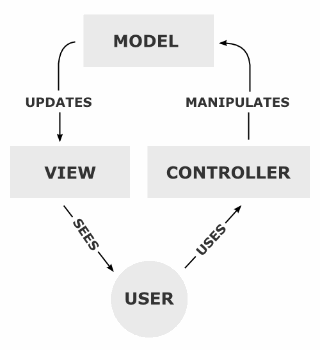
At its heart, Backbone is all about the Model-View-Controller, or MVC, pattern. This is a popular way to organize code by separating concerns into three interconnected parts.
Think of it like a restaurant. The Model is the kitchen, where the food (data) is stored and prepared. The View is the menu and your plate—it's how the food is presented to you. The Controller is the waiter who takes your order (user input), tells the kitchen what to make, and brings the food to your table.
This separation makes your application much easier to reason about. If there's an issue with the data, you check the Model. If something looks wrong on the screen, you check the View. If a button isn't working, you check the Controller.
Backbone's Core Components
Backbone provides a few key building blocks that map loosely to the MVC concept. Let's look at each one.
Model
noun
Models are the heart of any JavaScript application, containing the interactive data as well as a large part of the logic surrounding it: conversions, validations, computed properties, and access control.
A Backbone Model is where you store your application's data. For a to-do list app, you might have a Todo model that stores a title and a completed status.
var Todo = Backbone.Model.extend({
  defaults: {
    title: '',
    completed: false
  }
});

// Create an instance of our model
var myTodo = new Todo({
  title: 'Learn Backbone.js'
});
Next up are Collections. A Collection is simply an ordered set of models. You can use it to manage a group of related models, like all the items in our to-do list. Collections make it easy to perform operations on the entire group, like sorting or filtering.
var TodoList = Backbone.Collection.extend({
  model: Todo
});

// Create a collection with a few models
var todos = new TodoList([
  new Todo({ title: 'Go to the store' }),
  new Todo({ title: 'Finish article', completed: true })
]);
A View is responsible for displaying the data from a model or collection and listening for user events. A key thing to remember is that Backbone Views don't contain the HTML for your application. Instead, they are the logic that binds your data to the DOM (Document Object Model) and controls what happens when a user interacts with it.
var TodoView = Backbone.View.extend({
  tagName: 'li', // Each view will be an <li> element

  // A template function to render the view's content
  template: _.template('<%= title %>'),

  render: function() {
    // this.$el is a cached jQuery object for the view's element
    this.$el.html(this.template(this.model.toJSON()));
    return this; // Enable chained calls
  }
});
Finally, we have the Router. In a single-page application (SPA), the user never truly navigates away from the initial page. The Router allows you to manage the application state using URL fragments (the part after the #). This makes your app's different states bookmarkable and shareable.
var AppRouter = Backbone.Router.extend({
  routes: {
    'help': 'showHelp', // Matches #help
    'search/:query': 'search' // Matches #search/keyword
  },

  showHelp: function() {
    // ... display a help panel
  },

  search: function(query) {
    // ... perform a search for 'query'
  }
});
Setting Up a Project
Getting started with Backbone is straightforward. You only need to include a few libraries in your HTML file. Backbone has one hard dependency: Underscore.js, a utility library that provides helpful functions. Most people also use jQuery for DOM manipulation, though it's not strictly required.
Your basic index.html file would look something like this:
<!DOCTYPE html>
<html>
<head>
  <title>My Backbone App</title>
</head>
<body>

  <!-- Scripts -->
  <script src="https://code.jquery.com/jquery-3.6.0.min.js"></script>
  <script src="https://cdnjs.cloudflare.com/ajax/libs/underscore.js/1.13.4/underscore-min.js"></script>
  <script src="https://cdnjs.cloudflare.com/ajax/libs/backbone.js/1.4.1/backbone-min.js"></script>

  <!-- Your Application Code -->
  <script src="app.js"></script>

</body>
</html>
With these files in place, you can start writing your application code in app.js, creating your models, collections, views, and routers to build a structured and maintainable web application.
Ready to check your understanding?
What is the primary problem that Backbone.js is designed to solve for web developers?
Backbone.js is loosely based on which software design pattern?
Backbone.js provides a simple yet powerful way to bring structure to your JavaScript code, helping you move from simple scripts to robust, single-page applications.