Azure Single Sign-On Security
Introduction to SSO
One Login to Rule Them All
Think about your first few minutes of work. You log into your email, your team chat application, a project management tool, and maybe a cloud storage service. Each one requires a password. Remembering them all is a pain, and constantly typing them in is a waste of time.
This is the problem that Single Sign-On, or SSO, was created to solve. It’s an authentication method that lets you log in once with a single set of credentials to access multiple applications and services.
Imagine having a master keycard for your office building. Instead of a separate key for every room, you swipe one card at the main entrance and gain access to all the areas you're permitted to enter. SSO is the digital version of that keycard.
The Benefits of SSO
The most obvious benefit of SSO is convenience. Users no longer need to juggle a long list of passwords. This not only reduces frustration but also cuts down on the time spent logging into various systems throughout the day. Fewer passwords to remember also means fewer forgotten password requests for the IT department to handle.
For organizations, SSO provides a significant boost in security and efficiency. With a centralized authentication point, it becomes much easier to manage user access. When an employee joins the company, they can be granted access to all necessary applications in one go. When they leave, their access can be revoked from all systems simultaneously, closing potential security gaps.
Azure AD offers a single sign-on (SSO) capability that allows users to authenticate once and then access multiple applications without having to log in again.
SSO in Microsoft Azure
In the Microsoft ecosystem, SSO is handled by Azure Active Directory (Azure AD). It acts as the central identity provider that authenticates a user and then tells other applications that the user is verified. This allows for seamless access not only to Microsoft products like Office 365 but also to thousands of other third-party cloud applications like Salesforce, Dropbox, and Slack.
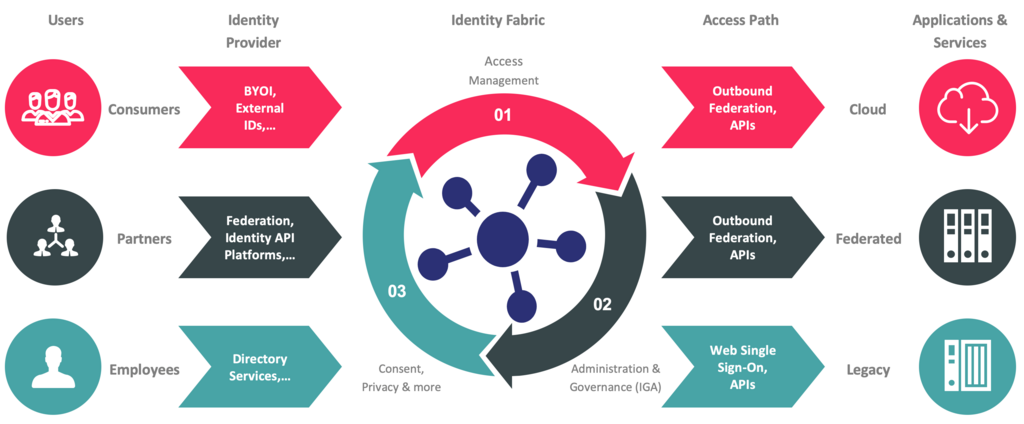
By connecting applications to Azure AD, a company creates a unified and secure environment. It simplifies life for users and provides system administrators with powerful tools to control and monitor who has access to what, all from a single dashboard.
Let's check your understanding of these core concepts.
What is the primary function of Single Sign-On (SSO)?
How does implementing SSO improve security when an employee leaves a company?
With SSO, you get a smoother, more secure way to navigate your digital workspace.