Azure Kubernetes Service Essentials
Introduction to Containers
What Are Containers?
Think about how global shipping works. Goods of all shapes and sizes are packed into standard-sized metal boxes. Because these containers are all the same, any ship, train, or crane can move them. It doesn't matter what's inside.

Software containers do the same thing for applications. A container is a standard unit of software that bundles up an application's code along with all its dependencies—like libraries and configuration files. This package can then run quickly and reliably on any computing environment.
This solves the classic problem of "it works on my machine" but nowhere else. By packaging everything together, containers ensure consistency from a developer's laptop to a testing environment and finally to a production server.
A container isolates an application and its dependencies into a self-contained unit that can run anywhere.
Containers vs. Virtual Machines
You might be thinking this sounds a lot like a Virtual Machine (VM). Both provide isolated environments for running applications, but they do it in fundamentally different ways.
A VM virtualizes the hardware. It runs a full-blown guest operating system (OS) on top of a host OS. Each VM has its own kernel, drivers, and system libraries, which can take up gigabytes of space.
Containers, on the other hand, virtualize the operating system. They share the host OS's kernel. Instead of packaging a whole OS, a container only holds the application and its direct dependencies. This makes them incredibly lightweight and fast.
This key architectural difference leads to several practical benefits for containers.
| Feature | Virtual Machine | Container |
|---|---|---|
| Startup Time | Minutes | Seconds |
| Size | Gigabytes | Megabytes |
| Resource Usage | High | Low |
| Isolation | Complete (Hardware) | Process-level (OS) |
Meet Docker
While the idea of containers has been around for a while, a company called Docker made them easy to use and accessible to everyone. Docker is an open-source platform for building, shipping, and running containerized applications.
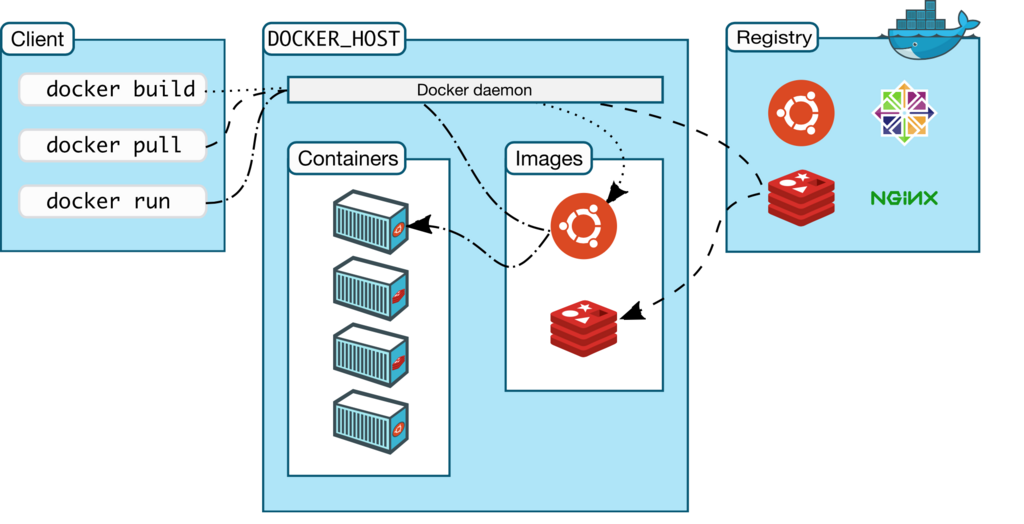
The Docker ecosystem has a few core concepts:
- Image: A read-only template used to create containers. An image contains the application code, a runtime, libraries, and environment variables. You can build your own or use thousands of official images from a public registry like Docker Hub.
- Container: A runnable instance of an image. You can create, start, stop, move, or delete containers using the Docker API or command-line interface (CLI).
- Docker Daemon: The background service that runs on the host machine and manages building, running, and distributing your containers.
Think of a Docker image as a cookie cutter and a container as the cookie. You use one cutter to make many identical cookies.
Your First Container
The best way to understand containers is to run one. First, you'll need to install Docker Desktop, which includes everything you need. You can find the right installer for your operating system on the official Docker website.
Once Docker is installed and running, open your terminal or command prompt. We're going to run a simple "hello-world" container to verify that everything is working correctly. Type the following command and press Enter:
docker run hello-world
When you run this command, Docker checks if you have the hello-world image locally. If not, it pulls the image from Docker Hub, creates a new container from that image, runs it, and then stops the container. You should see a message confirming that your installation appears to be working correctly.
Now let's try something a bit more interesting. Run this command to start a simple web server:
docker run -d -p 80:80 docker/getting-started
Let's break down those options:
-druns the container in detached mode (in the background).-p 80:80maps port 80 of your local machine to port 80 inside the container.
Now, open a web browser and go to http://localhost. You should see a tutorial page served from the container you just launched. Congratulations, you've just run your first containerized application!
Containers are a foundational technology for modern software development. They package applications for consistency and efficiency, making it easier to build, test, and deploy software anywhere.