Azure Fundamentals Explained
Cloud Computing Basics
What Is Cloud Computing?
At its core, cloud computing is about renting computing resources instead of owning them. Think about the electricity in your home. You don't own a power plant. You simply connect to a massive, shared grid and pay for the electricity you use each month. Cloud computing applies the same idea to things like servers, storage, and databases.
Instead of buying and maintaining your own physical servers in a dedicated room, you access these services over the internet from a cloud provider, like Amazon Web Services (AWS), Google Cloud, or Microsoft Azure. This provider owns and manages the physical hardware in large, secure facilities called data centers.

This setup gives you on-demand access to a nearly limitless pool of computing power. You can scale up your resources when traffic is high and scale them back down when it's quiet, all without ever touching a physical machine.
Cloud computing refers to the on-demand delivery of IT resources over the internet with pay-as-you-go pricing.
Who Manages What?
When you move to the cloud, you don't offload all your responsibilities. It’s a partnership. This partnership is defined by the shared responsibility model, which outlines what the cloud provider is responsible for and what you, the customer, are responsible for.
The provider is always responsible for the security of the cloud. This includes the physical data centers, the servers, and the network infrastructure that runs their services. They make sure the hardware is secure, powered, and cooled.
You are always responsible for security in the cloud. This includes your data, your applications, and how you configure access to them. You decide who can access your resources and what they can do.
Think of it like renting an apartment. The landlord is responsible for the building's structure, the plumbing, and the electricity. But you are responsible for locking your door and deciding who you let inside. The exact division of responsibility changes depending on the type of cloud service you use, but this fundamental principle always applies.
Cloud Deployment Models
Not all clouds are the same. There are three main ways to deploy cloud services, each with its own trade-offs.
| Model | Description | Key Advantage |
|---|---|---|
| Public Cloud | Resources are owned and operated by a third-party cloud provider and delivered over the internet. You share the hardware with other organizations. | Maximum scalability and cost-effectiveness. |
| Private Cloud | Resources are used exclusively by a single business or organization. The hardware can be located at your on-site data center or hosted by a third party. | Highest level of control and security. |
| Hybrid Cloud | Combines a private cloud with one or more public cloud services, allowing data and applications to be shared between them. | Flexibility to use the best environment for each task. |
A public cloud is like taking a public bus. It’s affordable and you share the ride with others. A private cloud is like owning your own car; it's all yours, but you bear all the costs and maintenance. A hybrid cloud is like owning a car but also using a ride-sharing service when it's more convenient or cost-effective. Many organizations start with one model and evolve to another as their needs change.
Paying for the Cloud
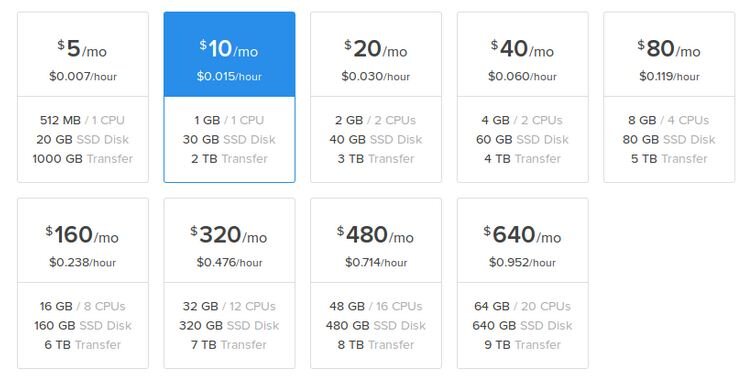
One of the biggest shifts with cloud computing is how you pay for it. Traditional IT involves large, upfront capital expenses (CapEx). You buy servers, software licenses, and networking gear, and then you own them. This often means over-provisioning—buying more than you need today to handle future growth.
The cloud primarily uses a consumption-based model, which turns those capital expenses into operational expenses (OpEx). You don't buy the hardware. Instead, you pay a monthly bill based on the resources you actually use.
This pay-as-you-go approach eliminates the need to guess your capacity needs. You can access as much or as little as you need and only pay for what you consume.
Within this model, several pricing options exist:
-
Pay-as-you-go: You are billed for services based on your actual usage, typically per hour or even per second. This is great for workloads with unpredictable traffic.
-
Reserved instances: You commit to using a certain amount of resources for a longer term, usually one or three years. In exchange, you get a significant discount compared to pay-as-you-go pricing. This is ideal for applications with a steady, predictable workload.
-
Spot instances: Cloud providers sell their unused computing capacity at a massive discount. The catch is that the provider can reclaim these resources with very little notice. This is perfect for tasks that can be interrupted and resumed later, like batch processing or data analysis.
Understanding these basic models is the first step in navigating the world of cloud computing. They provide the foundation for building, deploying, and managing applications in a modern, scalable, and cost-effective way.
What is the core concept of cloud computing?
According to the shared responsibility model, who is responsible for securing the physical data centers and hardware?