Azure AI Engineering Associate Exam Prep
Azure AI Services Overview
Your AI Toolkit on Azure
Microsoft Azure provides a powerful suite of services for building artificial intelligence into your applications. Instead of starting from scratch, you can use pre-built components or create custom models, all within the same cloud platform. Think of it as a workshop filled with specialized tools. You can either grab a ready-made tool off the shelf or use the machinery to build a custom one yourself. Let's look at the three main toolsets: Azure Cognitive Services, Azure Machine Learning, and Azure AI Search.
Cognitive Services: Ready-Made AI
Azure Cognitive Services are like pre-trained experts you can hire for specific tasks. These are a collection of APIs (Application Programming Interfaces) that let you add abilities like sight, hearing, and language understanding to your apps with just a few lines of code. You don't need a deep background in data science to use them.
The services are typically grouped by the sense they mimic:
- Vision: Analyze images and videos to identify faces, objects, and text.
- Speech: Convert spoken language to text and text back to natural-sounding speech.
- Language: Understand the meaning and sentiment of text, translate languages, and recognize key phrases.
- Decision: Help make smarter decisions, like detecting anomalies in data or personalizing content for users.
- Azure OpenAI Service: Provides access to powerful large language models, like the GPT series, for tasks ranging from content generation to complex reasoning.
Use Cognitive Services when you need to quickly add proven AI capabilities to an application without building and training a model from the ground up.
Azure Machine Learning: The Custom Workshop
If Cognitive Services are the off-the-shelf tools, Azure Machine Learning (AzureML) is the full workshop. This is a cloud-based environment where you can train, deploy, and manage your own custom machine learning models. It provides all the tools and services needed for the entire machine learning lifecycle, often called MLOps (Machine Learning Operations).
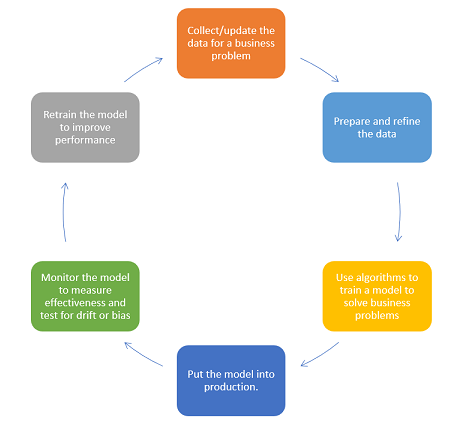
You would use AzureML when your problem is unique and a pre-built Cognitive Service isn't a good fit. For example, you might need to predict customer churn based on your company's specific sales data. AzureML provides:
- Workspaces: A centralized place to manage all your machine learning artifacts.
- Compute resources: Powerful virtual machines for training complex models.
- Data storage and management: Tools for connecting to and preparing your data.
- Automated ML: A feature that automatically tries different algorithms to find the best-performing model for your data, saving you time and effort.
Azure AI Search: Intelligent Indexing
Azure AI Search (formerly known as Azure Cognitive Search) is a service that helps users find information within your data. But it's more than a simple keyword search. It uses AI to understand and enrich your data, making searches more relevant and powerful.
Imagine you have thousands of company documents, images, and PDFs. Manually sifting through them is impossible. You can point Azure AI Search at this data, and it will create a rich, searchable index. It can even use Cognitive Services skills to extract text from images (OCR), detect the language of a document, or pull out key phrases. This process is called an enrichment pipeline.
The result is a search experience that feels more like asking a question and getting an intelligent answer, rather than just matching keywords.
Putting It All Together
The real power of Azure AI comes from combining these services. They aren't designed to work in isolation. A common pattern is to use them together to create a comprehensive, intelligent application.
For example, a company could build an internal knowledge base application. They would use Azure AI Search to index all their internal documents. During indexing, they'd apply Cognitive Services skills to translate documents and extract key entities. Then, they might use a custom model from Azure Machine Learning to categorize documents by project or predict which team would find a document most relevant. All of this is surfaced to employees through a simple web app.
As an architect that designs solutions, it's important to understand the AI and machine learning landscape and how you can integrate Azure solutions into your workload design.
This modular approach allows you to choose the right tool for the job. You can start small with a single Cognitive Service and build out more complex solutions by integrating custom models and intelligent search as your needs grow.
Ready to check your understanding of these core services? Let's try a few questions.
A retail company wants to analyze customer reviews on their website to understand general sentiment (positive, negative, neutral). They have no in-house data science team. Which Azure AI service is the most direct and appropriate tool for this task?
Which Azure service is best described as a complete environment for training, deploying, and managing your own custom machine learning models from scratch?
Understanding these three pillars is the first step in designing and building powerful AI solutions on the Azure platform.