AWS Networking for SAA Certification
Networking Fundamentals
The Language of Networks
For computers to talk to each other, whether across the room or across the world, they need a shared set of rules. Think of it like a language and grammar that ensures a message sent from one device can be correctly received and understood by another. This framework allows for the complex dance of data that powers the internet.
The most widely used conceptual model for this is the Open Systems Interconnection (OSI) model. It’s not a strict protocol itself, but rather a way to organize and understand the different jobs that need to happen to get data from point A to point B. It breaks the process down into seven distinct layers.
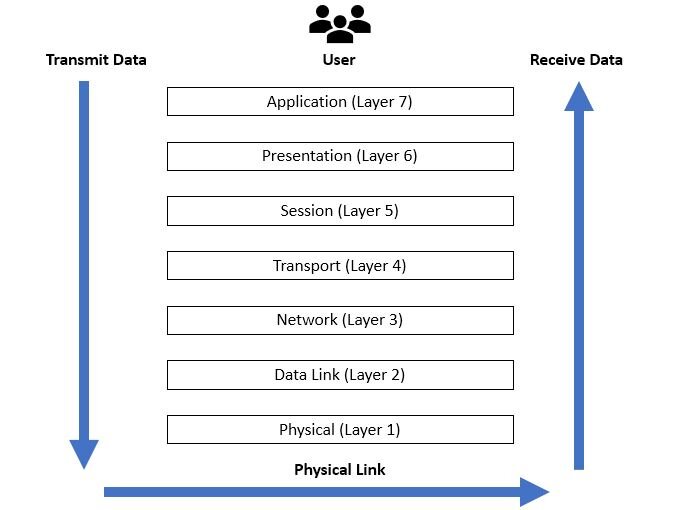
Each layer has a specific responsibility and only communicates with the layers directly above and below it. Let's walk through them from top to bottom:
- 7. Application Layer: This is the layer you interact with. When you use a web browser, email client, or chat app, you're using the Application Layer. It prepares your data to be sent.
- 6. Presentation Layer: This layer acts as a translator. It ensures data is in a format the receiving computer can understand, handling things like encryption and data compression.
- 5. Session Layer: The Session Layer manages the conversation between two devices. It opens, maintains, and closes the connection, ensuring the dialogue stays organized.
- 4. Transport Layer: This layer is all about reliability and flow control. It breaks large files into smaller chunks, called segments, on the sending end and reassembles them on the receiving end. It also ensures all the pieces arrive correctly.
- 3. Network Layer: Here, data gets its address. This layer adds the source and destination IP addresses to create packets and figures out the best physical path for the data to travel across the network.
- 2. Data Link Layer: This layer handles communication between devices on the same local network. It adds physical addresses (like a MAC address) to create frames and manages how devices access the physical wire or airwaves.
- 1. Physical Layer: This is the hardware. It's the actual cables, fiber optics, or radio waves that transmit the raw bits—the ones and zeros—of your data.
Giving Everything an Address
Just like a house needs a street address for mail delivery, every device on a network needs an Internet Protocol (IP) address to send and receive data. It's a unique identifier that tells the network where to find a specific computer, server, or phone.
A common IP address (using the IPv4 standard) looks like this: 192.168.1.10. It's a set of four numbers, each ranging from 0 to 255, separated by dots.
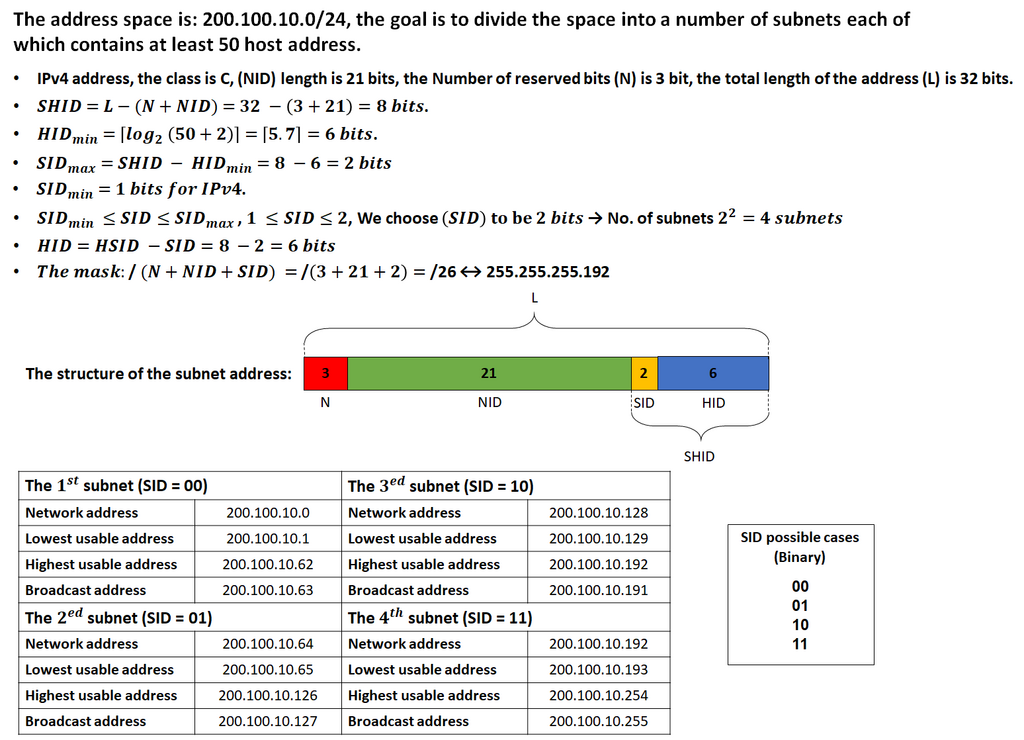
But an IP address alone isn't enough. It's always paired with a subnet mask, like 255.255.255.0. The subnet mask's job is to split the IP address into two parts:
- Network ID: The first part of the address, which identifies the specific network the device is on. All devices on the same local network share the same network ID.
- Host ID: The second part, which identifies the individual device (the host) on that network.
This process of dividing a network into smaller networks is called subnetting. It's crucial for organizing and managing traffic, improving performance, and bolstering security by isolating different parts of a network from each other.
Finding the Best Path
When you send data to a device on a different network, it doesn't just magically appear there. It has to travel through a series of interconnected networks, hopping from one router to another. A router is a device that directs traffic between networks. The process of choosing the best path for this traffic is called routing.
Think of it like using a GPS. The GPS knows the destination and calculates the best route based on current traffic, road closures, and distance. Routers do the same for data packets. There are two main ways they build their 'maps' or routing tables.
Static Routing
other
A routing method where a network administrator manually configures the paths that data packets will take to reach a specific destination.
With static routing, an administrator programs each router with explicit instructions: 'To get to Network X, send packets through Router Y.' This is simple, predictable, and secure because the paths don't change. However, it's not scalable. If a router on the path goes down, traffic stops until an administrator manually creates a new route.
Dynamic Routing
other
A routing method where routers automatically share information with each other to discover networks and determine the best paths for data packets.
With dynamic routing, routers talk to each other using special routing protocols (like OSPF or BGP). They announce which networks they can reach and learn about other networks from their neighbors. This allows them to build their own routing tables automatically. If a router goes down, other routers learn about the outage and calculate a new best path. This makes the network resilient and scalable, which is essential for large, complex networks like the internet.
Keeping Networks Secure
Network security is about protecting the usability and integrity of your network and data. It involves layering defenses to control who and what can access your network. A few core principles guide this practice.
| Principle | Description |
|---|---|
| Confidentiality | Ensures that data is only accessible to authorized users. Encryption is a key tool here. |
| Integrity | Guarantees that data is trustworthy and has not been tampered with in transit. |
| Availability | Makes sure the network and its resources are available to authorized users when they need them. |
To achieve this, network administrators use several tools and strategies:
- Firewalls: These act as a barrier between a trusted internal network and an untrusted external network (like the internet). They inspect incoming and outgoing traffic and decide whether to allow or block it based on a set of security rules.
- Access Control: This is the practice of restricting access to resources. It operates on the principle of 'least privilege,' meaning users should only have access to the specific data and systems they absolutely need to do their jobs.
- Encryption: This process scrambles data so that it's unreadable without the correct key. It protects data both when it's stored and while it's traveling across the network, ensuring confidentiality.
Understanding these foundational concepts—how networks are structured, how devices are addressed, how traffic is routed, and how it's all secured—is the first step to working with any networking environment, from a small office to a global cloud platform.