AWS Cloud Practitioner Essentials
Cloud Computing Basics
What Is Cloud Computing?
Think about how you get electricity. You don't own a power plant in your backyard. Instead, you tap into a massive grid and pay only for the electricity you use. Cloud computing applies this same idea to technology.
Instead of buying and maintaining your own expensive servers and data centers, you can access computing services like storage, databases, and processing power over the internet. A cloud provider, like Amazon Web Services (AWS), Google Cloud, or Microsoft Azure, owns and manages the hardware. You just rent what you need, when you need it.
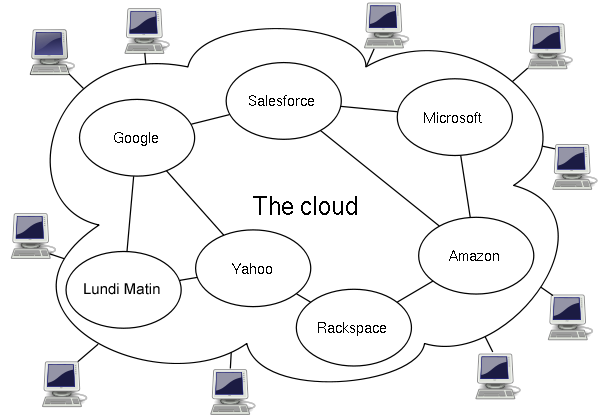
Cloud computing is the delivery of computing services (servers, storage, databases, networking, software, and more) over the internet (the cloud), offering faster innovation, flexible resources, and economies of scale.
This model has a few defining characteristics:
- On-demand self-service: You can get computing resources whenever you need them, without having to talk to a human.
- Broad network access: You can access these services from anywhere with an internet connection, using a phone, laptop, or tablet.
- Resource pooling: The provider's resources are shared among many customers. You don't know or care exactly which physical machine is running your code.
- Rapid elasticity: You can quickly scale your resources up or down to meet demand. If your website suddenly gets a surge of traffic, you can add more power in minutes.
- Measured service: You only pay for what you use, just like a utility bill. This is often called a pay-as-you-go model.
The Big Wins
Why has this model become so popular? The benefits are significant for everyone from solo developers to massive corporations.
First, it turns large upfront costs into smaller, variable expenses. Instead of spending a fortune on hardware, you pay a monthly fee based on your usage. This makes technology accessible to businesses that couldn't afford their own data centers. It also lets companies trade capital expenses (CapEx) for operational expenses (OpEx), which can be great for budgeting.
Speed and agility are also huge advantages. In a traditional setup, getting a new server could take weeks. In the cloud, you can provision powerful resources in minutes. This allows teams to experiment, innovate, and get their products to market much faster. If an idea doesn't work, they can simply shut down the resources without any long-term commitment.
Because cloud providers serve so many customers, they achieve massive economies of scale. This means they can offer computing power at a lower cost than most companies could achieve on their own.
Finally, cloud computing allows businesses to go global instantly. With a few clicks, you can deploy your application in data centers around the world, ensuring low latency and a better experience for your users, no matter where they are.
The Service Menu
Cloud computing isn't a single thing; it's a spectrum of services. These services are typically grouped into three main categories, often described using an analogy of ordering a pizza.
Infrastructure as a Service (IaaS) is the most basic category. It's like being given the raw ingredients: flour, water, tomatoes, and cheese. The cloud provider gives you access to fundamental computing infrastructure like virtual servers, storage, and networking. You have the most control but also the most responsibility. You have to manage the operating system, middleware, and all your applications.
Platform as a Service (PaaS) is the next level up. This is the 'take and bake' option. The provider gives you the pizza dough and sauce (the platform), and you just add your own toppings (your code) and bake it. PaaS provides a managed environment for developing, testing, and deploying applications. You don't have to worry about the underlying infrastructure, servers, or operating systems.
Software as a Service (SaaS) is the most common model. This is like ordering a fully cooked pizza delivered to your door. The software is hosted and managed by the provider, and you access it over the internet, usually through a web browser. Think of services like Gmail, Dropbox, or Salesforce. You just use the software; you don't manage any part of its creation or maintenance.
Where Does the Cloud Live?
Just as there are different service models, there are also different ways to deploy cloud infrastructure. These deployment models determine who has access to the cloud and where it is located.
| Deployment Model | Description | Key Advantage |
|---|---|---|
| Public Cloud | Resources are owned and operated by a third-party provider and shared by many organizations. | Maximum scalability and cost-effectiveness. |
| Private Cloud | Resources are used exclusively by a single business or organization. Can be located on-site or hosted by a third-party. | Enhanced security and control over resources. |
| Hybrid Cloud | A combination of public and private clouds, bound together by technology that allows data and applications to be shared between them. | Flexibility to use the best environment for each task. |
A public cloud is the most common type. When you use services from providers like AWS or Google Cloud, you're using a public cloud. The infrastructure is shared among all of their customers, a concept known as multi-tenancy.
A private cloud is dedicated to a single organization. It offers greater control and security, which is often required by companies in highly regulated industries like finance or healthcare. The company might manage it themselves or pay a provider to host a private environment for them.
A hybrid cloud gives organizations the best of both worlds. They can use their private cloud for sensitive, critical operations and then tap into the public cloud for handling traffic spikes, big data analytics, or development and testing. This approach offers flexibility and helps optimize costs.
Now, let's test your understanding of these core concepts.
Which statement best describes the primary financial benefit of moving from traditional on-premise IT to cloud computing?
A developer needs a cloud environment where they can deploy their custom application code without worrying about managing the underlying operating system, servers, or networking. Which cloud service model is the best fit?
Understanding these fundamental ideas—what the cloud is, its benefits, and its various models—is the first step to navigating the world of modern technology.