Automation Fundamentals with n8n and Make
Introduction to Automation
What Is Automation?
At its core, automation is about using technology to perform tasks that would otherwise require human effort. Think of it as creating a system that runs on its own, following a set of pre-defined rules. The goal isn't to replace people, but to free them up from repetitive, time-consuming work so they can focus on tasks that require creativity, strategy, and critical thinking.
Automation
noun
The use of technology to execute tasks or processes with minimal human assistance, often to increase efficiency and reduce errors.
From sending an automatic email reply to complex manufacturing processes, automation is happening all around us. It's the engine that powers many of the conveniences we rely on daily, making processes faster, more reliable, and often more cost-effective.
A Quick Trip Through Time
Automation isn't a new concept. The idea of building machines to do our work for us goes back centuries. The Industrial Revolution kicked things into high gear with steam power and mechanization, automating physical labor in factories and farms.
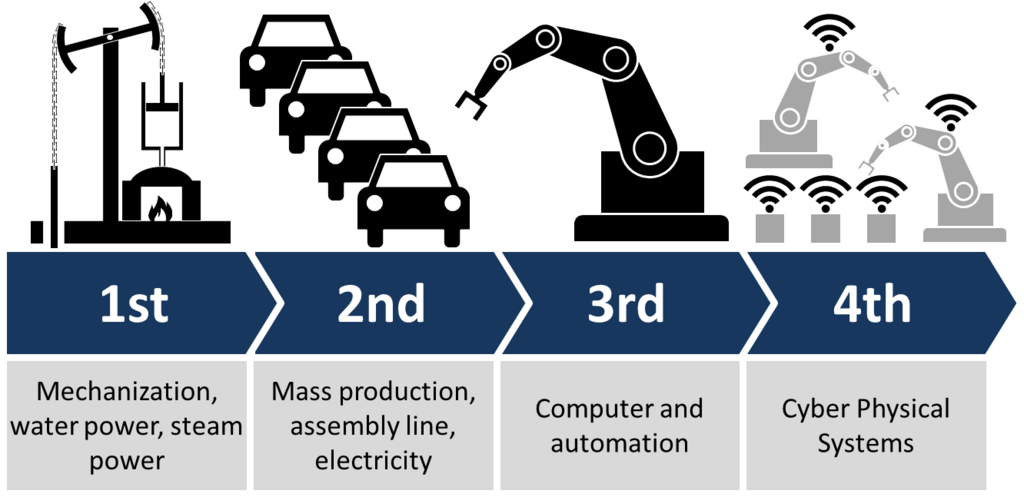
As technology evolved, so did automation. The rise of computers brought automation into the office, handling data processing and calculations at incredible speeds. Today, we're in an era of digital and AI-driven automation, where software can connect different applications, make decisions, and manage complex workflows.
Manual vs. Automated
The best way to understand the impact of automation is to compare a manual process with an automated one. Imagine you need to send a thank-you email to 100 people who attended an event.
Manually, you would open your email, copy and paste a template, personalize the name, and hit send, one hundred times. It's tedious, slow, and easy to make a mistake, like misspelling a name.
Automatically, you would use a tool to connect your attendee list to your email. You'd set up a template once, and the system would automatically pull each name from the list, insert it into the email, and send them all out in minutes. This highlights the key differences:
| Feature | Manual Process | Automated Process |
|---|---|---|
| Speed | Slow, limited by human pace | Extremely fast |
| Accuracy | Prone to human error | Consistent and precise |
| Cost | High labor costs over time | Lower operational costs |
| Scalability | Difficult to scale | Easy to scale up or down |
By automating the process, you save hours of work, ensure everyone gets the right email, and can easily handle a list of a thousand attendees just as easily as a hundred. This efficiency is why businesses of all sizes adopt automation. It allows teams to be more productive and focus on growth rather than getting bogged down in repetitive tasks.
Automation handles the repetitive. Humans handle the creative.
Tools of the Trade
Today, you don't need to be a programmer to build automations. A new generation of tools, often called workflow automation or integration platforms, lets you connect the apps you use every day with a visual, drag-and-drop interface. Think of them as digital glue.
These platforms allow you to create “if this, then that” recipes. For example: "If a new customer fills out a form on my website, then automatically add their information to a spreadsheet and send a welcome message via Slack." They integrate with thousands of applications, from email and calendars to project management software and customer databases, making it possible to automate almost any digital task you can imagine.
Before you dive into building your first workflow, it's helpful to test your understanding of these core concepts.
What is the primary goal of automation in a business context?
True or False: The concept of automation only began with the invention of digital computers.
Understanding these fundamentals is the first step toward harnessing the power of automation for yourself.