Automated YouTube for English Teaching
Understanding YouTube Basics
How YouTube Works
Think of YouTube as two different services in one. It's a massive search engine, like Google, but specifically for videos. It's also a personalized TV channel, recommending new content it thinks you'll love based on what you've watched before.
Your goal as a creator is to appeal to both of these systems. You want your videos to show up when people search for topics you cover, and you want YouTube to recommend your videos to new viewers who might be interested in your content.
The most important signal you can send the algorithm is that people enjoy your videos. YouTube measures this through watch time (how long people watch) and engagement (likes, comments, shares). If a viewer clicks your video and leaves after 10 seconds, that's a bad signal. If they watch the whole thing, leave a like, and subscribe, that's a great signal.
Your job isn't to "beat" the algorithm. It's to make videos that people genuinely want to watch. The algorithm will then do the work of finding more of those people for you.
Keywords and Tags
Keywords are the bridge between what a viewer is searching for and the content you create. They are the specific words and phrases you use in your video's title, description, and tags to tell YouTube what your video is about.
Imagine someone wants to learn the French alphabet. They might search for:
- "French alphabet pronunciation"
- "How to say the alphabet in French"
- "Learning French ABCs"
If you have a video on this topic, you should use these kinds of phrases in your title and description. This makes it easy for the search engine to connect that user with your video. Tags are extra keywords you can add behind the scenes. They aren't as important as they used to be, but it doesn't hurt to add a few relevant ones.
| Element | Purpose | Best Practice |
|---|---|---|
| Title | Grab attention & tell YouTube the topic. | Be clear, descriptive, and include your main keyword. |
| Description | Provide more detail and context. | Write a few sentences explaining the video. Use your main keywords and some related ones. |
| Tags | Help YouTube categorize your video. | Add a mix of specific and broad keywords related to your topic. |
Thumbnails and Playlists
While your title tells people what your video is about, the thumbnail is what gets them to click. It's the small preview image that appears in search results and on the YouTube homepage. A great thumbnail is clear, eye-catching, and creates curiosity.
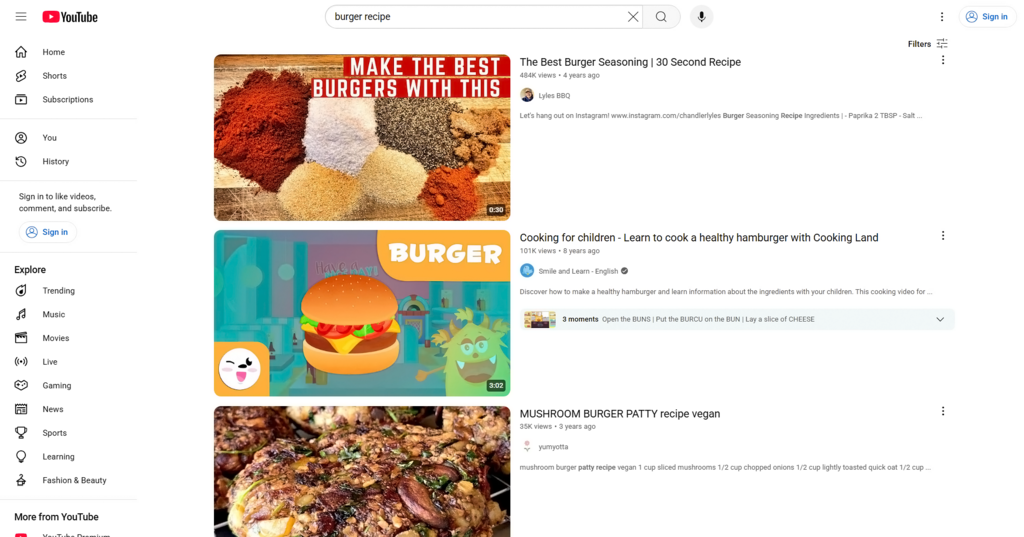
Good thumbnails often feature:
- A clear, high-quality image.
- Bright colors that stand out.
- A human face showing emotion.
- A small amount of easy-to-read text that adds context or asks a question.
Once someone is watching your video, you want to encourage them to watch another one. This is where playlists come in. A playlist is simply a collection of videos, usually organized around a specific theme. For a language channel, you might create playlists like "Spanish for Beginners," "French Verb Conjugations," or "Japanese Travel Phrases."
When one video in a playlist ends, the next one automatically begins. This is a powerful way to increase watch time on your channel. It organizes your content for viewers and keeps them engaged with your lessons.
Organize your videos into series or playlists around the theme of monetizing a YouTube channel.
By understanding these basics—how the algorithm works, how to use keywords, and how to present your content with great thumbnails and playlists—you build a strong foundation for your channel. Now, you're ready to start thinking about the content itself.