Automated Web-Scraping Newsletter App
Web Scraping Basics
What Is Web Scraping?
Web scraping is the process of automatically extracting information from websites. Think of it as hiring a very fast assistant to browse the web for you. Instead of manually copying and pasting data from a site into a spreadsheet, a program, often called a scraper or bot, does it for you. This bot visits a webpage, reads its underlying code (HTML), and pulls out the specific pieces of information you've asked for.
For example, you could build a scraper to check the price of a flight every hour, track stock market data, or collect all the headlines from your favorite news sites into a single document.
This technique is incredibly versatile. Companies use it for market research by analyzing competitor pricing. Journalists use it to gather data for stories. Developers use it to collect information to power their applications. Essentially, if data is publicly available on a website, it can likely be scraped.
The Rules of the Road
Just because you can automatically collect data doesn't always mean you should. Web scraping exists in a gray area, so it's crucial to understand the ethical and legal boundaries. The key is to be a good citizen of the web.
Ethical scraping goes beyond legality—it's about respecting digital boundaries, user privacy, and terms of service.
Most websites have a file called robots.txt in their main directory. This is a public set of instructions for bots. It tells them which parts of the site they are allowed to visit and which parts are off-limits. Before you scrape any site, you should always check its robots.txt file. Think of it as checking for a "No Trespassing" sign before entering a property.
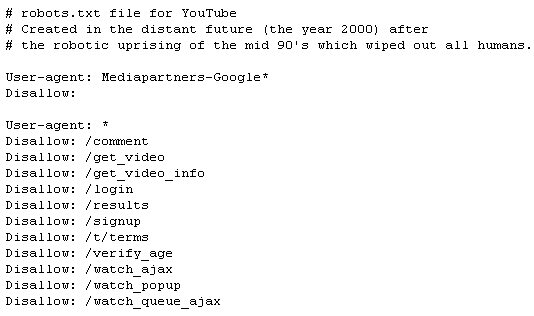
Beyond robots.txt, you should also review a site's Terms of Service. Many sites explicitly prohibit scraping in their legal terms. You also need to be respectful of the website's server. Sending too many requests in a short period can slow down or even crash the site for other users. A good practice is to space out your requests to mimic human browsing speed. Finally, never scrape sensitive or private information, like personal contact details.
Your Scraping Toolkit
You don't need to build a scraper from scratch. There are many powerful tools and libraries available to help you get started. Most are written for the Python programming language, which is a popular choice for web scraping.
| Tool | Type | Best For |
|---|---|---|
| Beautiful Soup | Library (Python) | Parsing HTML/XML from a single page. Great for beginners and small projects. |
| Scrapy | Framework (Python) | Building complex crawlers that follow links and handle large amounts of data. |
| Puppeteer | Library (JavaScript) | Scraping dynamic websites that rely heavily on JavaScript to load content. |
Let's look at each one.
Beautiful Soup
noun
A Python library for pulling data out of HTML and XML files. It works with your favorite parser to provide idiomatic ways of navigating, searching, and modifying the parse tree. It's great for parsing the content of a single webpage you've already downloaded.
Here's a small taste of how you might use Beautiful Soup to get the title of a webpage:
from bs4 import BeautifulSoup

# Imagine 'html_doc' contains the HTML of a webpage
html_doc = """
<html><head><title>The Dormouse's story</title></head>
<body>
<p class="title"><b>The Dormouse's story</b></p>
...
</body></html>
"""

# Create a Soup object
soup = BeautifulSoup(html_doc, 'html.parser')

# Extract and print the title
print(soup.title.string)
# Output: The Dormouse's story
Scrapy is a more comprehensive tool. It's a full-blown framework, not just a library. While Beautiful Soup is excellent at parsing a page, Scrapy can handle the entire process: making the request, following links to other pages, parsing the content, and saving the extracted data in a structured format like CSV or JSON.
If Beautiful Soup is a tool for reading a single map, Scrapy is an entire vehicle equipped for a cross-country expedition, complete with navigation and storage.
Finally, there's Puppeteer. It's a bit different because it's a JavaScript library that controls a headless version of the Chrome browser. This is essential for modern websites that load their content dynamically using JavaScript. A simple scraper might only see a mostly empty HTML page, but Puppeteer can wait for all the content to load, just like a real user, before it starts scraping.
Choosing the right tool depends on your project. For a simple, one-page task, Beautiful Soup is perfect. For a large-scale project that involves crawling many pages, Scrapy is the way to go. And if the site you're targeting is a dynamic, modern web app, Puppeteer is your best bet.
What is the primary file you should check on a website to understand which pages are permissible for bots to visit?
You need to scrape data from a modern, single-page web application where content loads dynamically using JavaScript. Which tool is best suited for this task?