Automated Software Testing Essentials
Introduction to Automated Testing
What Is Automated Testing?
In software development, testing is the process of checking whether an application works as expected. Traditionally, this was done manually. A person would sit at a computer, click through the application, and verify that every button, form, and link behaved correctly. This is known as manual testing.
Automated testing, on the other hand, uses software to perform these tests. Instead of a human, a script runs through the application, checks the outcomes, and reports any issues. Think of it like this: manual testing is like personally checking every lightbulb in a house by flipping each switch. Automated testing is like having a system that runs a diagnostic on all the lights at once and gives you a list of any that are burnt out.
Test automation involves using software tools, scripts, and frameworks to automate various aspects of the testing life cycle, including test case creation, execution, result analysis, reporting, and defect tracking.
The main purpose isn't to replace human testers but to empower them. By handing over the repetitive, time-consuming tasks to a machine, developers and quality assurance (QA) professionals can focus on more complex and creative problems that require human intuition.
The Benefits of Automation
Automating tests is an investment, but it pays off by improving the speed, efficiency, and reliability of the development process. Machines are simply faster and more consistent than people at repetitive tasks.
One of the biggest advantages is in regression testing. This is the process of re-running old tests to make sure that new changes haven't broken existing features. Manually re-testing an entire application after every small update is slow and impractical. An automated test suite can run hundreds or thousands of these checks in minutes, providing immediate feedback to developers.
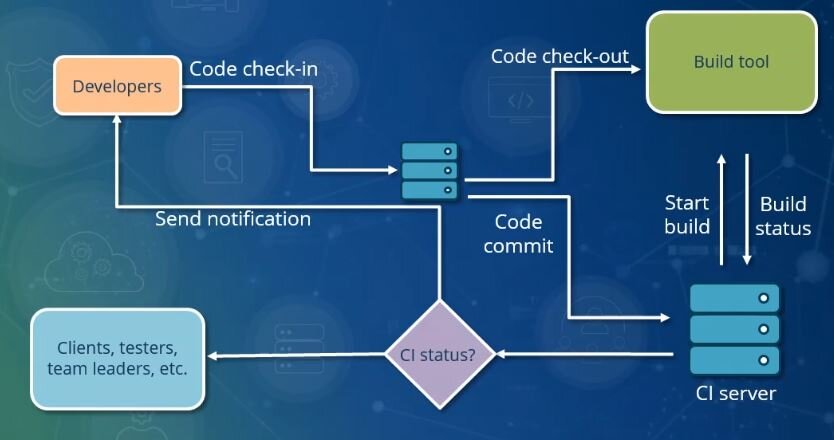
This leads to several key benefits:
- Speed: Automated tests can run 24/7 without human intervention, drastically shortening the feedback loop for developers.
- Reliability: An automated script performs the exact same steps every time, eliminating the risk of human error.
- Efficiency: It frees up QA teams to focus on exploratory testing, usability, and other areas where human insight is invaluable.
Common Hurdles
While powerful, automated testing isn't a silver bullet. Teams face a few common challenges when implementing it. The initial setup requires a significant investment of time and resources. Writing robust test scripts and configuring a testing environment takes specialized skill and planning.
Tests also need maintenance. As the application evolves, the test scripts must be updated. A test that fails because a button's color changed, not because the feature is broken, is called a "brittle" test. Maintaining a healthy test suite is an ongoing effort.
The other challenge is knowing what to automate. Not all tests are good candidates for automation. A simple comparison highlights the strengths of each approach.
| Feature | Manual Testing | Automated Testing |
|---|---|---|
| Speed | Slow, limited by human pace | Very fast, runs at machine speed |
| Consistency | Prone to human error | Highly consistent and repeatable |
| Initial Effort | Low; testers can start immediately | High; requires script development |
| Best For | Usability, exploratory testing | Repetitive tasks, regression tests |
| Long-Term Cost | High, due to repeated manual effort | Lower, after initial investment |
The most effective strategies use a mix of both. They automate the predictable, repetitive checks and save human expertise for tasks that require creativity, critical thinking, and a deep understanding of the user experience.
What is the primary purpose of introducing automated testing into a software development workflow?
In the context of software testing, what is regression testing?