Automated Inventory with Computer Vision
Introduction to Computer Vision
Teaching a Computer to See
Computer vision sounds like science fiction, but it's just a way for computers to understand the visual world. Instead of seeing a picture of a cat, they see a collection of data—pixels, colors, and shapes. The goal is to teach the computer to interpret this data and recognize that it represents a cat. For inventory management, instead of a cat, the computer needs to recognize a box of cereal or a bottle of soda on a shelf.
Computer vision is a branch of artificial intelligence (AI) that enables machines to interpret and analyze visual data from the world around them.
This process isn't magic. It starts with the basics of image processing, which is like giving the computer a pair of glasses to see more clearly. It’s the first step in turning a raw image into something a machine can analyze.
Image Processing Basics
An image, to a computer, is just a grid of pixels. Each pixel has a value representing its color and brightness. Image processing involves applying algorithms to this grid to enhance it or prepare it for analysis. Think of it like adjusting the settings on your phone's camera before taking a picture.
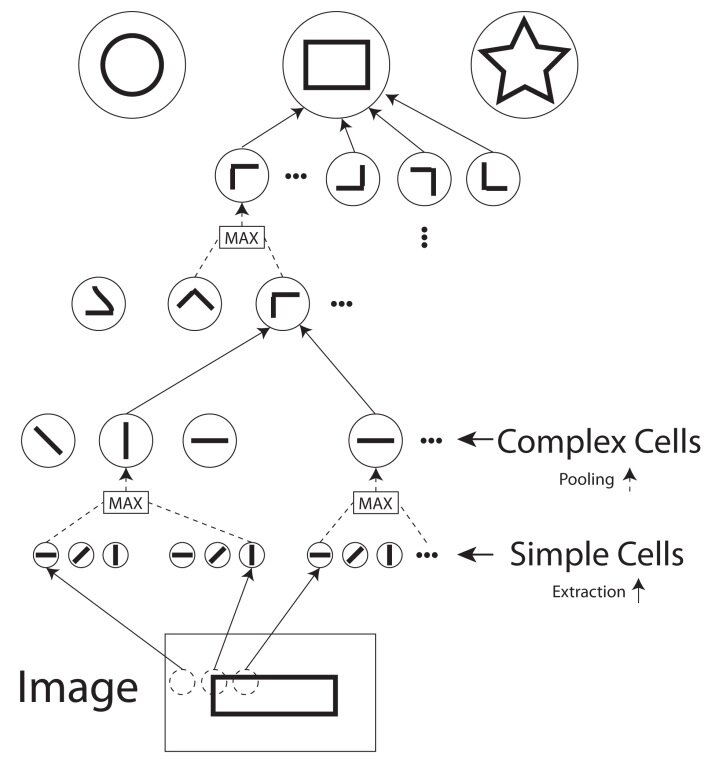
Common processing steps include:
- Grayscale Conversion: Color can be distracting. Converting an image to black and white (grayscale) simplifies the data, making it easier for the computer to focus on shapes and textures. Each pixel now has just one value for its brightness.
- Noise Reduction: Images, especially from security cameras in a warehouse, can be grainy or have random variations, called "noise." Algorithms can smooth out these imperfections, much like a photo editor removes blemishes.
- Edge Detection: This is a crucial step. The algorithm identifies where there are sharp changes in brightness in the image. These changes usually correspond to the outlines, or edges, of objects. Finding the edges helps the computer separate one object from another and from the background.
After cleaning up the image, the computer needs to pull out the most important information. This is called feature extraction.
Finding Important Features
Imagine describing an object to someone who can't see it. You wouldn't describe every single pixel. Instead, you'd mention its key characteristics: its color, its shape, its size, its texture. These are its features.
Feature extraction is the process of teaching a computer to do the same thing. It analyzes the processed image and extracts measurable properties that can distinguish one object from another. For a box of cereal, features might include its rectangular shape, the colors of the logo, and the texture of the cardboard.
The goal of feature extraction is to convert the raw pixel data into a more compact and meaningful representation that is easier to analyze.
Some common feature extraction techniques identify:
- Corners and Blobs: Points where edges meet (corners) or regions of similar color/texture (blobs) are strong indicators of an object's presence and shape.
- Color Histograms: This is a chart that shows the distribution of colors in an image. A can of Coke will have a very different color histogram than a can of Sprite.
- Texture: Algorithms can measure patterns and textures, like the smoothness of a plastic bottle versus the roughness of a cardboard box.
Recognizing Patterns
Once the features are extracted, the final step is pattern recognition. This is where the machine learning happens. The system takes the extracted features—like 'rectangular shape,' 'high red color value,' and 'smooth texture'—and compares them to a database of known objects.
This is a classification problem. The system has been trained on thousands of labeled images. It has learned what combination of features corresponds to 'Cereal Box A' and which corresponds to 'Soda Bottle B'. When it sees a new object, it calculates its features and finds the closest match in its memory.
Think of it like a sorting game. The computer has different bins, one for each product. It looks at the features of a new item and decides which bin it belongs in.
This process—image processing, feature extraction, and pattern recognition—forms the foundation of how computer vision works. By breaking down a visual scene into simple, analyzable parts, a computer can learn to see and understand the world, making tasks like automated inventory tracking possible.
Ready to check your understanding of these core concepts?
What is the primary goal of computer vision?
Why is converting an image to grayscale a common step in image processing for computer vision?
By mastering these fundamentals, we can build systems that don't just see pixels, but recognize products, count stock, and help businesses run more efficiently.