Automated Email Campaigns
Email Basics
The Anatomy of an Email
Before an email zips across the internet, it's assembled into a standard format, much like a physical letter has an envelope and a message inside. Every email is made of two main parts: the header and the body.
The header is like the outside of the envelope. It contains all the routing information: who it's from, where it's going, the subject, and timestamps showing its journey. It’s the metadata that mail servers use to figure out what to do with the message.
The body is the actual message—the text, images, and attachments you want to send. It's the letter inside the envelope.
| Component | Purpose |
|---|---|
| From | The sender's email address. |
| To | The primary recipient's email address. |
| Cc / Bcc | Carbon Copy and Blind Carbon Copy, for additional recipients. |
| Subject | A brief summary of the email's content. |
| Date | Timestamp showing when the email was sent. |
| Body | The main content of your message. |
The Internet's Mail Carriers
Emails don't just magically appear in an inbox. They're sent and received using a set of rules, or protocols. The two most important ones are SMTP and IMAP.
SMTP (Simple Mail Transfer Protocol) is for sending email. Think of it as the postal service. When you hit send, your email client hands the message to an SMTP server, which then acts as the mail carrier, delivering it across the internet to the recipient's mail server.
IMAP (Internet Message Access Protocol) is for retrieving and managing email. Once your message arrives at the recipient's mail server, it sits there waiting. IMAP is the protocol their email client uses to connect to that server, fetch the new mail, and display it. Because IMAP syncs with the server, actions you take on one device (like reading or deleting an email) are reflected everywhere.
An Email's Journey
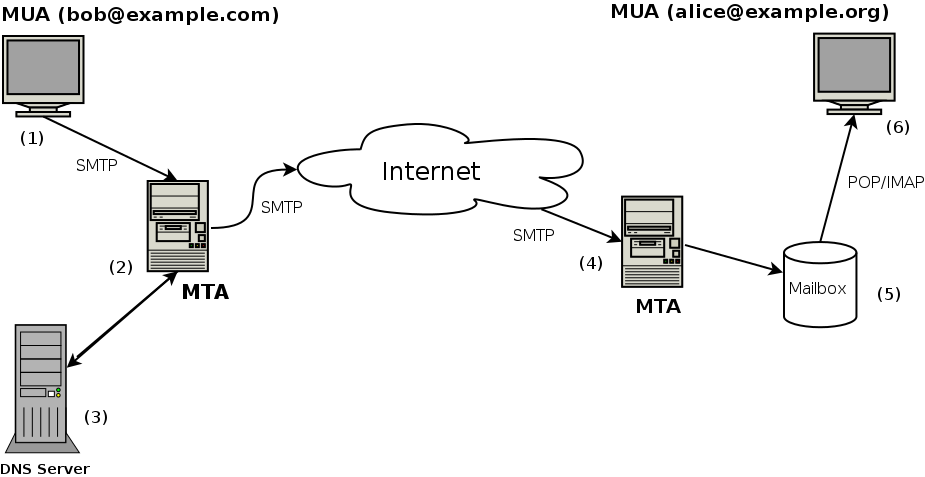
So, how do these pieces work together? Let's trace the path of an email from your keyboard to your friend's screen.
-
You Hit Send: Your email client (like Outlook or the Gmail app) connects to your outgoing mail server using SMTP. It hands over the email, including the header and body.
-
Server to Server: Your SMTP server reads the recipient's domain (the part after the
@symbol). It then acts like a digital detective, using the Domain Name System (DNS) to find the IP address of the recipient's mail server. -
The Hand-Off: Your server connects to the recipient's SMTP server and delivers the email. The receiving server accepts the message and places it in the recipient's mailbox.
-
Checking for Mail: When your friend opens their email app, their client uses IMAP to connect to their mail server. It asks, "Any new mail?" The server shows the new message, and your friend can now read it.
This whole process usually takes just a few seconds, involving a perfectly coordinated dance between multiple servers and protocols across the globe.
What are the two main components of an email's structure?
When you open your email app and it downloads new messages from the server, which protocol is it most likely using?