Automate Work with Python and AI No-Code
Introduction to No-Code Automation
What is No-Code Automation?
Think about the repetitive tasks you do at work every day. Maybe you copy data from an email into a spreadsheet, send a weekly reminder to your team, or save attachments from one app to another. These small jobs add up, taking time and focus away from more important work. This is where automation comes in.
Traditionally, automating tasks required writing code. You needed a developer to create a script or program to handle the process. No-code automation changes that. It's a way to build automated workflows using visual, drag-and-drop interfaces instead of programming languages. You connect different apps and services, set rules for how they should interact, and let the system handle the rest.
No-code platforms enable non-technical users, such as marketers or administrators, to create automations using drag-and-drop interfaces, eliminating the need for coding skills.
The core idea is to make automation accessible to everyone. If you can create a flowchart, you can build a no-code automation. You choose a trigger, like receiving a new email, and then define the actions that should follow, like extracting information and adding it to a database. It's about empowering people who understand the business process to build the solutions themselves, without waiting for technical help.
A Quick History
The dream of making computers do our bidding without complex code isn't new. It started decades ago with simple tools. Spreadsheets were an early form of this, allowing people to perform complex calculations without being programmers. Then came macros, which let users record and replay a sequence of actions in programs like Microsoft Excel.
Over time, these concepts evolved. The rise of cloud-based applications created a new challenge: how to make different apps talk to each other. Early solutions were clunky and still required technical know-how. But as technology improved, platforms emerged that were built specifically to connect these separate services. They translated the complex code of application programming interfaces (APIs) into simple, visual blocks that anyone could use. This shift marked the true beginning of the no-code movement.
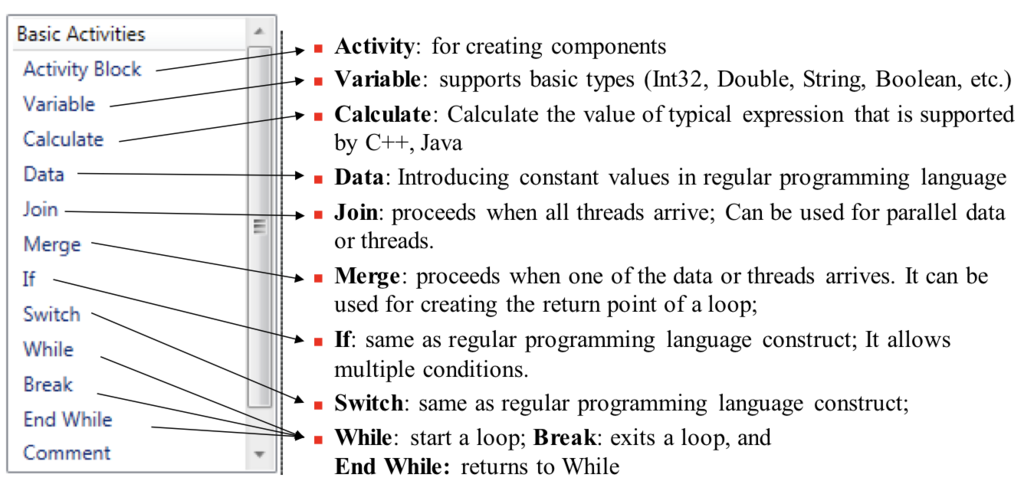
Today, these platforms are incredibly powerful, integrating with thousands of applications and even incorporating artificial intelligence to handle more complex decisions.
Why It Matters
The benefits of no-code automation extend beyond just saving a few minutes here and there. When teams can build their own solutions, it leads to significant improvements.
First, it dramatically increases efficiency. Automating manual data entry, notifications, and reporting frees up employees to focus on creative problem-solving and strategic thinking. It also reduces human error. A tired employee might mistype a number, but an automated workflow will perform the task perfectly every time.
Second, it empowers employees and fosters innovation. When a marketing specialist or a project manager has an idea to improve a process, they can build and test it themselves in hours, not weeks. This accelerates problem-solving and allows teams to adapt quickly to new challenges. It breaks down the bottleneck of relying on a limited number of developers for every small change.
Finally, it can lead to cost savings. Building custom software is expensive and time-consuming. No-code tools offer a faster, cheaper alternative for many common business needs, making powerful technology accessible even to small teams and startups.
Key Benefits:
- Efficiency: Spend less time on repetitive work.
- Accuracy: Reduce costly mistakes from manual tasks.
- Empowerment: Build the tools you need, when you need them.
- Speed: Go from idea to solution in a fraction of the time.
Here is a brief look at some of the popular platforms that help make this possible. Each has its own strengths, but they all share the goal of making automation simple and visual.
| Platform | Primary Use | Target User |
|---|---|---|
| Zapier | Connecting a wide range of web apps | Beginners, small businesses |
| Make (formerly Integromat) | Building complex, multi-step workflows | Intermediate users, tech-savvy teams |
| Airtable | Database and spreadsheet automation | Teams managing data and projects |
| Notion | All-in-one workspace with light automation | Individuals, collaborative teams |
This is just a small sample, and the landscape is constantly growing. The key takeaway is that there are tools available for nearly any automation need, regardless of your technical background.
What is the primary goal of no-code automation?
According to the text, which of the following is considered an early form of no-code automation that allowed users to record and replay a sequence of actions?
No-code automation isn't about replacing people. It's about equipping them with better tools to do their most valuable work.