Arduino Project Creation Fundamentals
Introduction to Arduino
What Is an Arduino?
Arduino is a tool for making computers that can sense and control more of the physical world than your desktop computer. It's an open-source electronics platform based on easy-to-use hardware and software. Think of it as a small, programmable brain that you can connect to all sorts of electronic parts, like lights, motors, and sensors.
It was invented in Italy in 2005 to give students a simple, low-cost way to build interactive projects. Before Arduino, getting into electronics often meant dealing with complex and expensive equipment. Arduino changed that by making it accessible for artists, designers, hobbyists, and anyone interested in creating things.
Arduino is an open-source electronics platform based on easy-to-use hardware and software.
The platform is designed to be straightforward. You can write code to tell the Arduino what to do, and it will execute those commands, whether that's blinking an LED, reading the temperature, or even sending a tweet.
The Hardware
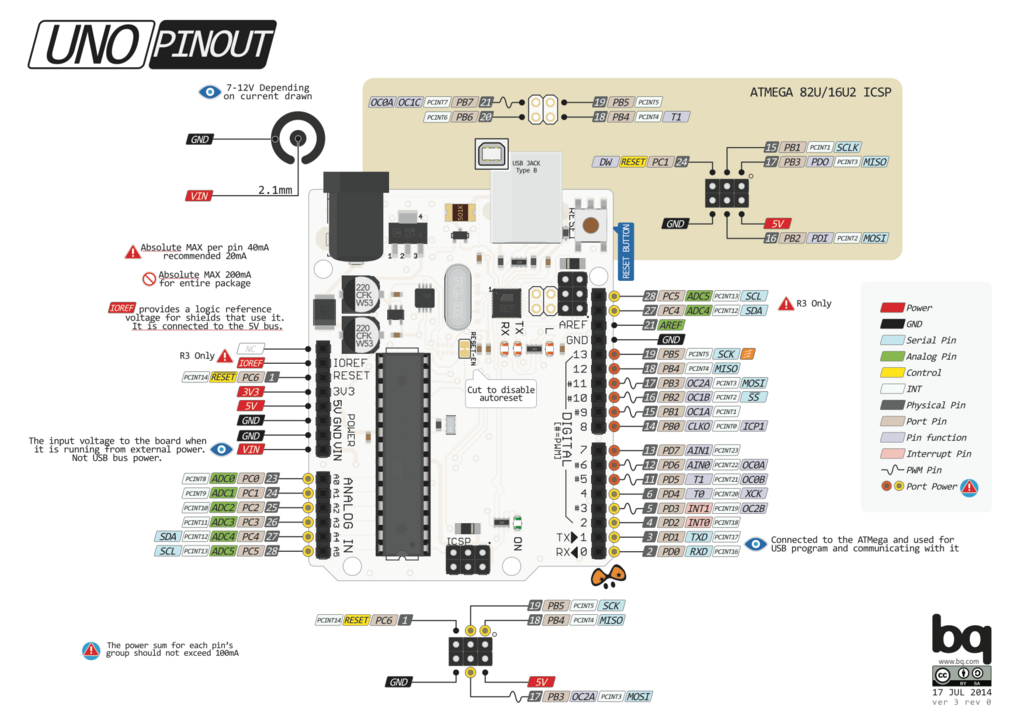
The physical part of Arduino is the board itself, a small microcontroller board. While there are many different types of Arduino boards, the most common one for beginners is the Arduino Uno. Let's look at its key features.
microcontroller
noun
A small, compact computer on a single integrated circuit containing a processor core, memory, and programmable input/output peripherals.
Here are the essential parts you'll see on an Uno:
- Microcontroller: This is the main chip, the "brain" of the board. On the Uno, it's usually the ATmega328P. It stores and runs the programs you write.
- USB Port: This is how you connect the Arduino to your computer. It serves two purposes: uploading your code to the board and providing power.
- Power Jack: You can also power your Arduino with a battery or an AC adapter through this jack, freeing it from being tethered to your computer.
- Digital and Analog Pins: These are the rows of sockets along the edges of the board. They are the connection points for your circuits. You use them to connect wires to sensors, lights, motors, and other components. Digital pins work with on/off signals, while analog pins can read a range of values, like from a dimmer knob.
The Software (IDE)
To tell the Arduino what to do, you need to write code. This is done in the Arduino Integrated Development Environment, or IDE. It's a free application you can download for Windows, Mac, and Linux.
The IDE is where you'll write your programs, which are called "sketches" in the Arduino world. The programming language is based on C++, but it's simplified to make it easier for beginners. Once you've written your sketch, you connect your Arduino to the computer via USB and click the "Upload" button in the IDE. This sends your code to the microcontroller, and it starts running immediately.
The Arduino IDE is your command center for writing code, checking it for errors, and sending it to your board.
The Open-Source Philosophy
One of the most powerful aspects of Arduino is that it's open-source. This means all the designs for the hardware and all the code for the software are publicly available. Anyone can see how it's made, modify it, and share their own versions.
This philosophy has created a massive, supportive community. If you have a problem, chances are someone has already solved it and shared the solution online. Thousands of tutorials, project guides, and code libraries are available for free. This collaborative spirit makes it much easier to learn and build complex projects, because you're standing on the shoulders of everyone who came before.
Now that you understand the basic components, let's test your knowledge.
What is the primary purpose of an Arduino?
In the Arduino world, what is a program called?