Architecting RESTful Services with .NET
Minimal APIs vs Controllers
Building Your API: Two Paths
When you build an API with ASP.NET Core, you have two main choices for how to structure your code: the traditional Controller-based approach or the newer, leaner Minimal API style. Think of it like building a house. You can either hire an architect who provides detailed blueprints for every room (Controllers), or you can start with a simple, open-plan studio and add walls as needed (Minimal APIs).
Both get the job done, but they excel in different scenarios. The right choice depends on your project's size, complexity, and how your team prefers to work. Let's start by looking at how a .NET 8 application gets up and running, because this is where both styles begin.
The Modern Startup
In older versions of .NET, you had a Startup.cs file that handled all the configuration. .NET 8 simplifies this into a single Program.cs file. The entry point is now incredibly clean, using what are called top-level statements to reduce boilerplate code.
// Program.cs

// 1. Create a builder.
var builder = WebApplication.CreateBuilder(args);

// 2. Add services to the container.
// (e.g., builder.Services.AddDbContext<...>();)

// 3. Build the application.
var app = builder.Build();

// 4. Configure the HTTP request pipeline.
// (e.g., app.UseHttpsRedirection();)

// 5. Define endpoints.
app.MapGet("/", () => "Hello World!");

// 6. Run the application.
app.Run();
The process is straightforward. First, WebApplication.CreateBuilder(args) sets up the essentials: configuration, logging, and dependency injection services. After you register any custom services you need, builder.Build() assembles the application host. From there, you configure middleware and define your API endpoints before calling app.Run() to start the server. This setup is the foundation for both Minimal and Controller-based APIs.
Minimal APIs: Quick and Direct
Minimal APIs are designed for speed and simplicity. You define your endpoints directly in Program.cs using Map methods like MapGet, MapPost, and MapPut. Each method takes a route pattern and a handler function, which is often a simple lambda expression.
This approach is perfect for microservices, simple web hooks, or small APIs where the overhead of a full MVC structure isn't necessary.
Here's how you would implement basic GET and POST endpoints for managing a list of products.
// In Program.cs

var builder = WebApplication.CreateBuilder(args);
var app = builder.Build();

// In-memory data for the example
var products = new List<string> { "Keyboard", "Mouse" };

// GET endpoint to fetch all products
app.MapGet("/products", () => products);

// POST endpoint to add a new product
app.MapPost("/products", (string productName) =>
{
    products.Add(productName);
    return Results.Created($"/products/{productName}", productName);
});

app.Run();
It's concise and easy to read. All the logic for a specific route is right there. However, as your application grows, putting dozens of endpoints in Program.cs can become messy. To keep things organized, you can group related endpoints into separate files using extension methods, which helps maintain clarity without adopting the full Controller pattern.
Controllers: Structured and Scalable
The Controller-based approach is the traditional way to build APIs in ASP.NET Core. It uses the architectural pattern, though for APIs, you're primarily concerned with the Model and Controller. Controllers are classes that group related API actions (methods) together. This structure is inherently more organized and scales well for large, complex applications.
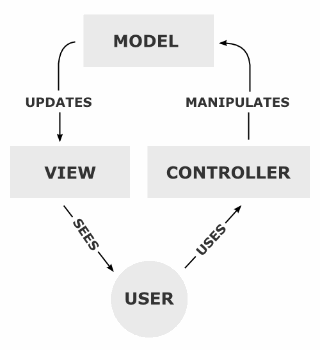
To use Controllers, you first need to register the necessary services in Program.cs.
// In Program.cs
var builder = WebApplication.CreateBuilder(args);

// Add services for controllers.
builder.Services.AddControllers();

var app = builder.Build();

// Map incoming requests to controller actions.
app.MapControllers();

app.Run();
Next, you create a Controller class. By convention, these are placed in a Controllers folder. The class inherits from ControllerBase and its methods, called actions, are decorated with attributes like [HttpGet] and [HttpPost] to map them to HTTP requests.
// In Controllers/ProductsController.cs
using Microsoft.AspNetCore.Mvc;

[ApiController]
[Route("[controller]")]
public class ProductsController : ControllerBase
{
    // In-memory data for the example
    private static List<string> _products = new List<string> { "Keyboard", "Mouse" };

    [HttpGet]
    public IActionResult GetAll()
    {
        return Ok(_products);
    }

    [HttpPost]
    public IActionResult Create(string productName)
    {
        _products.Add(productName);
        return CreatedAtAction(nameof(GetAll), new { id = productName }, productName);
    }
}
The [ApiController] attribute enables several helpful features, like automatic model validation. The [Route("[controller]")] attribute uses the controller's name (Products) as the base route. This structure clearly separates concerns and is ideal for large teams, as different developers can work on different controllers without conflict.
Which Should You Choose?
The choice between Minimal APIs and Controllers isn't about one being definitively better. It's about picking the right tool for the job. Here’s a quick breakdown of their trade-offs.
| Feature | Minimal APIs | Controllers |
|---|---|---|
| Boilerplate | Very low, concise | More setup required |
| Organization | Less structured by default | Highly structured, organized by feature |
| Performance | Slightly faster due to less overhead | Highly performant, minor overhead |
| Best For | Microservices, simple APIs, prototypes | Large monolithic apps, complex APIs |
| Team Size | Ideal for individuals or small teams | Excellent for large, distributed teams |
You can even mix both styles in the same project. You might use Minimal APIs for a few simple, high-traffic public endpoints and use Controllers to structure the more complex, internal-facing parts of your application. The flexibility of .NET 8 allows you to build solutions that are perfectly tailored to your needs.
What is the primary architectural difference between Minimal APIs and Controller-based APIs in ASP.NET Core?
In a modern .NET 8 application, where is the initial setup for services, configuration, and middleware for both Minimal and Controller-based APIs performed?