Architecting Network Foundations
Network Topologies
Physical vs. Logical Layouts
Every network has two layouts. The first is its physical topology, which is how the cables and devices are actually arranged. Think of it as the physical wiring in the walls and server racks. You can walk around and see it.
The second is the logical topology. This is the path the data thinks it's taking. It's the high-level map of how information flows from one point to another, regardless of the physical twists and turns of the cables. A network might be physically wired in a star shape but logically operate like a straight line.
The physical topology is the blueprint of the wires; the logical topology is the map of the data's journey.
The Star of the Show
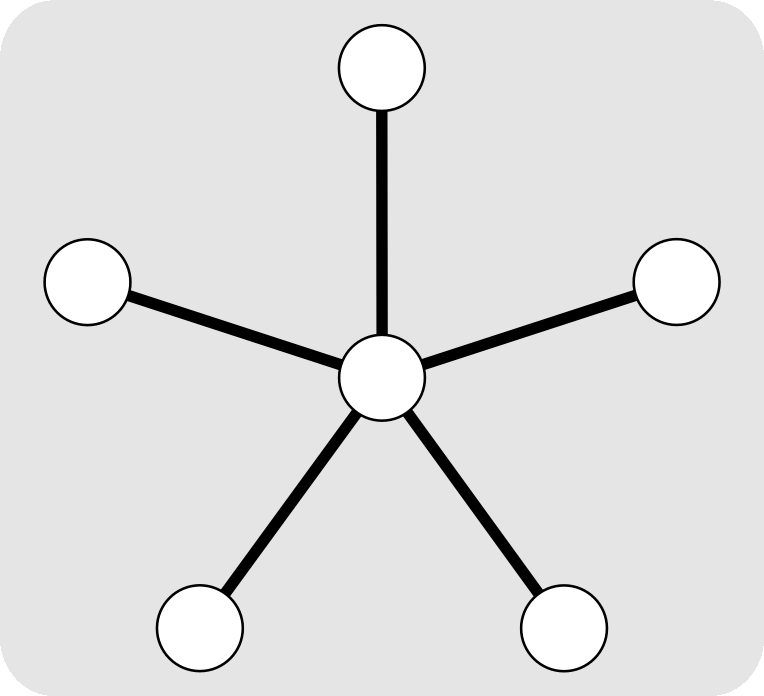
The most common physical topology in business LANs is the star topology. In this setup, every device—computers, printers, servers—connects to a central piece of hardware, usually a or a hub. It’s popular for a reason: it’s reliable and relatively easy to manage.
If one computer's cable fails, only that computer loses its connection. The rest of the network keeps humming along. This isolation makes troubleshooting straightforward. The downside? That central device is a single point of failure. If the switch goes down, the entire network segment connected to it goes down too.
The Tangled Web of Mesh
For situations that demand extreme reliability, a mesh topology is the answer. In a full mesh network, every single node is connected to every other node. If one link breaks, data simply reroutes through one of the many other available paths. This creates incredible —the system can handle failures without interruption.
A partial mesh is more common, where only critical nodes are connected to multiple other nodes. The primary drawback of any mesh network is cost and complexity. The amount of cabling required for a full mesh grows exponentially with each new device, making it impractical for most office environments but essential for the internet's core infrastructure.
Enterprise-Grade Design
In the real world, you rarely find a pure star or pure mesh network. Businesses use hybrid topologies that combine elements of different designs to balance cost, reliability, and scalability. A common example is the tree topology, which is essentially a series of interconnected star networks. A main switch might connect to smaller switches on each floor of a building, which in turn connect to individual workstations.
This hierarchical approach allows for easy expansion. Need to add a new department? Just add a new switch and connect it to the core. This design contains failures within each branch while maintaining a structured, manageable network. It's a pragmatic compromise that supports the reliability needs of a modern enterprise without the extreme cost of a full mesh.
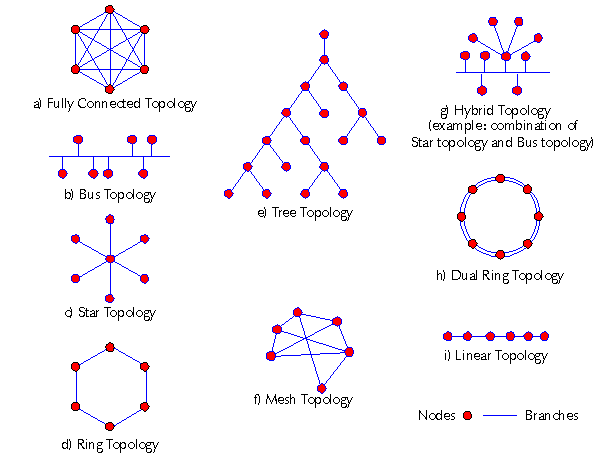
The choice of topology directly impacts how a business scales its operations. A well-designed network anticipates future growth, ensuring that adding new users or services doesn't require a complete overhaul of the physical infrastructure.
| Topology | Cabling Cost | Scalability | Reliability / Fault Tolerance |
|---|---|---|---|
| Star | Medium | Good | Medium (central failure point) |
| Bus | Low | Poor | Low (single cable break downs network) |
| Mesh | Very High | Excellent | Very High (many redundant paths) |
| Hybrid | Varies | Excellent | High (can be designed for redundancy) |
Ready to test your knowledge?
What is the key difference between a network's physical and logical topology?
In a star topology, what is the primary single point of failure?
Understanding these fundamental layouts is the first step in designing networks that are not just functional, but also resilient and ready for future demands.