Applied Ethical Hacking and Network Security
Advanced Network Reconnaissance
Beyond the Ping Sweep
You know how to use a ping sweep to see which hosts are alive on a network. It’s like knocking on doors to see if anyone’s home. But what if you need to know more? What if you need to know who lives there, what language they speak, and whether the door is unlocked?
This is where advanced reconnaissance comes in. We move beyond simply finding a host to deeply profiling it. Our primary tool for this is Nmap, the Network Mapper. It allows us to send crafted packets to see not just if a host is up, but exactly what services it's running, what operating system it uses, and what potential vulnerabilities it might have.
Probing with Purpose
Standard scans, like a TCP SYN scan, are effective but noisy. They complete part of the three-way handshake, which is easily logged by firewalls and Intrusion Detection Systems (IDS). To gather intelligence more quietly, we can use scan types that exploit subtle details in the TCP protocol.
Stealth scans, such as FIN, Null, and Xmas scans, work by sending TCP packets with unusual combinations of flags. According to the TCP RFC, a closed port should respond to these malformed packets with a RESET (RST) packet, while an open port should drop them and send no reply. This distinction allows Nmap to infer the port's state without initiating a full connection.
This technique is clever but has a key limitation: it doesn't work on Microsoft Windows systems, which ignore the RFC specification and don't send the expected RST packet from closed ports.
# FIN Scan (-sF)
# Sends a packet with only the FIN flag set.
nmap -sF <target_ip>

# Null Scan (-sN)
# Sends a packet with no flags set.
nmap -sN <target_ip>

# Xmas Scan (-sX)
# Sends a packet with FIN, PSH, and URG flags set.
nmap -sX <target_ip>
These scans are less likely to be logged, making them a good first choice when you need to be discreet. However, because they rely on a lack of response for open ports, they can be less reliable on networks with heavy packet loss.
Fingerprinting the Target
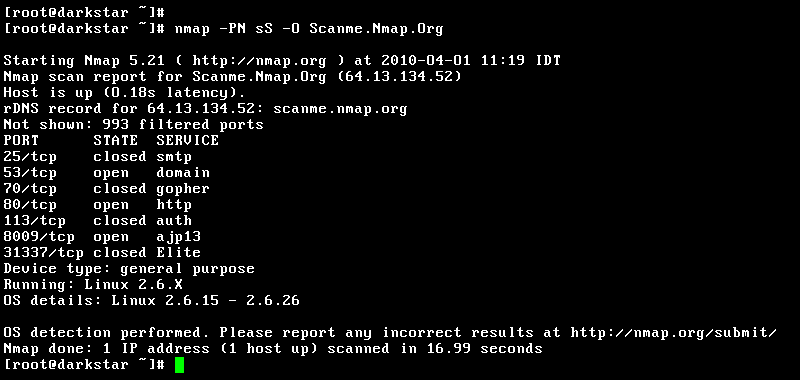
Discovering an open port is just the start. Is port 80 running Apache, Nginx, or Microsoft IIS? Is the host a Linux server or a Windows workstation? Answering these questions is crucial for identifying potential vulnerabilities. Nmap automates this with service version detection and ().
- Service Version Detection (-sV): After discovering a port, Nmap sends a series of probes designed to elicit a response. It then compares these responses to its
nmap-service-probesdatabase, which contains thousands of signatures for different services and versions. - OS Detection (-O): Nmap sends a sequence of TCP and UDP packets to the target and analyzes the responses. Tiny differences in the TCP/IP stack implementation between operating systems allow Nmap to guess the OS, version, and even the patch level with high accuracy.
# Scan for open ports, service versions, and OS
nmap -sV -O <target_ip>
Automation and Evasion
The real power of Nmap is unlocked with its (NSE). The NSE allows users to write—and use a vast library of existing—scripts to automate a wide range of networking tasks. These scripts can detect specific vulnerabilities, perform more advanced reconnaissance, or even carry out light exploitation.
Using the -sC flag or --script argument, you can run scripts to check for known security holes. For example, you could run all scripts in the vuln category to actively check for vulnerabilities on the discovered services.
# Run the default set of safe scripts
nmap -sC <target_ip>

# Run all scripts in the 'vuln' category
nmap --script vuln <target_ip>
But what if a firewall or IDS is blocking your scans? Nmap has built-in features to help. You can fragment packets (-f) to split the TCP header over several smaller packets, which can sometimes bypass less sophisticated detection rules. You can also use decoys (-D) to make the scan appear as if it's coming from multiple IP addresses, obscuring your own.
# Scan using tiny fragmented packets
nmap -f <target_ip>

# Scan using random decoys and your own IP (ME)
nmap -D RND:10,ME <target_ip>
Interpreting the results from these advanced scans is an art. A port listed as filtered means a firewall or other network device is blocking your packets, preventing Nmap from determining if the port is open or closed. A result of open|filtered means Nmap isn't sure if the port is open or if a filter is just dropping the packets. These results tell you about the network's architecture and defenses, which is just as valuable as finding an open port.
Time to test your knowledge of these advanced scanning techniques.
Why would a security analyst choose a stealth scan (like a FIN, Null, or Xmas scan) over a standard TCP SYN scan?
According to the TCP RFC, how should a closed port respond to a malformed TCP packet, such as one used in a FIN or Null scan?
By moving past simple discovery, you can build a detailed map of a target network. This information is the foundation for all subsequent phases of ethical hacking, allowing you to identify and test for specific weaknesses with precision.