Applied Data Science Mastery
Data Cleaning
Preparing Data for Analysis
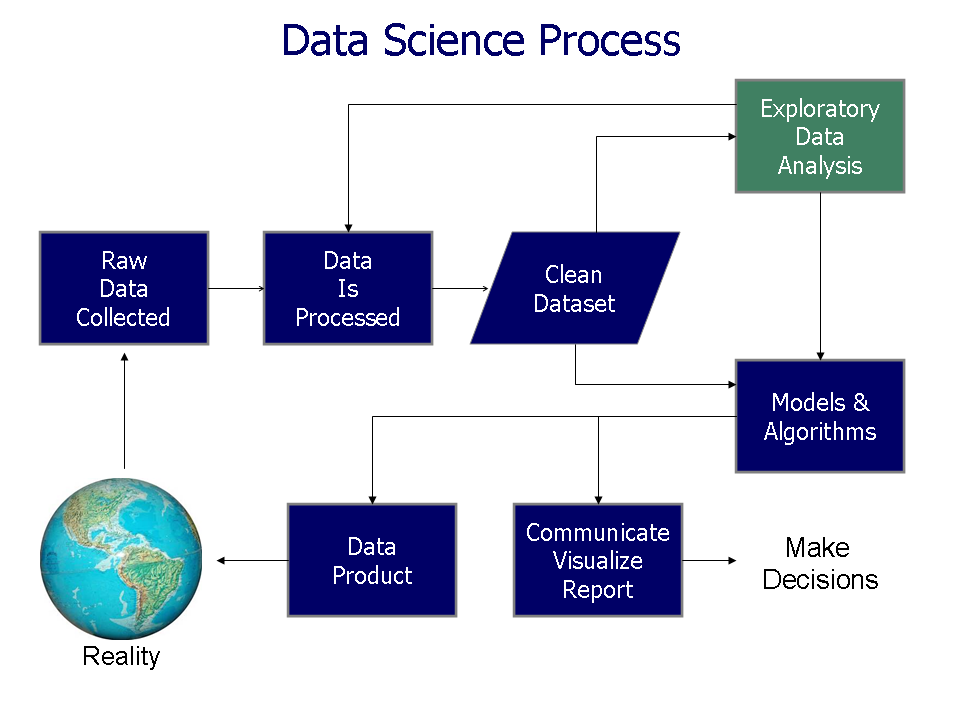
Raw data is rarely perfect. Think of it like a chef receiving a box of fresh vegetables from a farm. Before they can be used in a recipe, they need to be washed, peeled, and chopped. Data cleaning is the same idea: it's the process of preparing raw data for analysis by finding and fixing problems.
Without this step, your analysis can be skewed, leading to wrong conclusions. Messy data can have missing information, duplicate entries, or simple typos. Cleaning it up ensures that the insights you draw are accurate and reliable. It’s a critical first step in any data project.
Handling Missing Data
One of the most common issues is missing data. This happens when a value is not stored for a variable in an observation. Imagine a customer survey where some people skip the question about their age. In your dataset, those entries would be blank or marked as 'null'.
Leaving these gaps untouched can cause errors in your calculations. For example, you can't find the average age of your customers if some of the ages are missing.
There are a few common ways to deal with this:
-
Deletion: The simplest approach is to remove any rows that contain missing values. This works well if you have a very large dataset and only a tiny fraction of it is missing. However, if you remove too many rows, you might lose valuable information or introduce bias.
-
Imputation: Another strategy is to fill in, or 'impute', the missing values. For numerical data, you could fill the gaps with the mean (average), median (middle value), or mode (most frequent value) of the column. For categorical data, using the mode is common.
import pandas as pd
import numpy as np

# Create a sample DataFrame with missing values
data = {'Name': ['Alice', 'Bob', 'Charlie', 'David', 'Eva'],
        'Age': [25, 32, np.nan, 22, 40],
        'City': ['New York', 'Los Angeles', 'Chicago', np.nan, 'Boston']}
df = pd.DataFrame(data)

# Option 1: Drop rows with any missing values
df_dropped = df.dropna()

# Option 2: Fill missing 'Age' with the mean age
mean_age = df['Age'].mean()
df_filled = df.copy() # Make a copy to keep original safe
df_filled['Age'].fillna(mean_age, inplace=True)
Removing Duplicates
Duplicate data occurs when the same observation appears more than once. This can happen due to data entry errors or issues when merging datasets from different sources. If you're counting unique customers, a duplicate entry for the same person will throw off your count.
Finding and removing these duplicates is essential for accuracy. You can check for duplicates across the entire dataset (where every value in a row is identical to another) or based on a specific column, like an email address or a user ID.
# Create a DataFrame with duplicate rows
data = {'ID': [101, 102, 101, 103],
        'Product': ['A', 'B', 'A', 'C']}
df_duplicates = pd.DataFrame(data)

# Remove duplicate rows
df_no_duplicates = df_duplicates.drop_duplicates()

# The row with ID 101 and Product 'A' appears twice.
# drop_duplicates() will keep the first instance and remove the second.
Correcting Errors
Data errors can come in many forms, from simple typos to values that are logically impossible. A person's age listed as 150 is a clear error. A city name spelled as 'Nwe York' is another. These mistakes can make it difficult to group and analyze data correctly.
A big part of correcting errors is standardizing data formats. Inconsistency is a major source of problems. For example, a 'State' column might contain 'California', 'CA', and 'california'. To a computer, these are three different values. Standardizing them to a single format, like 'CA', is necessary for accurate analysis.
| Problem | Messy Data | Cleaned Data |
|---|---|---|
| Capitalization | usa, USA, U.S.A. | USA |
| Date Format | 10/1/23, Oct 1, 2023 | 2023-10-01 |
| Whitespace | New York | New York |
| Units | 150 lbs, 68 kg | 68.0, 68.0 (in a new 'Weight_kg' column) |
Fixing these issues often involves writing scripts to trim extra spaces, convert text to a consistent case (like uppercase), and parse different date formats into one standard. This process ensures that when you filter or group your data, you get everything you expect.