Apple Data Agent LLM Integration
Apple TCC Framework
Meet TCC The Guardian of Your Data
Apple devices are designed with privacy at their core. A key part of this design is a system that manages how apps access your personal information. This system is called Transparency, Consent, and Control, or TCC for short. Think of it as a vigilant gatekeeper for your data.
TCC
noun
Transparency, Consent, and Control. An Apple security framework that requires user consent before an application can access sensitive data or system resources.
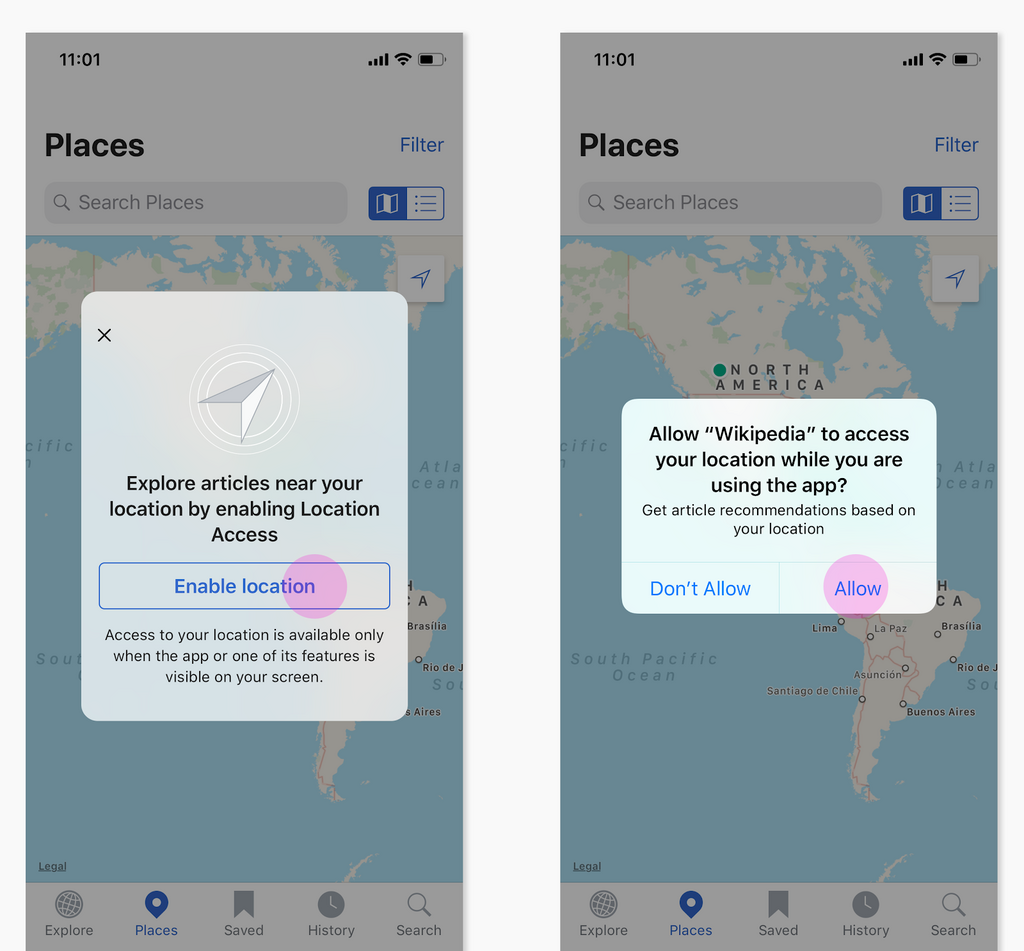
Whenever an app wants to access something sensitive, like your location, photos, camera, or contacts, it can't just take it. TCC intercepts the request and presents you with a standardized, system-level pop-up. This prompt clearly states what the app wants and why it needs it. You are then given a simple choice: allow or deny.
This process ensures transparency because you always know who wants what. It's based on consent because nothing happens without your approval. And it provides control because you hold the power to grant or revoke access at any time.
Permission Categories
TCC protects a wide range of data and system features. Each protected resource is called a 'permission category.' When an app needs access, it must declare its intent to use one of these categories.
| Category | Data or Feature Protected |
|---|---|
NSPhotoLibraryUsageDescription | The user's photo library. |
NSCameraUsageDescription | The device's camera. |
NSMicrophoneUsageDescription | The device's microphone. |
NSLocationWhenInUseUsageDescription | The user's location while the app is active. |
NSContactsUsageDescription | The user's address book and contacts. |
NSCalendarsUsageDescription | The user's calendars. |
NSBluetoothAlwaysUsageDescription | Bluetooth connectivity. |
NSSpeechRecognitionUsageDescription | On-device speech recognition. |
This is just a sample. The full list is extensive and covers everything from health data to your media library. For each category, the developer must provide a short, clear string explaining why they need access. This is the text you see in the permission pop-up.
A good permission request string is specific and helpful. "We need your location to show nearby coffee shops on the map" is much better than "We need your location for app functionality."
How Apps Ask for Permission
Requesting permission isn't just a setting; it's an active process. Developers must write code that triggers the TCC prompt at the right moment. The request should happen when you try to use a feature that needs the data, not necessarily the first time you open the app. This provides context and helps you understand why the permission is necessary.
Here is a simplified example in Swift, the language used for iOS development, showing how an app might request access to the user's contacts.
import Contacts

// Create a 'contact store', which is the gateway to the user's contacts
let store = CNContactStore()

// Request access to the contacts
store.requestAccess(for: .contacts) { (granted, error) in
    // This part of the code runs after the user has made a choice
    if granted {
        print("Access to contacts was granted.")
        // The app can now proceed to fetch contacts
    } else {
        print("Access was denied.")
        // The app must handle this case gracefully
    }
}
The key is the requestAccess function. When this code runs, TCC steps in and shows the permission dialog. The app's execution pauses until you tap 'Allow' or 'Don't Allow'. The app then receives your decision and must respect it.
Managing Your Permissions
Your initial decision isn't set in stone. You have complete control to review and change permissions for any app at any time. On iOS and macOS, this is handled in the Settings or System Settings app, under 'Privacy & Security'.
Use MAS-aligned and clear micro-copy to explain permissions, security steps, or data usage without sounding robotic.
There, you'll find a list of all the protected categories, like Location Services, Photos, and Microphone. Tapping on any category reveals which apps have requested access. A simple toggle switch next to each app's name lets you grant or revoke permission instantly. If you revoke permission, the app immediately loses its ability to access that data.
Let's test your understanding of Apple's TCC framework.
What does the acronym TCC stand for in the context of Apple's privacy features?
What is the primary function of the TCC framework on Apple devices?
By centralizing permission management, TCC gives you a single, reliable place to oversee your digital privacy. It's a powerful tool that puts you in charge of your personal information.