Android to IoT Device Communication
Introduction to IoT Communication
Connecting Your App to the World
At its heart, the Internet of Things (IoT) is about connecting physical objects to the digital world. For an Android app, this means being able to talk to a smart lightbulb, a fitness tracker, or a home security sensor. But how do they communicate? They need a shared language, a set of rules for sending and receiving information. These rules are called communication protocols.
The Languages of Devices
Imagine you have two devices that need to share data. They can't just shout into the void; they need a reliable channel. For most consumer IoT devices that interact with mobile apps, two protocols are dominant: Wi-Fi and Bluetooth.
Wi-Fi is the protocol you likely use to connect to the internet at home or work. It's great for IoT devices that need a constant, high-speed connection to the internet. Think of a smart camera that streams video to the cloud or a smart speaker that pulls music from an online service. They connect to a local Wi-Fi router, which acts as a gateway to the broader internet.
Bluetooth is designed for short-range, direct communication between two devices. It uses less power than Wi-Fi, making it ideal for battery-powered gadgets like wireless headphones, smartwatches, or remote sensors. Instead of connecting to a central router, a Bluetooth device pairs directly with your phone.
| Feature | Wi-Fi | Bluetooth |
|---|---|---|
| Range | Longer (up to 100 meters) | Shorter (up to 10 meters) |
| Power Use | High | Low |
| Data Rate | High | Lower |
| Best For | Internet access, streaming data | Direct device pairing, wearables |
So, your app might need to speak Wi-Fi to control a smart plug and Bluetooth to get data from a heart rate monitor. Managing all these different connections and data formats can get complicated quickly. That's where a special layer of software comes in.
The Universal Translator
This software layer is called middleware. Think of it as a universal translator and traffic cop for your IoT system. It sits between your Android application and all the various IoT devices.
Instead of your app having to know the specific protocol and data format for every single device, it just talks to the middleware. The middleware then handles the messy details of communicating with each device, whether it uses Wi-Fi, Bluetooth, or another protocol. It can collect data from multiple sources, standardize it into a single format, and pass it cleanly to your app. This dramatically simplifies development.
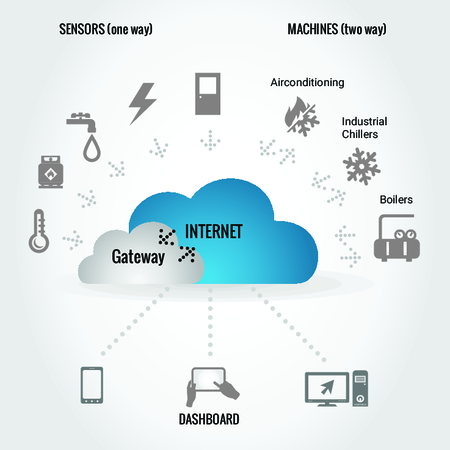
As the diagram shows, the app has one simple connection to the middleware, while the middleware manages the multiple, complex connections to the devices. This not only makes the code cleaner but also makes it easier to add new types of devices to the system later on.
Now that you understand the basic components of IoT communication, let's test your knowledge.
What is the fundamental concept behind the Internet of Things (IoT)?
You are developing an app for a small, battery-powered heart rate monitor that sends data directly to a user's smartphone. Which communication protocol is most suitable?
Understanding these communication basics is the first step toward building Android apps that can control and interact with the physical world.