Android Middleware Development
Android Middleware Basics
What is Middleware?
Think of middleware as a helpful translator. Imagine two people who need to work together but speak different languages. A translator stands between them, relaying messages back and forth so they can cooperate. In the world of software, middleware does a similar job.
In Android, middleware is the software layer that sits between the operating system and the applications you use every day. It handles the essential but often invisible tasks that make everything work smoothly. When an app wants to play a video, connect to Wi-Fi, or get your location, it doesn't talk directly to the phone's hardware. Instead, it makes a request to the middleware, which then handles the complex communication with the underlying system.
Middleware allows apps to access system services without needing to understand the complex inner workings of the device's hardware.
The Android Architecture
To understand where middleware fits, it helps to see the Android operating system as a stack of layers, kind of like a cake. Each layer has a specific job and builds upon the one below it.
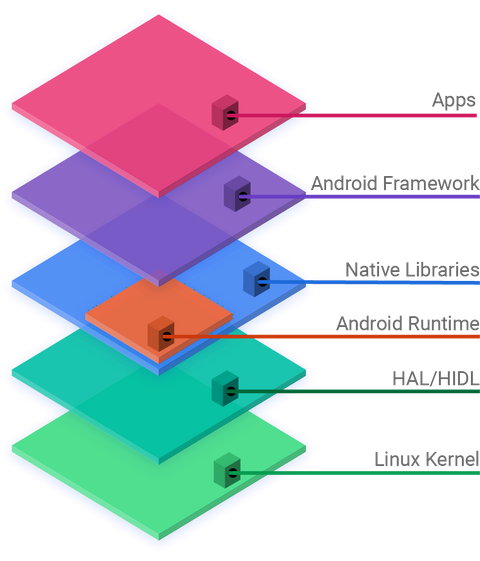
Let's look at these layers from the bottom up:
-
Linux Kernel: This is the foundation. The kernel is the core of the operating system and directly manages the device's hardware, including the processor, memory, and drivers for components like the camera and display. Apps never interact with the kernel directly.
-
Hardware Abstraction Layer (HAL): This layer provides a standard interface that exposes device hardware capabilities to the higher-level framework. It allows Android to be hardware-agnostic, meaning it can run on different hardware configurations without changing the upper-level code.
-
Native Libraries & Android Runtime: This is a crucial part of the middleware. It includes a set of C and C++ libraries that handle many core system functions like drawing graphics, playing media, and managing databases. The Android Runtime (ART) is also at this level. ART is responsible for taking your app's code and executing it on the device.
-
Application Framework: This is where developers spend most of their time. It's a rich set of tools and services that form another key part of the middleware. It provides high-level building blocks for apps, such as an Activity Manager to control the app lifecycle, a Notification Manager to display alerts, and a View System for creating user interfaces.
-
Applications: The top layer. This is where you find the apps you install and use, like the phone dialer, web browser, and games. These apps are built using the tools provided by the Application Framework.
How It All Works Together
Middleware is not a single, separate layer but is spread across the Native Libraries and the Application Framework. These two layers work in tandem to connect the apps at the top with the kernel and hardware at the bottom.
When you tap a button in an app to take a picture, a chain of events kicks off through the middleware.
The app calls a function from the Application Framework, like the CameraManager. This framework component then uses the Native Libraries to process the request. Finally, these libraries communicate through the HAL to the Linux kernel, which instructs the actual camera hardware to capture an image. The data then flows back up the same chain to your app.
This layered approach, with middleware as the critical link, is what makes Android so flexible and powerful. It allows developers to create complex applications without needing to be experts in hardware engineering.
Now that you have a high-level view of Android's structure, let's test your understanding of these core concepts.
What is the primary role of middleware in the Android operating system?
The text describes middleware as being spread across which two layers of the Android stack?
Understanding these layers is the first step toward building great applications. By knowing how the system is structured, you can better understand how your code will interact with the device.