Android Development with Kotlin for Web Developers
Introduction to Kotlin
Getting Started with Kotlin
Kotlin is a modern programming language that makes developers happier. It's concise, safe, and fully interoperable with Java, which is why Google named it the preferred language for Android development. If you're coming from a web background, you'll find Kotlin's syntax clean and intuitive.

One of the first things to learn is how to declare variables. In Kotlin, you use val for variables whose value never changes (immutable) and var for variables that can be reassigned (mutable). It's good practice to use val whenever possible.
// Use 'val' for a read-only variable
val name: String = "Alex"

// Use 'var' for a mutable variable
var score: Int = 0
score = 10 // This is okay

// You can't reassign a val
// name = "Maria" // This would cause an error
Notice the data types String and Int. Kotlin is a statically-typed language, meaning the type of a variable is known at compile time. However, Kotlin also has excellent type inference, so you often don't need to explicitly declare the type.
statically typed
adjective
A characteristic of a programming language where variable types are checked before the program is run, helping to catch errors early.
The compiler can figure it out on its own, making your code more concise.
// The compiler infers the type String
val greeting = "Hello"

// The compiler infers the type Int
var year = 2024
Common data types include Int for integers, Double for floating-point numbers, Boolean for true/false values, and String for text.
A major feature of Kotlin is its built-in null safety. The type system distinguishes between references that can hold null (
String?) and those that cannot (String), virtually eliminating the dreaded NullPointerException.
Controlling the Flow
Like other languages, Kotlin uses control flow statements to determine the execution path of a program. You have the standard if-else construct, but in Kotlin, it can also be used as an expression that returns a value.
val a = 10
val b = 20

// 'if' as an expression
val max = if (a > b) a else b

println("The maximum value is $max")
// Prints: The maximum value is 20
For more complex branching, Kotlin provides the when expression. It's a more powerful and readable version of the switch statement found in other languages.
val httpStatusCode = 200
val message = when (httpStatusCode) {
    200 -> "OK"
    404 -> "Not Found"
    500 -> "Internal Server Error"
    else -> "Unknown Code"
}
println(message) // Prints: OK
You can also iterate over collections with for loops. Here's how you might loop through a list of numbers:
val numbers = listOf(1, 2, 3, 4, 5)
for (number in numbers) {
    println(number)
}
Functions and Lambdas
You declare functions in Kotlin using the fun keyword. You specify the parameter names and types, followed by the return type.
Kotlin uses the fun keyword to introduce functions.
// A function that takes two integers and returns their sum
fun add(a: Int, b: Int): Int {
    return a + b
}

// A function can also be written in a single line
fun multiply(a: Int, b: Int) = a * b
Kotlin also has first-class support for lambdas, which are essentially anonymous functions you can treat as values. You can store them in variables, pass them as arguments, or return them from other functions. They are incredibly useful and common in modern Kotlin code.
// A lambda that takes two integers and returns their sum
val sum: (Int, Int) -> Int = { a, b -> a + b }

// You can then call it like a regular function
val result = sum(5, 3) // result is 8
Working with Java
One of Kotlin's greatest strengths is its 100% interoperability with Java. This means you can have both Kotlin and Java files in the same project, and they can call each other seamlessly. This was a critical feature for its adoption in the Android world, as it allowed developers to gradually migrate existing Java codebases.
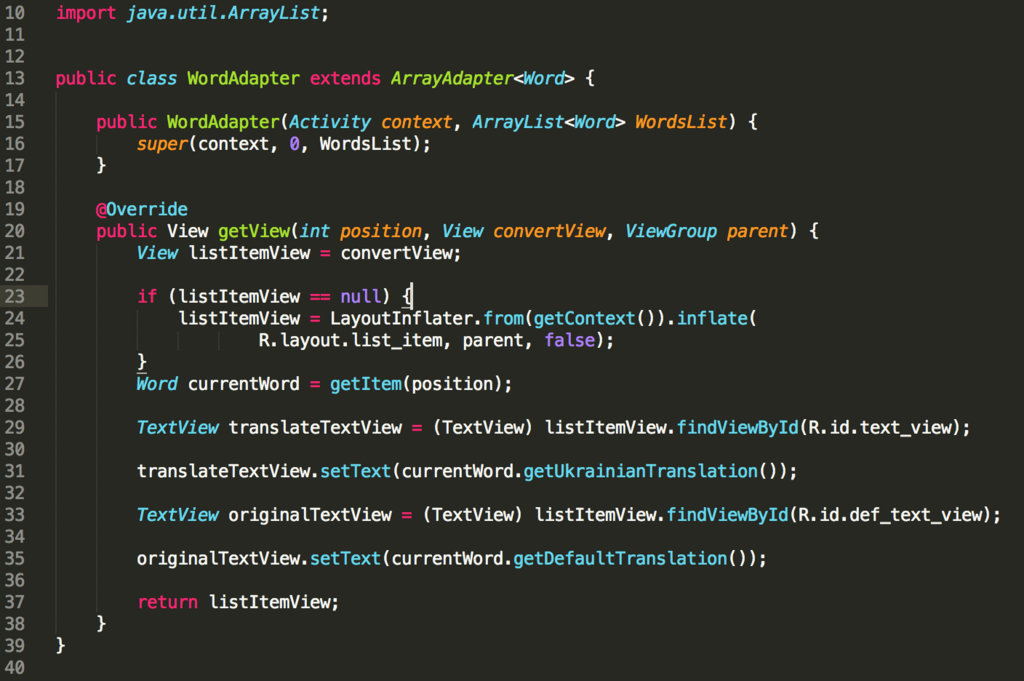
For example, you can instantiate a Java class and call its methods from a Kotlin file just as you would with a native Kotlin class. The Kotlin compiler handles all the behind-the-scenes work to make this possible. This bridge between the two languages makes Kotlin a practical and powerful choice for any developer familiar with the Java ecosystem.
Let's review the key concepts we've covered.
Ready to check your understanding?
In Kotlin, what is the primary difference between declaring a variable with val and var?
What does it mean that Kotlin has "type inference"?
This covers the very basics of Kotlin. With this foundation, you can start exploring how these concepts are applied to build real Android applications.