Android App Development Fundamentals
Introduction to Android Development
Welcome to Android
Android is more than just the software on your phone. It's a massive, open-source operating system based on the Linux kernel, powering billions of devices worldwide, from smartphones and tablets to watches and TVs. Think of it as the foundation upon which all your apps are built.
This foundation has a layered structure, much like a building. Each layer has a specific job and builds upon the one below it.
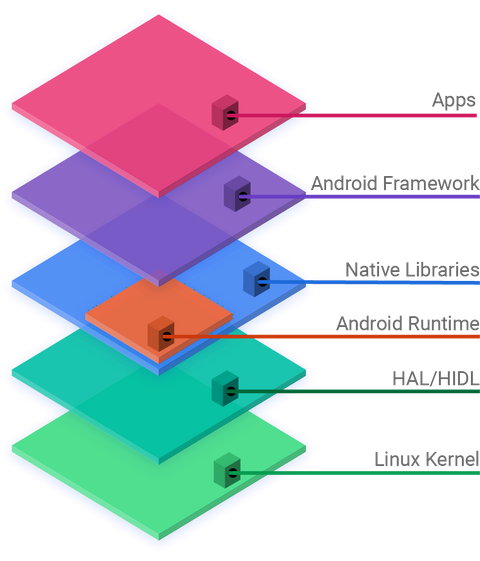
At the very bottom is the Linux Kernel, the core that manages the device's hardware like the processor, memory, and drivers. Above that, you have layers for hardware abstraction (HAL), native libraries written in C/C++, and the Android Runtime (ART), which executes app code. Near the top is the Application Framework, which provides the high-level services apps use, like managing notifications or phone calls. Finally, at the very top, are the apps themselves—both the ones that come with the phone and the ones you'll build.
Your Development Toolkit
To build an app, you need a workshop. In the world of Android development, that workshop is called an Integrated Development Environment, or IDE. The official IDE for Android is Android Studio. It's a powerful piece of software that bundles everything you need into one place: a code editor, debugging tools, and an emulator to test your app on a virtual device.
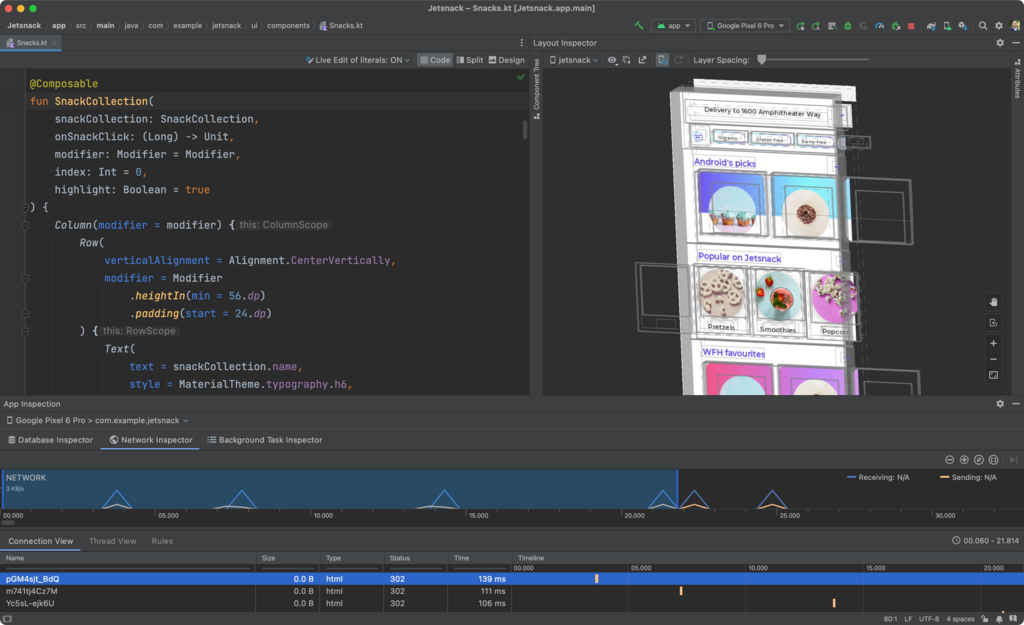
When you install Android Studio, it also comes with the Android SDK, which stands for Software Development Kit. If Android Studio is the workshop, the SDK is your specialized set of tools and blueprints. It includes essential components like libraries, a debugger, and documentation that allow your code to interact with the Android operating system.
Android Studio and the SDK are the industry-standard tools for a reason. They streamline the development process from start to finish.
Getting set up is straightforward. You download Android Studio from the official Android developer website. The installation wizard will guide you through the process, including downloading the latest SDK components. Once installed, you'll have everything you need to start creating your first project.
The Language of Android
Apps are built with code, and for Android, you have two primary language choices: Kotlin and Java. For many years, Java was the official language. It's a well-established, powerful language with a huge amount of documentation and community support.
However, in recent years, Google has adopted a "Kotlin-first" approach. Kotlin is a more modern language that also runs on the Java Virtual Machine (JVM). It's fully interoperable with Java, meaning you can have both Kotlin and Java code in the same project. Many developers prefer Kotlin because its syntax is more concise and expressive, which can lead to writing less code with fewer errors.
Kotlin makes developing Android apps simpler and more fun.
For a beginner, starting with Kotlin is generally the recommended path. Here’s a tiny glimpse of how Kotlin looks. This snippet declares a function named greet that prints a message.
fun greet() {
    // This is a comment. It explains the code.
    val name = "Android Developer" // Declares a read-only variable
    println("Hello, $name!")    // Prints a message to the console
}
Don't worry about understanding every piece of that syntax right now. The key takeaway is that you'll be using a language like Kotlin to write the instructions that tell your app what to do. You'll define what happens when a user taps a button, how data is displayed on the screen, and all the other logic that makes an app work.
Let's check your understanding of these foundational concepts.
What is the core of the Android operating system that directly manages the device's hardware like the processor and memory?
The official Integrated Development Environment (IDE) for Android, which bundles a code editor, debugger, and emulator, is called __________.
You now have a high-level view of the Android ecosystem, the tools you'll use, and the language you'll write in. The next step is to put it all together and build something simple.