Amazon SageMaker Fundamentals
Introduction to Amazon SageMaker
Your ML Workshop in the Cloud
Imagine you're building a complex project, like a custom piece of furniture. You'd need a workshop with all the right tools: saws, sanders, drills, and a sturdy workbench. Amazon SageMaker is like a complete machine learning workshop provided as a service. It's a single platform that brings together all the tools you need to build, train, and deploy ML models without the hassle of managing servers or software.
Because SageMaker is a fully managed service, Amazon handles all the underlying infrastructure. You don't have to worry about buying servers, installing operating systems, or patching software. You can just focus on your data and your models. This approach saves time and lets developers and data scientists get their projects off the ground much faster.
If you master SageMaker, you will rarely need another tool.
What's Inside the Toolbox
SageMaker organizes the messy process of machine learning into a streamlined workflow. It provides specialized tools for each stage of the journey, all accessible from one central place.
The entire process is managed within a web-based integrated development environment (IDE) called SageMaker Studio. Think of it as your command center for all things ML.
One of SageMaker's biggest advantages is its collection of built-in algorithms. These are pre-built, high-performance models optimized for running efficiently in the cloud. You can use them for common tasks like classification, regression, and clustering without having to write the algorithms from scratch.
If you prefer to use your own custom code or popular open-source tools, SageMaker supports all major machine learning frameworks. You can bring your models written in TensorFlow, PyTorch, Scikit-learn, or others and run them on SageMaker's powerful infrastructure.
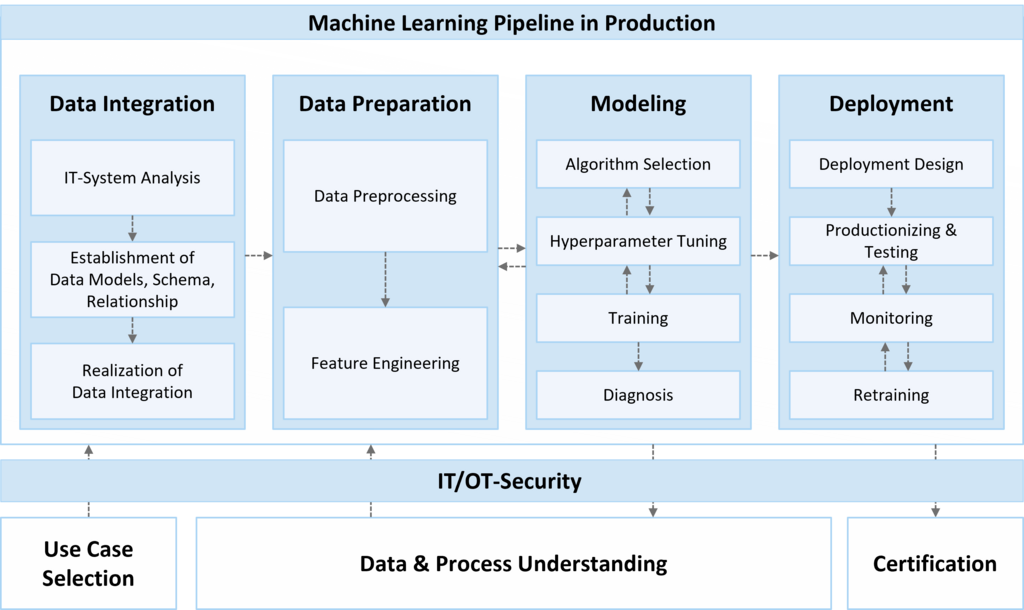
The SageMaker Workflow
While every project is different, most machine learning workflows follow a similar path. SageMaker provides tools to simplify each step.
- Data Preparation: First, you need to collect, clean, and format your data. SageMaker has tools like Data Wrangler to simplify this often time-consuming step.
- Model Building: This is where you write the code for your model. You can do this in SageMaker Studio Notebooks, choosing either a built-in algorithm or bringing your own from a framework like PyTorch.
- Model Training: Next, you'll 'teach' your model using your prepared data. With SageMaker, you can kick off a training job with a single command, and it will handle provisioning the necessary servers, running the training, and then shutting everything down when it's done to save money.
- Model Deployment: Once your model is trained, you need to make it available for applications to use. SageMaker can deploy your model to a secure, auto-scaling environment with just a few clicks, creating what's known as an 'endpoint'.
- Monitoring: After deployment, SageMaker helps you monitor your model's performance and watch for issues like 'model drift,' where the model becomes less accurate over time as new data comes in.
Ready to check your understanding of SageMaker's key features?
What is the primary advantage of Amazon SageMaker being a 'fully managed' service?
A developer wants to quickly deploy a trained model so that a web application can get predictions from it. Which SageMaker feature is specifically designed for this purpose?
By providing a unified environment for these steps, SageMaker helps teams build and deploy models faster and more reliably.