Amazon Delivery Logistics
Order Placement
The First Click
It all starts with a search. Whether you're using the website or the mobile app, Amazon’s storefront is designed to make finding and buying products as simple as possible. You can browse categories, type in exactly what you want, or explore personalized recommendations. This interface is the front door to a massive digital warehouse.
When you find an item you want, you add it to your virtual shopping cart. This action reserves nothing and commits you to nothing. It's just a way of gathering potential purchases. The user interface keeps track of everything, from the quantity of each item to different options like color and size. For millions of customers, this process is the entire visible part of the Amazon experience.
Think of the 'Add to Cart' button as the start of a conversation. You're telling the system, 'I'm interested in this.' The system then holds onto that information, ready for when you decide to check out.
Behind the Scenes
When you proceed to checkout, Amazon's system springs into action. It pulls together several key pieces of information into a single digital package: your order. This package includes the items in your cart, your chosen shipping address, and your preferred delivery speed.
This is where customer data integration becomes critical. The system needs to access your account details, saved addresses, and payment methods securely and instantly. All this information is combined to create a unique order ID. This ID is the key that unlocks the rest of the fulfillment process, tracking your purchase from this moment until it arrives at your door.
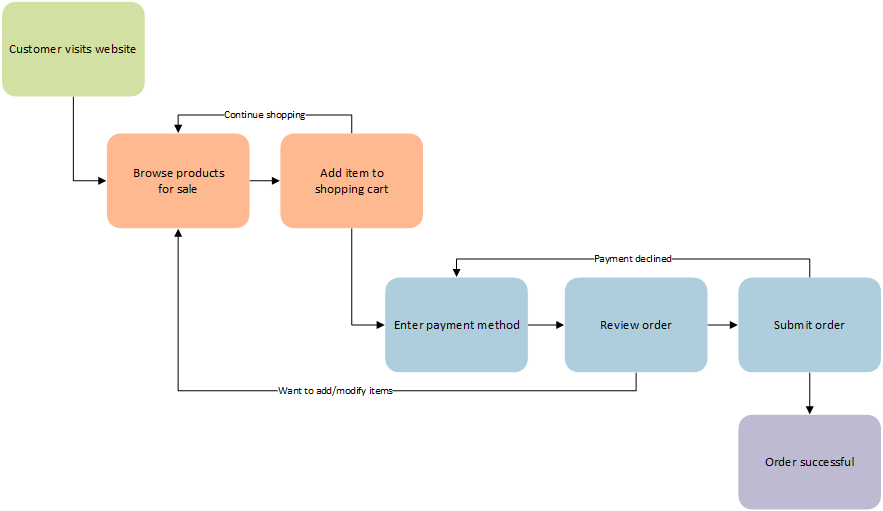
Once all the details are collected and you've reviewed your order, the final step is payment. Clicking 'Place your order' triggers another complex, high-speed process.
Payment and Confirmation
Processing a payment is more than just charging a card. When you confirm your order, Amazon’s system sends a secure request to a payment gateway. This gateway acts as a middleman, communicating with your bank or credit card company to verify that you have sufficient funds and that the transaction is legitimate.
This all happens in a matter of seconds. The system performs security checks to prevent fraud, ensuring the transaction is safe for both you and Amazon.
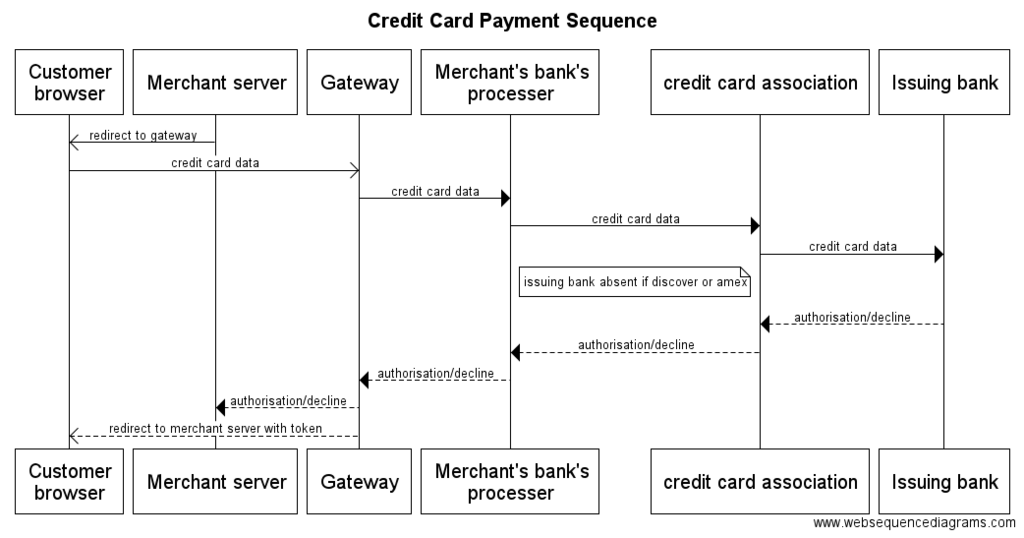
Once the payment is approved, the order is officially confirmed. The system immediately sends you a confirmation email and updates the order status in your Amazon account. This confirmation is the green light. Your request has been successfully received, paid for, and is now ready to be handed off to the fulfillment network.
Now that you've seen how an order is placed and confirmed, let's review the key concepts.
What is the primary function of the virtual shopping cart on Amazon?
During the checkout process, which of the following is created to track your purchase from that point until delivery?
With the order successfully placed, the next phase of the delivery journey begins.