AI Workflows Explained
Introduction to AI Workflows
What is an AI Workflow?
Think of an AI workflow as a recipe or an automated assembly line for a specific task. Instead of baking a cake or building a car, you're getting an AI to accomplish a goal, like identifying spam emails or forecasting sales.
A workflow is simply the series of steps an AI system follows, from start to finish, to turn raw information into a useful result. It provides a structured, repeatable process that ensures consistency and allows the system to operate on its own.
The goal is to automate complex processes, freeing up human experts to focus on strategy and creative problem-solving rather than repetitive tasks.
The Building Blocks of a Workflow
Every AI workflow, regardless of the task, is built from a few core components. Each step takes an input and produces an output for the next stage in the line.
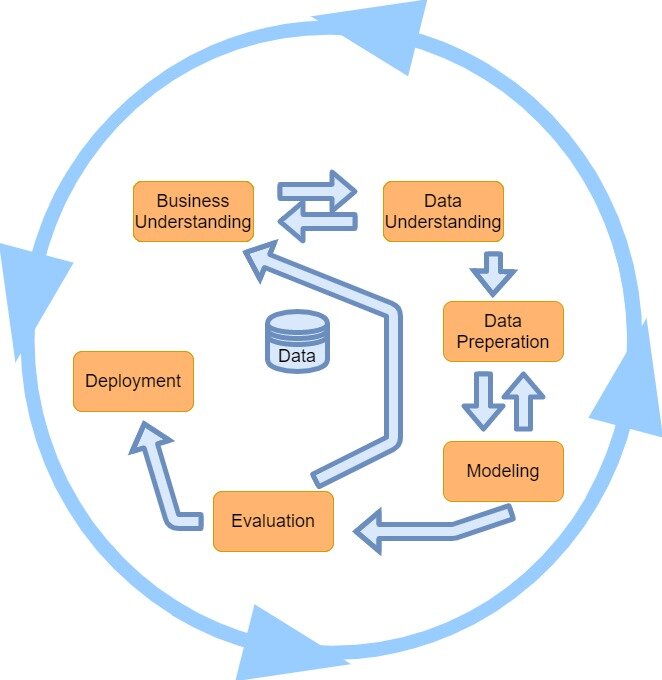
This structured process typically involves five key stages.
Data Collection
noun
The first step is gathering the raw materials. This could be anything from customer reviews and sales figures to images and sensor readings. Without data, the AI has nothing to learn from.
2. Preprocessing Raw data is often messy. It might have missing values, errors, or irrelevant information. The preprocessing step cleans and organizes the data, getting it into a consistent format that the AI model can understand. Think of it as chopping vegetables and measuring ingredients before you start cooking.
3. Model Training This is where the "learning" happens. The prepared data is fed into an AI model (an algorithm). The model analyzes the data to find patterns, relationships, and insights. For example, it might learn to associate certain words in an email with spam.
4. Evaluation Once the model is trained, it needs to be tested. The evaluation stage measures how well the model performs its task using new data it hasn't seen before. This step is crucial for ensuring the AI is accurate and reliable before it's put to use.
5. Deployment After a model passes evaluation, it's deployed. This means integrating it into a real-world application or business process. A deployed spam filter starts actively blocking junk mail in your inbox; a deployed sales forecaster starts generating reports for the sales team.
Why Bother with Workflows?
Structuring AI processes into workflows isn't just about organization; it provides tangible benefits.
- Efficiency: Automation is the name of the game. Workflows run on their own, handling repetitive tasks much faster and more consistently than a person could.
- Scalability: Once a workflow is built, it can be scaled up to handle enormous amounts of data. A process that works for one hundred images can be applied to one hundred million.
- Complexity Management: AI projects can be incredibly complex. A workflow breaks the process down into manageable, logical steps. This makes it easier to build, monitor, and troubleshoot the system.
Tools for Automation
Building these workflows from scratch requires deep programming knowledge. However, a growing number of tools and platforms are designed to make this process easier. Many of these are "no-code" or "low-code," meaning you can build and connect the different stages of a workflow using a visual interface.
No-code AI workflow automation tools enable users to build, deploy, and manage AI‑driven workflows through visual interfaces without coding.
These platforms allow teams to quickly assemble, test, and deploy AI solutions, democratizing access to powerful automation and making it possible to implement AI without a dedicated team of software engineers.
Which stage of the AI workflow involves integrating the model into a real-world application, like a spam filter in an email service?
An AI workflow is most similar to which of the following?
By understanding these core concepts, you have a solid foundation for how AI is put into practice to solve real-world problems.