AI Strategies for Modern Childcare Centres
Provider Comparison for Childcare
Choosing Your AI Engine
Selecting the right AI model for your childcare centre is like choosing an engine for a car. You need to look past the brand names and understand the specific performance of each option. The three main contenders are OpenAI's GPT-4o, Anthropic's Claude 3.5 Sonnet, and Google's Gemini 1.5 Pro. Each has distinct strengths for the administrative and educational tasks you handle daily.
Think of them not just as chatbots, but as powerful processing tools. They can digest lengthy documents, analyse images from the classroom, and help draft communications. The key is matching their specific features to your centre's needs.
Key Features for Childcare
When evaluating these models, three features are particularly important for a childcare environment: the context window, multimodal capabilities, and specialised work environments.
The 'context window' refers to the amount of information the AI can hold in its 'memory' at one time. A larger context window means you can give it more information to work with, like a full curriculum document, without it forgetting the beginning.
Imagine you need to create a series of lesson plans based on the Early Years Learning Framework (EYLF). With a large context window, you can upload the entire framework document and ask the AI to generate age-appropriate activities that align with specific outcomes. A smaller window would require you to feed the document in chunks, making the process less efficient and the results less coherent.
| Model | Context Window (Tokens) | Approximate Pages |
|---|---|---|
| OpenAI GPT-4o | 128,000 | ~300 pages |
| Google Gemini 1.5 Pro | 1,000,000 (up to 2M) | ~3,000 pages |
| Anthropic Claude 3.5 | 200,000 | ~500 pages |
As the table shows, Gemini 1.5 Pro has a significant advantage in handling massive documents, which could be useful for analysing yearly reports or extensive regulatory guidelines. Claude 3.5 Sonnet offers a generous window that is more than sufficient for most curriculum documents and policy manuals.
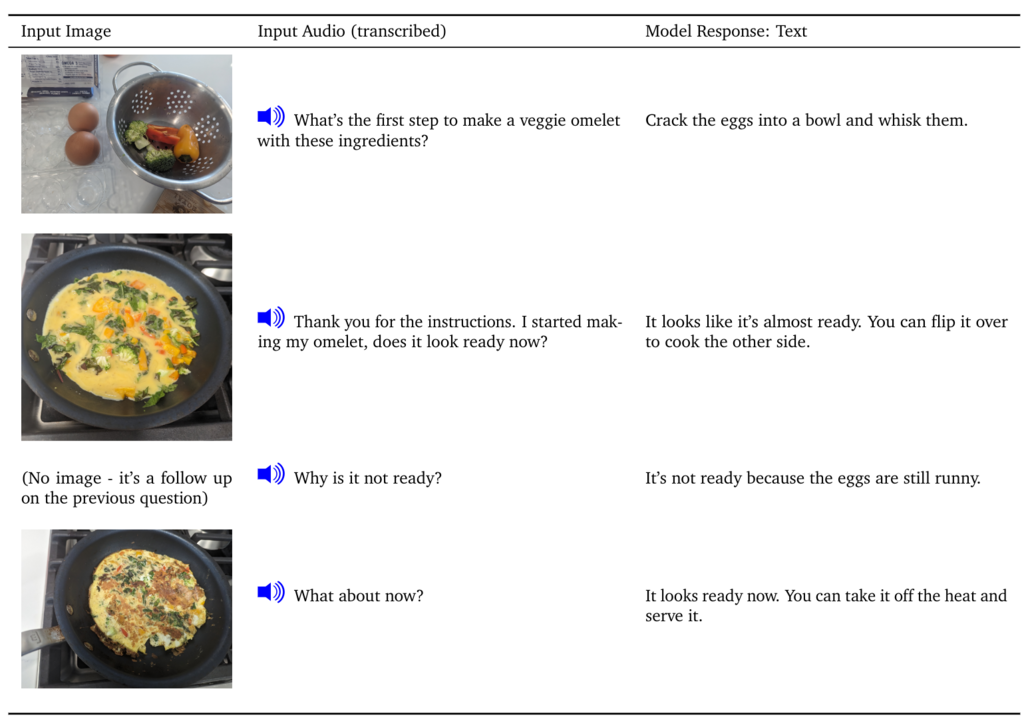
Next, consider multimodal capabilities. This means the AI can process more than just text; it can 'see' images and 'hear' audio. For a childcare centre, this is a game-changer. You could upload a photo of a block tower a child has built and ask the AI to analyse it for signs of fine motor skill development, spatial reasoning, or problem-solving. It could help you draft a developmental observation for that child's portfolio, linking the visual evidence directly to learning outcomes.
Finally, some models offer a 'sandbox' or 'artifacts' environment. This is a dedicated workspace within the AI interface where you can have it generate content like code, text documents, or website designs. Anthropic’s Claude 3.5 Sonnet is a leader here with its 'Artifacts' feature. You could ask it to draft a monthly parent newsletter, and it will generate a formatted draft in a separate window. You can then edit it in real-time and see the changes, making it a collaborative tool for creating polished documents without having to copy and paste text back and forth.
Performance and Practicality
Beyond features, you need to consider how these models perform in the real world. Factual accuracy, or the reduction of 'hallucinations', is paramount. When drafting developmental reports or summaries for parents, you cannot afford errors. All three models have made significant strides in accuracy, but it's crucial to always verify AI-generated content, especially when it relates to a child's development.
Claude 3.5 Sonnet is often praised for its nuanced writing style and strong performance in coding and text generation. GPT-4o is a powerful all-rounder, known for its strong reasoning and conversational abilities. Gemini 1.5 Pro excels at processing and finding specific information within very large amounts of data, thanks to its massive context window.
For a small or medium-sized centre, cost-effectiveness is key. Most providers offer a tiered pricing model. You can use the free or lower-cost consumer versions for simple tasks, but for handling sensitive data like child records, you'll need an enterprise-grade plan. These plans offer enhanced data privacy, ensuring your centre's information isn't used to train the models.
Integrating an AI model with your CCMS via an API could streamline your workflow significantly. Imagine your software automatically drafting daily reports based on photos and notes logged by educators throughout the day. This level of integration requires technical expertise to set up but can lead to major efficiency gains.
Before you make a decision, it's time to check your understanding of these powerful tools.
A childcare director wants to analyse the entire National Quality Framework (a very large set of documents) to ensure all centre policies are compliant. Which AI model is specifically designed to handle this kind of massive document analysis most effectively?
An educator uploads a photo of a child's drawing and asks the AI to help write a developmental observation based on the visual evidence. What is this capability of processing images in addition to text called?
Ultimately, the best 'engine' for your centre depends on your priorities. If your main goal is to analyse very long documents, Gemini might be the best fit. If you want a collaborative tool for creating documents and communications, Claude's 'Artifacts' feature is a standout. For a versatile and powerful all-rounder, GPT-4o remains a top contender.