AI-Powered Product Experiences
Understanding AI Outputs
The Nature of AI Answers
When we get a result from traditional software, we expect it to be precise and instant. Ask a calculator for 2+2, and it gives you 4. Every time. Without delay.
AI outputs are different. They behave less like a calculator and more like a conversation with a creative, knowledgeable, but sometimes quirky expert. Their answers have three distinct characteristics: they can be messy, they aren't immediate, and they're based on probability.
AI-generated content is not a finished product. It's a first draft, a starting point that requires human oversight to refine and validate.
First, AI outputs are often messy. A model might generate a block of text that's poorly formatted, contains factual errors (often called “hallucinations”), or includes extra, unrequested information. This happens because the AI isn't retrieving a stored answer; it's constructing a new one based on patterns in its training data. The result can be unstructured and unpredictable.
Second, there’s latency. Generating a response takes time. The model performs billions of calculations to figure out the most likely sequence of words or pixels. This delay, from a few seconds to much longer, is a core challenge. A user waiting for a spinning icon can quickly become a user who closes the tab.
Finally, AI responses are probabilistic. The model doesn't know the right answer; it calculates the most probable one. It assigns a confidence score to its predictions, but this is an internal metric. The output you see is simply the model's best guess. Sometimes that guess is brilliant, and other times it's slightly off or completely wrong.
The User Experience Puzzle
These unique characteristics create a tricky puzzle for anyone building an AI-powered product. How do you design an experience that feels reliable and smooth when the underlying technology is messy and slow?
The variability of AI outputs directly impacts user trust. If a user asks for a chicken pot pie recipe and gets one that includes chocolate syrup, they won't trust the app again. Even small inconsistencies, like getting a slightly different answer to the same question, can make the user feel like the system is unstable.
Latency is a classic user experience killer. A blank screen is a dead end. Users need feedback that something is happening. Without it, they'll assume the application is broken. The perception of speed is often more important than actual speed.
Designing AI-powered products presents unique UX challenges, from interpretability to user trust.
The challenge for frontend developers is to build a bridge between the AI's raw, unpredictable output and the user's expectation of a clean, responsive interface. They can't just display whatever the model spits out. They have to anticipate errors, handle delays gracefully, and present information in a way that builds, rather than erodes, trust.
Taming the Output
Fortunately, there are several strategies for managing AI outputs and creating a better user experience. It's about being a good editor and a thoughtful conversationalist.
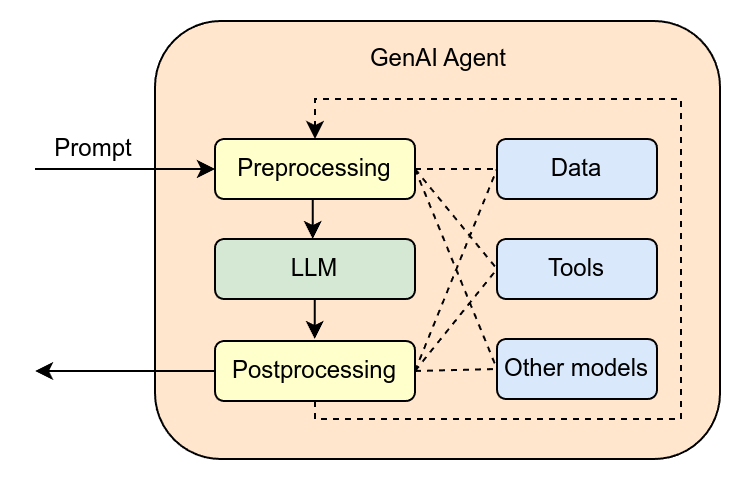
To handle messy, unstructured data, developers use post-processing. This is a crucial step where the raw output from the model is cleaned up, formatted, and validated before it ever reaches the user's screen. Post-processing can strip out unnecessary text, apply consistent formatting like bullet points or bolding, and even run checks to catch obvious hallucinations.
// A simple (and hypothetical) post-processing step
function cleanAIResponse(rawText) {
  // Remove conversational filler from the model
  let cleanedText = rawText.replace("Here is the code you requested:", "");

  // Trim whitespace
  cleanedText = cleanedText.trim();

  return cleanedText;
}
To combat latency, developers can stream the response. Instead of waiting for the entire answer to be generated, the interface can display words or sentences as they become available. This is the
Finally, to manage the probabilistic nature of AI, it's vital to set clear expectations. This can be done through the user interface itself. For example, adding a small disclaimer like, "AI-generated content may be inaccurate," helps users understand the limitations. For tasks with high stakes, it's often best to present AI suggestions as a starting point for the user to review and approve, rather than as a final answer.
Which of the following is a core characteristic of AI-generated outputs, as opposed to traditional software outputs?
When a developer cleans up, formats, and validates a raw AI-generated response before showing it to the user, this process is called:
By understanding the messy, slow, and probabilistic nature of AI outputs, we can design applications that are not only powerful but also trustworthy and enjoyable to use.