AI-Powered Coding for Beginners
Introduction to AI-Assisted Coding
What is AI-Assisted Coding?
AI-assisted coding is like having a smart co-pilot while you program. These AI tools work alongside you, helping you write code faster, better, and with fewer mistakes. Think of it as a super-powered autocomplete that doesn't just suggest the next word, but entire lines or even whole functions.
The main benefits are speed and efficiency. Instead of typing out repetitive code, an AI assistant can generate it for you. This frees you up to focus on the more creative, problem-solving aspects of programming. It can also help you learn by showing you different ways to write code and flagging potential errors before you even run your program.
Embrace AI‑assisted coding. It's not cheating – it's collaboration between you and your tools.
Meet Your AI Coding Partners
Several tools have become popular in the world of AI-assisted development. While they share the common goal of making coding easier, each has its own strengths.
| Assistant | Key Feature | Best For |
|---|---|---|
| GitHub Copilot | Suggests whole functions and blocks of code. | General-purpose coding and quick prototyping. |
| Tabnine | Focuses on line-by-line code completion. | Teams wanting to train the AI on their private code. |
| Google's AI | Integrated into tools like Android Studio (Gemini). | Developers working within the Google ecosystem. |
GitHub Copilot, developed by GitHub and OpenAI, is trained on a massive dataset of public code, making it incredibly versatile. Tabnine excels at predicting your next lines of code and can be customized for your team's specific projects. Google has integrated its powerful AI, like Gemini, directly into its developer tools, offering tailored assistance for platforms like Android.
How They Fit In Your Workflow
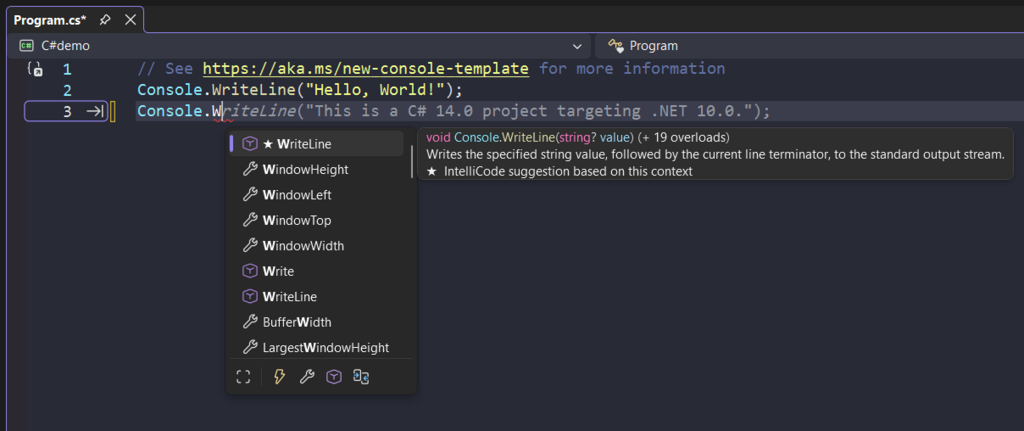
These AI assistants aren't separate applications you have to switch to. They integrate directly into your Integrated Development Environment (IDE) as plugins or extensions. Whether you use VS Code, a JetBrains product like IntelliJ, or another popular editor, you can likely find an AI tool that fits right in.
Once installed, the experience is seamless. As you start typing a comment or a line of code, the AI analyzes the context and provides a suggestion. You can accept the suggestion with a single key press, cycle through alternatives, or simply ignore it and keep typing. It works with you, not for you.
Capabilities and Limitations
It's crucial to have realistic expectations. AI coding assistants are powerful, but they aren't perfect. They are excellent at handling boilerplate code, writing common functions, and even helping you debug by suggesting fixes. They can significantly speed up development.
However, AI-generated code isn't always correct, optimal, or secure. The AI might produce code that contains subtle bugs, uses outdated practices, or even introduces security vulnerabilities.
You are still the pilot. It is your job to review, test, and understand any code the AI suggests before you add it to your project. Use these tools to augment your skills, not to replace your judgment.
What is the best analogy for an AI coding assistant's role in the development process?
What is a primary benefit of using AI to assist with coding?
Understanding these fundamentals sets the stage for using AI as a powerful collaborator in your coding journey.