AI Powered Avatar Animation and Sequential Image Generation
ControlNet Multi-Pipeline Setup
Layering Control for Animation
Creating a consistent walking animation frame-by-frame requires more than a clever prompt. The key challenge is fighting the model's tendency to redraw the character slightly differently in each image, causing a flickering effect. A single ControlNet can lock down one aspect, like a pose, but true consistency demands a multi-layered approach.
We'll stack three specific ControlNet models to achieve this. OpenPose will provide the skeletal data for the walking gait. The Depth model will map the character's position in 3D space, preventing them from floating. Finally, Canny will capture the character's specific details, ensuring their appearance remains stable across the animation.
Configuring the Pipeline
In Stable Diffusion interfaces like AUTOMATIC1111 or ComfyUI, you can enable multiple ControlNet units. Each unit in this pipeline will have its own pre-processor and model, acting as a separate layer of instructions for the final image generation.
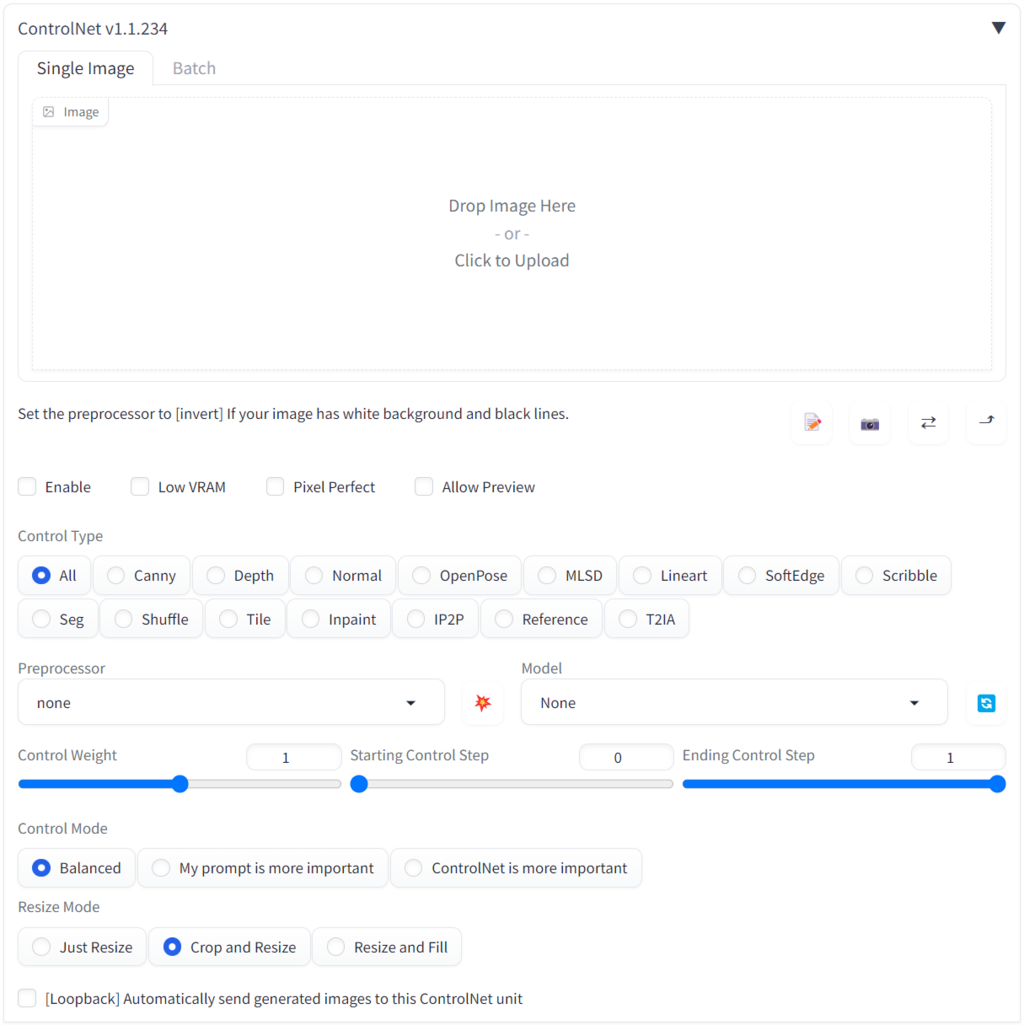
For our walking avatar, we'll configure three units. Think of them as a hierarchy of control, from broad structure to fine detail.
-
Unit 0 (The Skeleton): Load the model. This is our primary control. Its pre-processor will extract a stick-figure skeleton from our source video frames, dictating the exact position of the avatar's limbs in each shot. This locks in the walking motion.
-
Unit 1 (The Volume): Use a Depth model (like Midas or Zoe). Its pre-processor creates a depth map, a grayscale image where white is close and black is far. This gives the character volume and ensures they feel grounded in the scene, preventing spatial inconsistencies.
-
Unit 2 (The Outline): Add the Canny model. Its pre-processor generates a clean, black-and-white line drawing of the source frame, capturing the precise edges of the character's clothing, hair, and accessories. This layer is crucial for maintaining identity and preventing details from morphing between frames.
Balancing Influence
With three models active, we need to manage their influence. If all three have equal power, the result can be a chaotic mess. We do this by adjusting each model's Weight and its Start/End Control Step, a technique known as an effect.
Weight determines how strongly a model influences the output. A higher value forces the AI to follow its instructions more strictly.
Start/End Control Step defines when a model is active during the generation process, measured on a scale from 0 (start) to 1 (end).
A balanced setup for a walking animation might look like this:
| ControlNet Unit | Model | Weight | Start Step | End Step | Purpose |
|---|---|---|---|---|---|
| 0 | OpenPose | 1.0 | 0.0 | 1.0 | Lock the pose for the entire generation. |
| 1 | Depth | 0.8 | 0.0 | 0.8 | Ground the character's form, then fade out. |
| 2 | Canny | 0.5 | 0.2 | 0.7 | Add details after the main form is set, but before final polish. |
Here, OpenPose has the highest weight and is active for the whole process, as the pose is non-negotiable. Depth has slightly less weight and stops influencing the image near the end, giving the main model freedom to refine textures. Canny has the lowest weight and is only active during the middle phase, guiding details without overwhelming the more critical structural inputs from Pose and Depth.
Matching Resolutions
One final, critical step is ensuring your are aligned. The output resolution you set for your final image must be compatible with the resolution your ControlNet models were trained on and the resolution of your pre-processor output.
If your source video is 1920x1080 but you're generating a 512x512 image, the pre-processors will downscale the video frame. This can cause a loss of detail, especially for the Canny model. For best results, aim to generate at a resolution close to your source, or at least maintain the same aspect ratio. For a walking animation, a vertical aspect ratio like 512x768 often works well, giving the character room to move.
What is the primary challenge when creating frame-by-frame character animations with AI image generation, according to the text?
Which combination of three ControlNet models is recommended to create a stable walking animation?
Experimenting with these weights and schedules is key. Each project will have different needs, but this layered pipeline provides a robust foundation for creating consistent, believable character animations.