AI Operating Systems Explained
Introduction to Operating Systems
The Computer's Conductor
A computer's hardware, like the processor, memory, and storage drive, are just powerful components. By themselves, they don't know what to do. They need a manager to direct their operations and make them useful. That manager is the operating system (OS).
An operating system is the main software that manages all the hardware and software on a computer. It acts as an intermediary between you and the computer's hardware.
Without an OS, you couldn't browse the web, write an email, or play a game. Every application you use relies on the OS to communicate with the physical parts of the computer. It handles everything from saving a file to displaying text on your screen.

Core Components
Every operating system, whether it's Windows, macOS, or Linux, is built around a few fundamental components that work together to make the computer function.
kernel
noun
The central part of an operating system that manages the system's resources and the communication between hardware and software components.
Think of the kernel as the engine of the OS. It's the core that controls everything. It manages the processor's time, allocates memory, and handles input and output from devices like your keyboard and mouse. The kernel is the bridge that allows software to talk to hardware.
Next is the user interface (UI), which is the part you interact with. There are two main types. A Command-Line Interface (CLI) uses text commands, while a Graphical User Interface (GUI) uses windows, icons, and menus. Most modern operating systems use a GUI because it's more intuitive for the average user.

Finally, there's the file system. This is how the OS organizes and keeps track of files on a storage device, like a hard drive or SSD. It's like a digital filing cabinet, creating a structure of directories (folders) and files so that you can easily find and access your data.
The Juggling Act
Modern computers do many things at once. You might have a web browser, a music player, and a word processor all running simultaneously. The OS makes this possible through a few key functions.
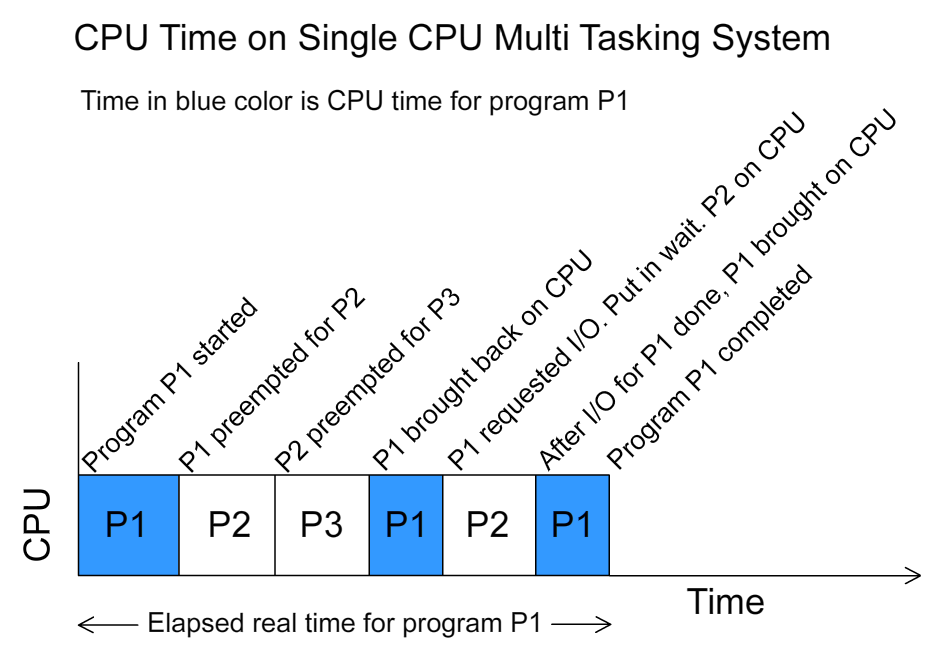
Process management is how the OS handles running programs. Each running application is a 'process'. The OS's scheduler decides which process gets to use the CPU and for how long. It switches between them so quickly that it feels like they're all running at the same time.
Memory management is another crucial task. The OS keeps track of every part of the computer's memory (RAM). It allocates memory to processes that need it and frees it up when they're done, ensuring that one program doesn't interfere with another's memory space.
Lastly, device management involves communicating with all the hardware connected to your computer. When you plug in a printer or a webcam, the OS uses special software called drivers to understand how to control that device. The driver acts as a translator, converting general commands from your applications into specific instructions the hardware can understand.
Which component of the operating system is responsible for organizing files and folders on a storage drive?
If you plug in a new webcam, what specialized software does the OS use to communicate with it?
These core functions—managing processes, memory, and devices—are the foundation of any operating system, enabling the complex and powerful computing we rely on every day.